
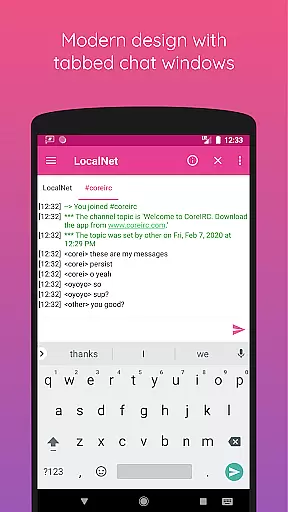
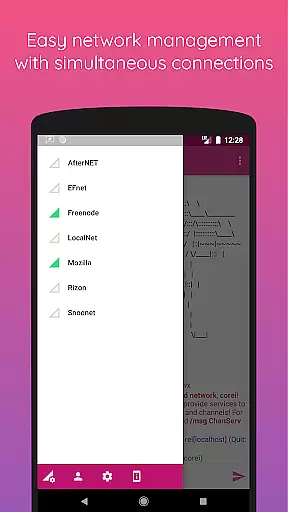
CoreIRC is a feature-rich IRC client designed for secure and customizable communication. The app allows users to connect to multiple IRC networks using SSL encryption, ensuring secure interactions across various channels. With support for modern authentication protocols like SASL and NickServ, users can safely verify their identity on different servers.
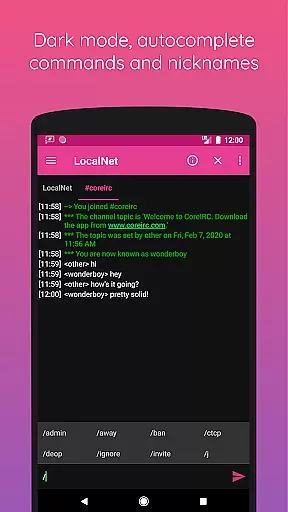
Beyond basic chat functionality, CoreIRC offers advanced features such as robust notification systems, inline URL previews, and file transfers via DCC with resume capabilities. Its sleek design follows Material Design principles, providing an intuitive user experience while maintaining powerful tools like command autocomplete, logging, and theming options.
Whether you're managing multiple networks or engaging in detailed technical discussions, CoreIRC provides the tools necessary for efficient and enjoyable IRC communication. From posting 'Now Playing' updates to sharing system information directly within chats, this app caters to both casual users and power users alike.
CoreIRC stands out with its comprehensive set of features tailored for IRC enthusiasts. One of its key strengths is the ability to maintain multiple secure connections through SSL, alongside flexible authentication methods including SASL PLAIN, SASL EXTERNAL, and SASL SCRAM-SHA-256. This ensures that your communications remain private and verified.
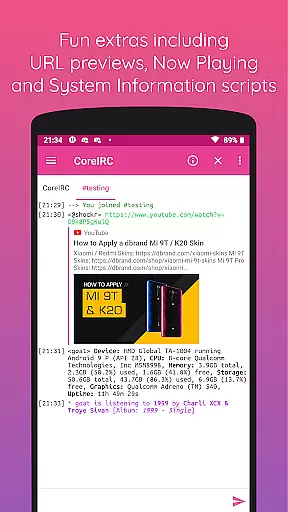
The app also includes a sophisticated notification system where users can create custom rule sets based on channels, senders, or specific messages. Additionally, fun extras like inline URL previews allow users to preview links without leaving the app, while the 'Now Playing' script lets you share music details from popular streaming services. For those interested in device specifics, the System Information script provides easy-to-read data about your hardware and software environment.
Other notable features include background connectivity via Android services, extensive protocol support up to IRC v3.2, and UI customization options such as themes and timestamps. These elements combine to make CoreIRC not just functional but also adaptable to individual preferences and workflows.
CoreIRC offers robust real-time messaging capabilities, ensuring that users can communicate instantly and reliably across multiple IRC networks.
The application supports SSL encryption for secure connections, providing not only speed but also security in messaging. This dual focus on performance and protection ensures that every message is delivered promptly and privately.
With features like SASL authentication and CTCP support, CoreIRC guarantees a dependable communication experience. Users can trust that their messages will reach the intended recipients without delays or interruptions.
This reliability extends to background connectivity, meaning users remain connected and can send and receive messages even when multitasking or when the app is running in the background.
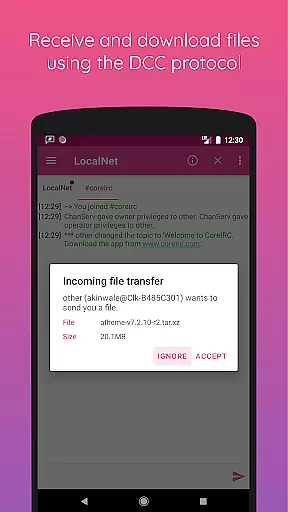
CoreIRC facilitates comprehensive media sharing support, allowing users to exchange files seamlessly using the DCC protocol.
Users can send and receive various types of files with resume support, making it convenient to share media without worrying about connection interruptions. This feature enhances collaborative efforts and information exchange within chat environments.
In addition to traditional file sharing, CoreIRC provides inline URL previews, enabling users to preview links before opening them in a browser. This functionality enriches the user's interaction with shared content by offering immediate context and relevance.
Furthermore, the client supports modern Android design principles, ensuring an intuitive interface for all media sharing activities. The sleek design coupled with practical features like chat logging and timestamps makes media interactions efficient and enjoyable.
Secure multi-network connections
Advanced notification settings
Modern Material Design interface
Comprehensive protocol support
Customizable user experience
Complex for beginners
Limited third-party integrations
No built-in voice chat
Occasional connection issues
Heavy on system resources

Fast and simple walkie talkie app
 4.20
4.20
Quickly and easily identify and block unknown callers
3.70
Experience real private browsing without tracking, surveillance, or censorship.
4.50
Fast, Simple And Secure Application That Provides SMBv3 Server On Your Device
3.30
Auto Reply SMS, Text Messaging, Away SMS Response, Busy SMS messages, Block Text
3.10
Bringing the functionality of Winlink to your Android device
4.4
Manage your mobile phone plan, check unlimited 5g data usage and track rewards
4.50
Say “hello” to privacy.
4.60
Group Chat That’s Fun & Games
4.30
Browse fast on Opera Mini, with Data Saving, News, Football Scores, and Download
4.60
FolderSync enables easy sync of files between cloud storage and Android devices.
4.60
Connect and browse the internet with a fast VPN proxy server and IP blocker.
4.50
Faster version of Messages. Messenger for your contacts.
4.50
A web browser that respects your privacy.
4.30
Block spam calls & scam - no more annoying calls with the call blocker function
4.30
A customizable phone number in the cloud
4.20
Caller ID, Spam Call & SMS Blocker
3.80
Call & Text Anywhere With A Canadian Number.
3.60
Enables Plus features of Quick Search.
4.2


User Reviews