
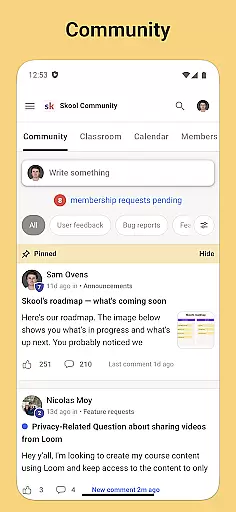
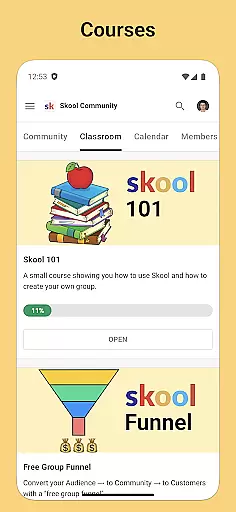
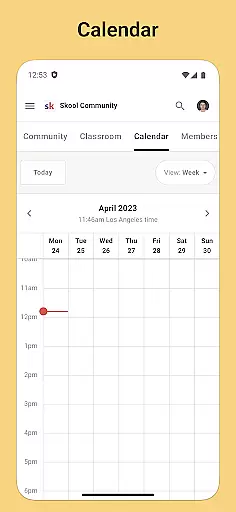
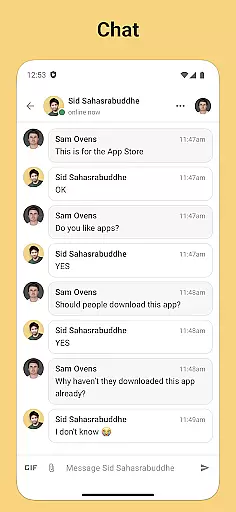
Skool is a dynamic social platform designed to keep users engaged with their online communities through an intuitive mobile experience. The app serves as a comprehensive hub for community interaction, offering features like group discussions, courses, event calendars, and direct messaging. With its robust notification system, Skool ensures you never miss important updates or interactions within your networks. Whether you're looking to participate in meaningful discussions, expand your knowledge through structured courses, or simply stay updated on community events, Skool provides the tools to do so conveniently from your mobile device.
The application's strength lies in its ability to consolidate various forms of communication and learning into one streamlined interface. Users can actively contribute to discussions, engage in educational content, and manage their social calendar, all while receiving timely notifications that keep them in the loop. This makes Skool particularly valuable for individuals who are deeply involved in online communities and seek a seamless way to interact with these groups without being tied to a desktop computer.
Skool stands out with its diverse feature set tailored for vibrant community engagement. One of its core functionalities is the Community section, where users can create and participate in threaded discussions using posts and comments. This forum-like environment encourages active participation and collaboration among members. Additionally, the Courses feature offers a rich learning experience through video and text-based lessons, making it easy for users to acquire new skills or knowledge directly within the app.
Beyond discussion and learning, Skool includes practical tools such as the Calendar, which helps users track upcoming community events, ensuring they never miss an important gathering or deadline. The Chat functionality allows for private, direct messaging between community members, fostering closer connections. Each of these features is designed to enhance user interaction and provide multiple avenues for engagement, making Skool a versatile tool for anyone looking to deepen their involvement in online communities.
User profile customization is a crucial aspect of any social platform, allowing individuals to express their identity and establish trust within the community. Skool offers a comprehensive profile system that enables users to showcase their interests, achievements, and affiliations with various groups.
The app provides multiple customization options, including profile pictures, bios, and links to relevant courses or community discussions. This flexibility ensures that members can create a digital representation that truly reflects their unique persona and contributions to the platform.
Authenticity verification is equally important in fostering a reliable network. Skool implements a robust verification process that confirms the legitimacy of user profiles through multi-factor authentication and activity tracking. This helps maintain the integrity of interactions across the Community, Courses, and Chat features.
By combining extensive customization capabilities with stringent verification protocols, Skool creates a secure environment where users can confidently engage with others who share similar educational and professional interests.
Discovering meaningful connections is at the heart of Skool's functionality. The app employs sophisticated algorithms to help users find like-minded individuals within their communities based on shared interests, course enrollments, and discussion participation.
Through its intelligent matching system, Skool analyzes user behavior and preferences to recommend potential connections that align with individual goals and activities. Whether you're looking for study partners, professional collaborators, or simply expanding your network, the app facilitates these interactions seamlessly.
In addition to automated suggestions, Skool allows manual searches using specific criteria such as community involvement or event attendance. This dual approach ensures that users have both curated recommendations and the freedom to explore new relationships.
The Calendar feature further enhances connection discovery by highlighting upcoming events where users can meet face-to-face or virtually. These gatherings provide valuable opportunities for networking and deepening existing relationships within the Skool ecosystem.
User-friendly interface
Comprehensive community tools
Robust notification system
Integrated learning modules
Event tracking capabilities
Limited customization options
Occasional notification delays
Heavy reliance on internet connectivity
Interface can feel cluttered
Some features require premium access

Global short video platform: epic effects, trending videos & vibrant community!
 4.40
4.40
Watch 24/7 live stream, and make real friends nearby
4.30
The video chat to meet people in the blink of an eye!
3.90
Follow the Truth! Join America's leading free-speech social platform.
3.10
Social calendar for friends to make plans, group chat, share events & schedules
4.60
Instant video chat with cool people. Live video call & make friends with Monkey!
3.80
Find your next obsession.
3.50
Unlimited calls & texts | WiFi voice line plus group txt | Call & text now
4.50
Reddit is where you’ll find your people and feel at home in every conversation.
4.60
This version of Facebook uses less data and works in all network conditions.
4.60
Connection Beyond Content
4.50
Match, chat & date with singles nearby. The dating app to find true love
4.50
Build Your Team With One App
4.30
Discover an open-minded dating experience when you download today
4.10
The world's leading social networking app for gay, bi, trans, and queer people.
4.10
Unlimited messages, WiFi Calling, Texting app. Text now with Second Phone Number
4.10
Join your friends and discover videos you love, only on TikTok
4.10
Meet online & chat with people! Talk, have fun, make connections in real time!
4.00
Resonate & Date with New Match
3.70


User Reviews