
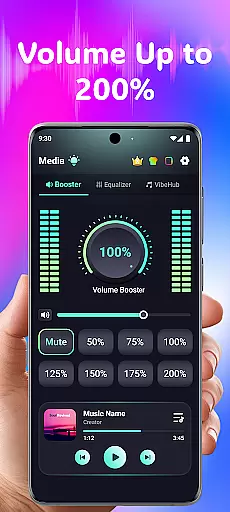
Volume Booster Bass Booster EQ is a specialized medical application designed to address hearing challenges through advanced digital signal processing. The app provides users with powerful volume amplification of up to 200%, making it ideal for individuals with mild to moderate hearing difficulties.
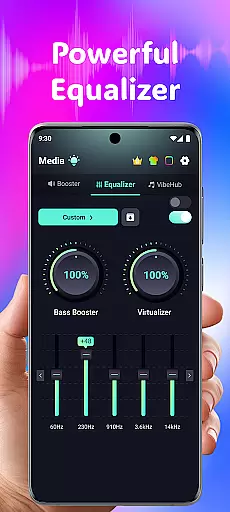
In addition to its core amplification function, the app features a sophisticated 5-band equalizer that allows precise sound customization across different frequency ranges. This ensures optimal clarity for music, movies, and speech. The app also incorporates AI-powered noise reduction technology, which effectively filters out unwanted background sounds, creating a more focused listening experience.
This application is particularly beneficial for elderly users or those working in noisy environments who need enhanced auditory support. Its user-friendly interface and customizable settings make it accessible for people of all technical skill levels.
The app's standout feature is its comprehensive hearing enhancement system, which combines multiple technologies to deliver superior audio performance. At its core is the powerful volume booster that can amplify sound levels up to 200%, complemented by a phone volume amplifier for maximum effect.
A notable innovation is the Advanced Hearing Mode, which offers independent left and right ear control with real-time visual feedback. This feature is particularly valuable for users with asymmetrical hearing loss. The app's 5-band equalizer (60Hz, 230Hz, 910Hz, 3.6kHz, 14kHz) provides granular control over different sound frequencies, while the 6-range frequency amplification system targets specific audio characteristics.
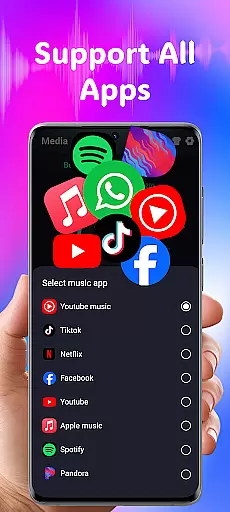
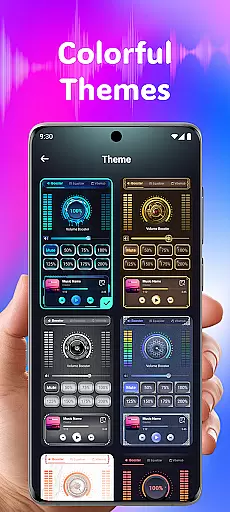
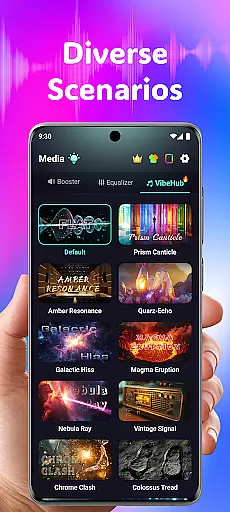
Additional features include 3D surround sound effect for immersive audio experiences, wide app compatibility with popular streaming services, and a live sound recorder with playback functionality. The inclusion of various stylish themes allows users to personalize their interface, while optimized device support ensures consistent performance across different audio output methods.
In the realm of medical applications, content credibility is paramount. Volume Booster Bass Booster EQ addresses this by offering features that are not only designed for entertainment but also cater to users' hearing needs with a scientific approach. The app includes an Advanced Hearing Mode which allows precise control over different sound frequencies, aiding users with specific auditory requirements.
The app's dedication to accuracy is evident through its advanced frequency amplification feature. This functionality enables users to fine-tune six distinct sound ranges, from deep rumbles at 125Hz to high-pitched sounds between 4kHz-8kHz. Such detailed control ensures that speech and ambient noises can be enhanced according to individual needs, providing a personalized auditory experience that aligns with professional standards.
Moreover, Volume Booster Bass Booster EQ incorporates AI-powered real-time noise reduction technology. By filtering out unwanted background disturbances like wind or crowd chatter, it delivers clear audio input, which is crucial for those who rely on auditory assistance. These features have been crafted in line with expert recommendations, ensuring they serve as valuable tools for both casual listeners and individuals requiring specialized hearing support.
While Volume Booster Bass Booster EQ does not provide teleconsultation services directly, its features can significantly enhance remote communication experiences where clear audio exchange is vital. For instance, during virtual meetings or consultations conducted via other platforms, using this app can ensure that every word is heard without distortion.
The application's ability to amplify media volume up to 200% while maintaining sound integrity makes it an excellent companion tool for telehealth scenarios. Users can adjust their deviceu2019s output precisely so that no detail is missed during important discussions about health mattersu2014a critical aspect when interacting with healthcare professionals online.
Additionally, independent left and right ear controls offer asymmetrical hearing support, allowing users to balance sound levels based on personal comfort or necessity. This level of customization ensures optimal listening conditions regardless of whether one is engaging in leisure activities or participating in serious conversations requiring full attention and clarity.
Powerful 200% volume boost
Advanced noise reduction
Precise equalizer controls
User-friendly interface
Comprehensive hearing support
Potential hearing risks
Device compatibility issues
Battery consumption concerns
Learning curve for settings
Limited free features

Want to make it easier to manage your health? We’re with you, wherever you are.
 4.70
4.70
Molina Members: My Molina. Manage your health anytime, anywhere!
4.30
Pelvic Floor Muscle Exercises
4.80
Control your hearing aids discreetly with the touch of a finger
4.30
Conveniently receive lab results, schedule lab appointment and pay your bills
3.70
Coaches you through labour using hypnobirthing techniques & tracks contractions
4.70
Boost reading, writing, speaking and listening with a scientifically proven app.
4.70
Discover the source of pain with Muscle Trigger Point Anatomy.
4.70
Update medical records, view upcoming appointments, message your provider & more
3.80
The Better Pharmacy Experience
4.90
myVCA is your tailor-made guide to raising a healthy and happy pet.
4.90
Be more confident prescribing homeopathy at home for your family.
4.80
Blue Cross and Blue Shield of Texas member information
4.60
Check and Track your Blood Pressure & Heart Rate.
4.50
The official DSM-5-TR® app
4.50
Manage your health care in one easy place
4.40
Voice pitch monitor for speech therapy, LSVT, Parkinson's, singing & trans
4.30
Good for You. Great for Life.
4.00
A rapid reference for prehospital providers caring for pediatric patients.
4.4


User Reviews