
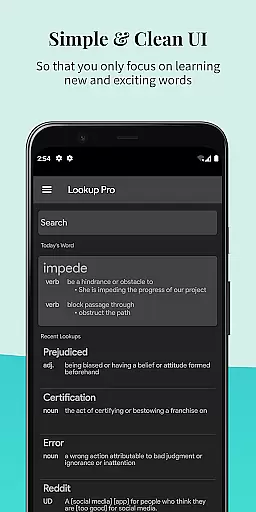
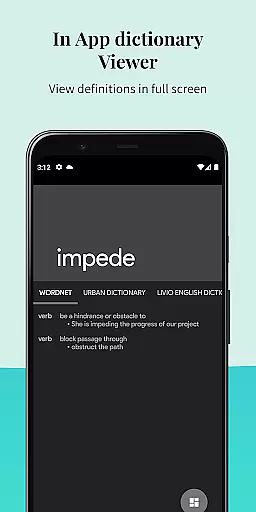

Look Up - Pop Up Dictionary Pro is an innovative offline dictionary application designed for book lovers and language enthusiasts who value efficiency in their reading experience. The app eliminates the need to switch between multiple apps or visit Google for word definitions, offering instant lookup functionality right within your reading environment.
The dictionary supports seven major languages including English, Italian, Spanish, German, Portuguese, and French. It also integrates with popular e-reading platforms like Moon Reader and learning tools such as Anki Flashcards. With its extensive offline Wordnet database of 0.22 million words and phrases, users can access definitions even without an internet connection. The app's predictive search feature ensures quick access to word meanings, while additional functionalities like word starring, note-taking, and pronunciation assistance enhance the overall user experience.
Whether you're a student, professional, or avid reader, Look Up streamlines vocabulary building and comprehension by providing a seamless dictionary lookup solution that works across different Android versions through various selection methods.
Look Up - Pop Up Dictionary Pro stands out with its versatile integration capabilities and comprehensive feature set tailored for enhanced language learning and reference. One of its key strengths is the support for multiple lookup methods, accommodating different Android versions. Users on older Android versions can copy a word to trigger the pop-up definition, while those on Android 6.0 and above can use the dedicated lookup button after selecting a word or share the selected word directly to the app.
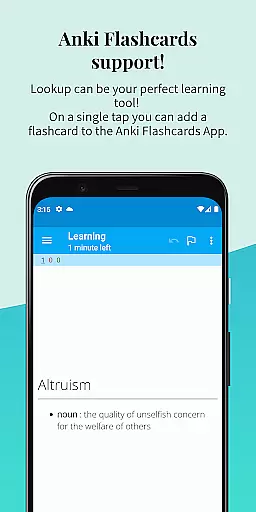
The app boasts an impressive range of plugins, extending its functionality beyond basic definitions. These include Urban Dictionary for slang and colloquial terms, Google Define for authoritative explanations, Vocabulary.com for expanded learning, Wikipedia for encyclopedic knowledge, and Cambridge for academic references. The inclusion of Anki Flashcard support enables effective vocabulary retention through spaced repetition.
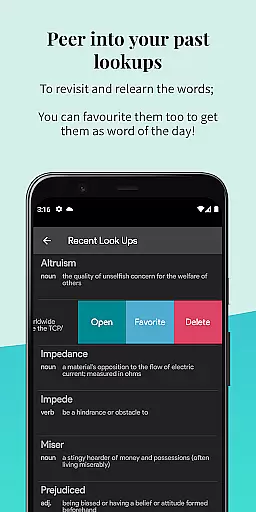
Additional notable features include automatic syncing to Google Drive (which can be disabled), dark mode for comfortable nighttime reading, text-to-speech functionality for pronunciation guidance, and a Word of the Day feature delivered both in-app and via notifications. The Material Design interface ensures a visually appealing and user-friendly experience, while the ability to add personal notes to words helps contextualize learning.
Look Up - Pop Up Dictionary Pro offers an extensive offline word database that enhances its e-book library size and credibility. With over 0.22 million words and phrases, the app ensures users have access to a comprehensive collection without needing an internet connection.
The inclusion of the Wordnet Database affirms the app's commitment to copyright authenticity. This database is a large lexical reference system that is both reliable and authoritative, making it an indispensable tool for bibliophiles and language learners alike.
Users can search for words in multiple ways, including copying a word, pressing the lookup button after selecting a word, or sharing the selected word directly to the app. These features make the dictionary experience interactive and tailored to individual preferences.
Furthermore, Look Up supports seven languages and integrates with platforms like Urban Dictionary, Google Define, Vocabulary.com, Wikipedia, and Cambridge. This multilingual support coupled with reputable sources guarantees that users receive accurate and diverse linguistic information.
Look Up - Pop Up Dictionary Pro excels in format compatibility by integrating seamlessly with various third-party applications and plugins. Its support extends to Moon Reader for dictionary functions and Anki for flashcard creation, catering to different learning and reading styles.
The app also allows users to sync their data to Google Drive, providing a convenient way to back up and access their word collections across devices. Although this feature can be disabled, it underscores the app's versatility in managing user content in various formats.
Additionally, Look Up includes functionalities such as starring words for future reference, adding personal notes, and even vocalizing words for auditory learners. These options ensure that users can interact with content in ways that best suit their needs.
With its material design interface, dark mode for comfortable nighttime reading, and 'Word of the Day' notifications, Look Up combines aesthetic appeal with practical usability. Such features highlight the app's dedication to delivering a polished and adaptable user experience.
Offline functionality
Multi-language support
Extensive word database
Fast search capability
User-friendly interface
Limited device compatibility
Occasional sync issues
Premium price point
Resource-intensive
Learning curve present

CleverBook Pro makes the popular guide for the game even better!
 4.00
4.00
Mirror Bible - eye-opening paraphrase translation of the NT by Francois du Toit
4.30
Crowd-sourced listing of businesses with anti-gun signs, and pro-2a alternatives
4.60
Knots 360 Pro ( 3D ) shows you animated 192 knots in 3D perspective
4.10
Bible Spiritual Companion
4.40
KJV Bible works offline with Audio, Hebrew & Greek lexicon (concordance) & more!
4.20
Holy Bible, a KJIV Bible study, audios & daily verses, talk with God now.
4.80
Daily Bible app: King James Version with verses and audio for studying&prayer
4.40
Learn to tie more than 200 knots in 3D!
4.90
Daily thoughts, meditations, and prayers for living a sober life in recovery.
4.90
The favorite Christmas story comes to life!
4.80
Personalized Chat with Bible
4.80
Learn Thai with 195,000+ entries, crisp Thai sounds, big text; works offline.
4.80
My Bible offers a comprehensive app by providing offline access, daily verses.
4.80
Translate into 100+ languages with the world’s most accurate AI translator.
4.70
Read unlimited novels, audiobooks, stories & Unlock ebooks, fanfiction and more!
4.70
Offline translator from english to spanish, and from spanish to english.
4.50
Unlock more features in Lithium and show your support. Expand for details.
4.00
Read popular romance books and web novels on the fantastic ebook reader
3.50


User Reviews