
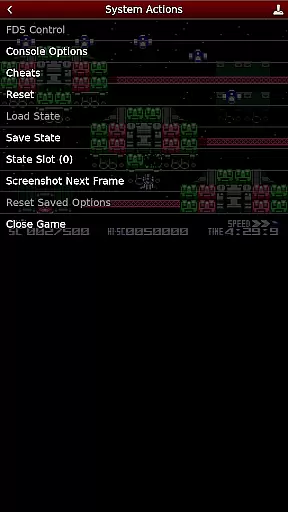
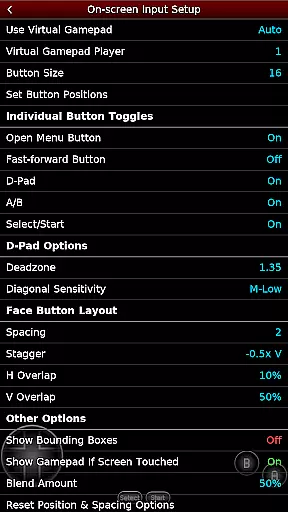
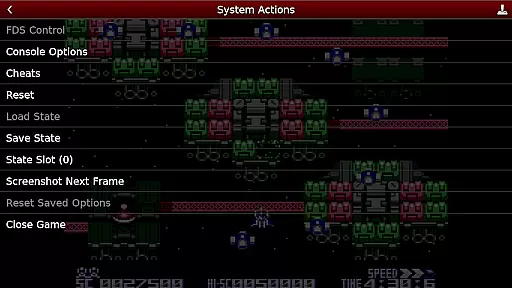
NES.emu is an advanced open-source NES emulator that offers a minimalist UI with a focus on low audio and video latency. It supports a wide range of devices, from the original Xperia Play to modern devices like the Nvidia Shield and Pixel phones. This app allows users to enjoy classic NES games with high performance and minimal delay.
One of the standout features of NES.emu is its compatibility with various file formats, including .nes, .unf, and .fds files, which can be optionally compressed with ZIP, RAR, or 7Z. Additionally, it provides Famicom Disk System emulation and VS UniSystem support, enhancing the gaming experience for enthusiasts. The app also includes configurable on-screen controls and supports Bluetooth/USB gamepads and keyboards, making it versatile for different gaming preferences.
For users who want to relive the nostalgia of classic NES games, NES.emu offers a seamless and responsive emulation experience. Whether you are a casual gamer or a dedicated retro gaming enthusiast, this app provides the tools necessary to enjoy your favorite games on modern devices.
NES.emu stands out with its comprehensive feature set designed to enhance the emulation experience. One of the key features is its support for multiple file formats, including .nes, .unf, and .fds files, which can be optionally compressed with ZIP, RAR, or 7Z. This flexibility ensures that users can access a wide variety of games without compatibility issues.
The app also includes Famicom Disk System emulation using .fds files, allowing users to select BIOS in the options for an authentic experience. Additionally, it supports VS UniSystem games where users can insert coins by pressing Start. NES.emu uses FCEU-compatible cheat files (.cht extension) with editing features, providing users with the ability to customize their gaming experience.
Another notable feature is the Zapper/Gun support, where users can touch the screen to fire and touch & hold outside of the display area to simulate firing away from the TV. The app also offers configurable on-screen controls and supports Bluetooth/USB gamepads and keyboards, ensuring compatibility with a wide range of HID devices recognized by the OS, such as Xbox and PS4 controllers.
Arcade authenticity and nostalgia are crucial elements for any emulator aiming to recreate the classic gaming experience. NES.emu, as an advanced open-source NES emulator, excels in delivering this by accurately emulating a wide range of devices from the original NES systems to Famicom and even arcade-style VS UniSystem games.
The app supports numerous file formats including .nes, .unf, and .fds, which ensures that users can enjoy a vast library of games just as they remember them. The inclusion of Famicom Disk System emulation adds another layer of authenticity, allowing gamers to relive the full spectrum of Nintendo's 8-bit era.
Moreover, NES.emu offers unique features like Zapper/Gun support, enhancing the nostalgic experience by simulating the excitement of light gun games directly on modern touch screen devices. This attention to detail not only preserves the integrity of classic gameplay but also enhances it with modern convenience.
By focusing on low audio/video latency and providing a minimalist UI, NES.emu ensures that the essence of arcade gaming is preserved, offering players an immersive trip down memory lane without compromising on performance or usability.
Control responsiveness is a key factor in delivering an authentic and enjoyable gaming experience, especially for action-packed arcade games. NES.emu addresses this by offering highly configurable on-screen controls that cater to different play styles and preferences.
The emulator supports a wide array of input methods including Bluetooth and USB gamepads, making it compatible with popular HID devices such as Xbox and PS4 controllers. This versatility ensures that players can choose their preferred method of control, whether it be tactile buttons or responsive touch screens.
Additionally, the app allows users to customize their control schemes extensively, ensuring that every game feels as responsive and intuitive as possible. This level of customization helps bridge the gap between retro gameplay mechanics and modern hardware capabilities.
With its focus on low-latency input processing, NES.emu guarantees that every button press translates instantly into in-game actions, maintaining the tight feedback loop essential for high-paced arcade classics. This commitment to precision makes all the difference in recreating those thrilling moments from the arcades right on your mobile device.
Low audio/video latency
Wide device compatibility
Supports multiple file formats
Famicom Disk System emulation
Configurable on-screen controls
No ROMs included
Requires technical knowledge
Limited user interface customization
Occasional crashes reported
Device-specific issues

Get into your tractor to cut grass and harvest the crops in our mowing simulator
 4.10
4.10
Sega Saturn Emulator
4.20
A Ball Bouncer With Depth
4.00
Play fun multiplayer games with friends on one device! Two, Three, Four players!
4.60
Save the Galaxy from galaxiga alien - Classic arcade shooter game
4.60
This app is a very fast emulator
3.40
Venture into the galaxy to fight against the invasion of space invaders.
4.60
NEOGEO's masterpiece game is now available in the app!
4.10
Absorb, or be absorbed...
4.70
Amid the vastness of the universe, you are a Black Hole about to be swallowed!
5.00
Ready… Set… DASH! Play now!
4.70
Gameboy Color Emulator
4.60
Cool car builder & racing simulator: make a car to win the obstacle course race!
4.60
Flip the bottle! Do tricks and don't let the bottle fall!
4.50
PC Engine/TurboGrafx-16 Emulator
4.50
Millions of crafters have smashed billions of blocks! Now you can join the fun!
4.40
Mine planets, upgrade your space ship, battle others, and dominate the galaxy!
3.90
Spaceship racing on a rocky planet — pure action and challenge.
4.2
Reach high, and shine in the neon world in 3D!
4.2


User Reviews