
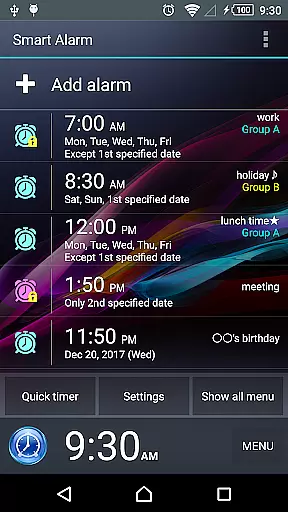
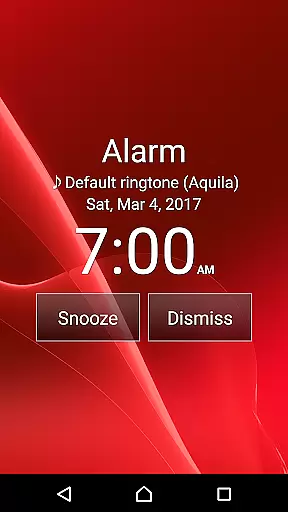
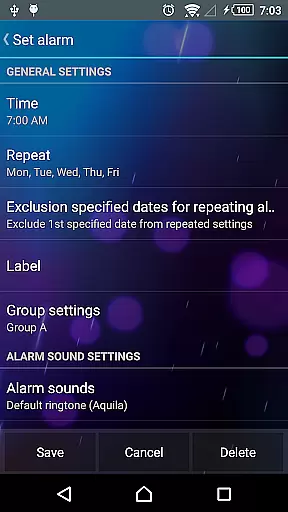
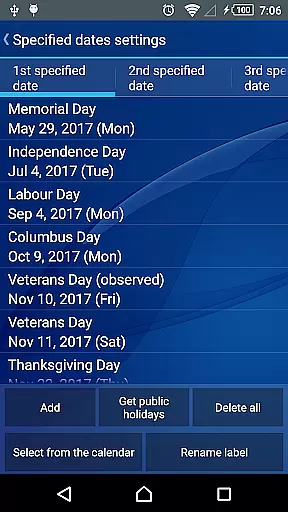
Smart Alarm is a premium alarm clock application designed to provide users with a reliable and customizable wake-up solution. The app offers essential alarm functions such as snooze and weekly repeats, alongside unique features like holiday exclusions and math-based alarm dismissal. With its user-friendly interface, Smart Alarm allows seamless integration into daily routines, ensuring users wake up refreshed and on time.
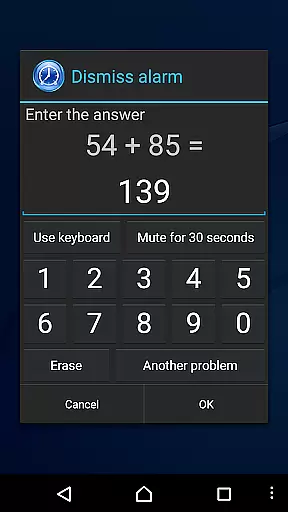
The app stands out with its advanced customization options, enabling users to tailor their alarm experience to individual preferences. From setting personalized alarm tones from an SD card to adjusting vibration intensity, Smart Alarm caters to diverse user needs. Its innovative features, such as the math puzzle challenge to stop the alarm, help prevent oversleeping and promote better sleep habits.
Whether you're a busy professional needing precise time management or a student looking for a fun way to start your day, Smart Alarm fits various lifestyles. By combining practical functionality with thoughtful design, this app ensures a smooth and enjoyable wake-up experience every morning.
Smart Alarm distinguishes itself through a rich array of features designed to enhance the wake-up process. One of its standout capabilities is the snooze function, allowing users to temporarily silence alarms and resume them at predetermined intervals. This feature is complemented by weekly repeat options, enabling users to set recurring alarms for specific days, thus streamlining morning routines.
Beyond basic functionalities, Smart Alarm incorporates intelligent features like holiday exclusions, ensuring alarms do not disrupt rest during public holidays. Users can also personalize their wake-up experience by selecting custom alarm sounds from their SD cards, creating a more pleasant auditory environment. The app's gradual wake-up mode simulates natural waking conditions, starting with soft sounds and gentle vibrations that intensify over time, reducing the shock of sudden loud noises.
Additional innovations include adjustable button sizes to prevent accidental alarm dismissals and math-based challenges to stop alarms, promoting alertness and preventing oversleeping. These thoughtful additions demonstrate Smart Alarm's commitment to providing a comprehensive and adaptable alarm solution that meets modern users' diverse needs.
Smart Alarm offers comprehensive lifestyle functionality tailored to various user needs. The app includes essential alarm features such as snooze, repeat alarms on specified days, and holiday exclusion settings for uninterrupted sleep schedules.
With additional customization options like setting personal music from an SD card as the alarm tone, gradual volume increase, and two-stage vibration strength, it ensures a personalized and comfortable waking experience. These features cater to diverse preferences and habits, enhancing daily routines.
The app also provides practical solutions for common issues, such as preventing accidental alarm stops with math problems or number inputs, and customizing hardware keys for alarm control. This wide range of features solidifies its role in managing multiple aspects of a user's lifestyle effectively.
Smart Alarm guarantees content authenticity by offering reliable and tested features that users can trust. The app undergoes thorough verification processes to ensure its functions operate correctly across different devices, providing a credible tool for daily time management.
While the app does not claim universal compatibility, it sets clear expectations regarding device power requirements and interactions with task killer or power-saving apps. This transparency helps users make informed decisions about using the app within their specific device environments.
Additionally, Smart Alarm outlines necessary permissions and their purposes, such as preventing the device from sleeping during alerts and enabling automatic startup at boot for alarm configuration. These details reinforce the app's commitment to delivering genuine and trustworthy content that respects user privacy and system integrity.
User-friendly interface
Highly customizable settings
Innovative wake-up features
Reliable performance
Comprehensive documentation
Paid version only
Requires device power
Permissions needed
No built-in radio
Limited free support

Big bold weather watch face with dynamic backgrounds and 3 complications
 4.1
4.1
Unique Dark Analog style for Wear OS watches.
4.2
Big bold hybrid watch face with 30 colors, 5 fonts & 5 complications.
4.2
This app is intended to support professional EMDR therapy.
4.50
Discounts, savings, and rewards
4.20
See wait times and check into a hair salon ahead of time with Online Check-In.
4.80
Play fun games, complete quick surveys, and earn money. It's fun and easy!
4.40
Crochet made easy: step-by-step tutorials, beginner patterns & projects
4.60
Futuristic watchface inspired by Back to the Future: sleek, retro, timeless
4.3
Good magnifier app to see tiny things bigger and more clearly!
4.80
Simple, stylish & fresh watch face. Customize colors, gradients & complications.
4.70
A smart Siddur with halachic times
4.60
Zodiac & Horoscope Launcher: Daily Sign Predictions & Astrology
4.40
This minimalist yet classic board design brings a futuristic twist to your wrist
4.20
What is my face shape? Find out your face shape from picture, see fitting frames
3.90
Your home in your hand
3.80
Creativity and savings for kids, beginners and experts in arts and crafts
3.50
An Eerie Musical Trigger Toy for Spirits to Play with!
3.50
A uniquely designed isometric digital watch face made for Wear OS
4.2


User Reviews