
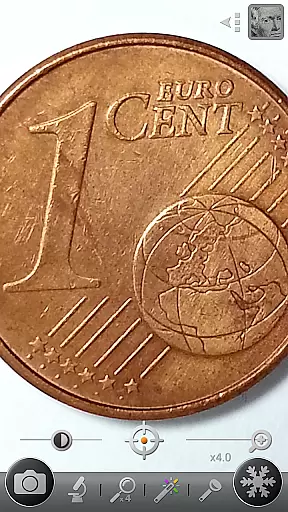

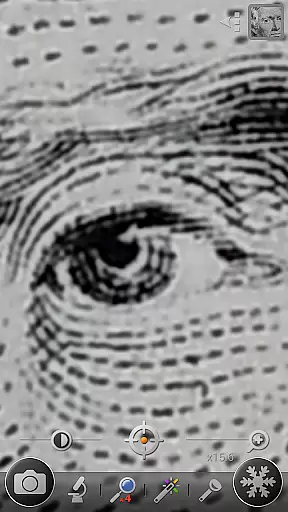

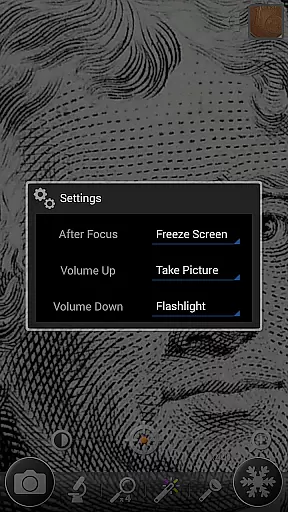
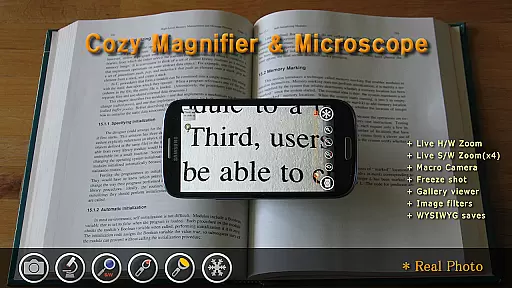
Magnifier & Microscope+ [Cozy] is a versatile digital magnification tool designed to assist users in viewing small details with ease. The app transforms your smartphone into a powerful magnifying glass, eliminating the need to carry a physical one. With specialized features like microscope mode (x2, x4), an LED flashlight, and macro camera functionality, it caters to various magnification needs.
Users can benefit from advanced controls such as brightness adjustment, zoom control, and color filters including Negative, Sepia, and Mono. Additionally, the app offers practical functions like screen freezing for stable viewing and enhanced gallery management. The Plus version provides an ad-free experience with extended features and additional filters, making it ideal for reading fine prints or examining intricate objects.
This app stands out with its comprehensive feature set tailored for magnification tasks. The core magnifier function includes an intuitive zoom controller, continuous auto-focusing, and temporary zoom-out options for precise targeting. Users can utilize pinch and vertical drag gestures for seamless zoom adjustments.
Specialized modes enhance the user experience further. The microscope mode allows up to 4x magnification, while the color filter options help in highlighting text or altering visual perspectives. Practical additions like the LED flashlight ensure usability in low-light conditions. The macro camera feature enables capturing detailed images, which are saved in the DCIM/CozyMag directory. These capabilities collectively provide a robust solution for both casual and professional magnification requirements.
Magnifier & Microscope+ [Cozy] offers a comprehensive suite of features that cater to various lifestyle needs, making it more than just a magnification tool. With functionalities ranging from a digital magnifier and microscope mode to an LED flashlight and macro camera, the app ensures users are equipped for multiple scenarios requiring close-up visibility or detailed imaging.
The app's dedication to covering diverse aspects of daily life is evident in its additional offerings such as color filters, which include Negative, Sepia, Mono, and Text Highlight options. These filters not only enhance the usability of the magnifier but also cater to personal preferences and specific use-cases, like improving text readability. This wide array of features highlights the app's commitment to providing a versatile toolset for its users.
Moreover, Magnifier & Microscope+ [Cozy] addresses convenience and accessibility by integrating practical functions such as freezing the magnifier screen for stable viewing and offering brightness and zoom control. Such features ensure that users can customize their experience according to their unique requirements, whether for leisure activities or professional tasks.
The credibility of Magnifier & Microscope+ [Cozy] is bolstered by its recognition as a recommended magnifying glass app by various media outlets and even being highlighted as a Mother's Day Recommended App by Google Korea. These endorsements signify a level of trust and validation from reputable sources within the tech community and beyond.
Furthermore, the app provides enhanced functionality with its Plus version, which boasts additional features and filters without advertisements, suggesting a polished and uninterrupted user experience. The availability of advanced options indicates the developers' expertise in crafting a reliable tool that meets both casual and more demanding magnification needs.
While Magnifier & Microscope+ [Cozy] is designed to assist with an array of tasks, it transparently acknowledges the dependency on the phone's camera capabilities for image quality and admits limitations across different devices. By setting these realistic expectations, the app maintains honesty about its performance parameters, thereby reinforcing content authenticity and building user trust.
User-friendly interface
Multiple magnification modes
Effective color filters
Convenient screen freezing
Integrated LED flashlight
Dependent on phone's camera quality
Limited functionality on some devices
No real-time collaboration
Premium version costs
Occasional auto-focus issues

Countdown to Christmas 2025 with festive games & activities in a virtual village
 4.80
4.80
Unique Dark Analog style for Wear OS watches.
4.4
Duo Watch Face (animated)
4.5
Paranormal Spirit Bell Trigger Device
4.30
My Diary - Daily Journal with lock: Diary journal app and secret diary with lock
4.80
Share opinions, get paid cash
4.30
DailyGift can help you record your habits and get rewards along the way!
4.60
Remotely monitor the time and temperature of food cooking on your grill.
4.60
Decorate your home screen with custom icons, color widgets, themes & wallpapers
4.70
Play. Earn. Repeat. Get rewarded for playing mobile games. Welcome to Mobius!
4.80
Simple, stylish & fresh watch face. Customize colors, gradients & complications.
4.70
The all-new Cync app. The simple, connected app for Cync and C by GE.
4.50
Cute Adorable Animals now on your wrist with our Wear OS watch face!
4.40
Zodiac & Horoscope Launcher: Daily Sign Predictions & Astrology
4.40
What is my face shape? Find out your face shape from picture, see fitting frames
3.90
Easily manage your child's playtime, spending messaging and more.
3.50
Falling Fruit is a massive collaborative map of food in our cities.
3.20
Designed to delight, impress and energize your festive spirit every single day
4.5
Futuristic watchface inspired by Back to the Future: sleek, retro, timeless
4.4


User Reviews