
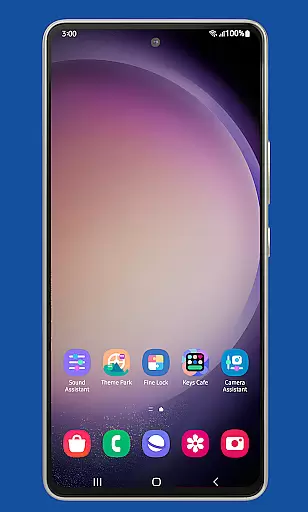
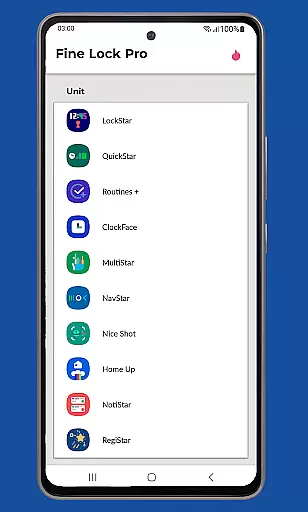
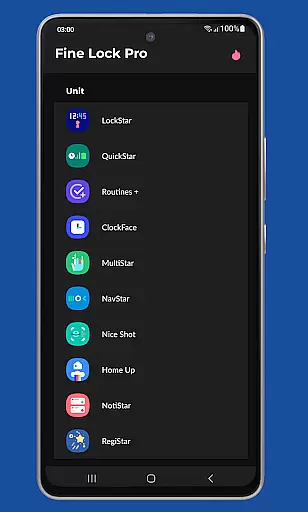
Fine Lock is a specialized launcher designed exclusively for Samsung devices running official One UI, enabling users to access and manage Good Lock and Galaxy Labs modules. This app bridges the gap for users in regions where these customization tools are not readily available through Galaxy Store.
With Fine Lock, users can enjoy advanced customization features on their Samsung devices, even if they are outside supported markets. The app provides essential functionalities like module shortcuts, update checks, and dynamic wallpapers, making it an indispensable tool for power users seeking to enhance their device experience.
This application is particularly useful for tech-savvy individuals who want to unlock the full potential of their Samsung smartphones without being limited by geographical restrictions. By serving as a gateway to powerful customization options, Fine Lock empowers users to personalize their devices according to their preferences.
Fine Lock offers several distinctive features that set it apart from other customization tools. The app acts as a bridge between users and Samsung's official Good Lock suite, providing seamless access to various modules that enhance device functionality.
Key features include the ability to create home screen shortcuts for module apps, background update checks to ensure you're always using the latest versions, and the option to hide uninstalled modules for a cleaner interface. Additionally, the PRO version offers dynamic wallpapers that adapt to your device's Dark/Night modes, providing a more personalized visual experience.
The app's compatibility with Android 9 and later versions ensures that users can take advantage of modern operating system features while customizing their devices. These capabilities make Fine Lock an essential tool for Samsung device owners looking to maximize their customization options.
Fine Lock offers a unique approach to personalizing Samsung devices by acting as a launcher for Good Lock and Galaxy Labs modules. These modules provide users with an extensive range of customization options, allowing them to tailor their Android experience on Samsung devices running official Oreo and One UI.
With Fine Lock, users can access features such as module app shortcuts directly from the home screen, which is part of the PRO features package. This enhances the ability to quickly interact with preferred customization tools without navigating through multiple menus.
The application also supports dynamic wallpapers that adapt based on the device's Dark/Night modes, provided the device runs on Android 9 or later and has scheduled Dark/Night mode enabled. This feature ensures that the visual experience remains fresh and aligns with user preferences throughout the day.
By providing these advanced customization capabilities, Fine Lock empowers users to create a personalized and optimized interface that caters to their specific needs and aesthetic choices, significantly enhancing the overall usability of their Samsung device.
Theme compatibility is at the heart of Fine Lock's functionality, ensuring that all visual customizations are seamlessly integrated into the Samsung deviceu2019s One UI environment. The app is designed exclusively for Samsung devices running official Samsung's Android 8 and Android 9+ with One UI, guaranteeing a harmonious blend with the device's native themes.
Users benefit from Fine Lock's ability to hide modules that are not installed, streamlining the interface and maintaining a clutter-free theme presentation. This selective visibility helps in preserving the integrity of the deviceu2019s appearance, making sure only relevant and desired elements are displayed.
Moreover, the app's support for dynamic wallpapers adds another layer of theme compatibility. As these wallpapers change according to the device's Dark/Night modes, they ensure that the visual theme remains consistent and visually appealing regardless of the time of day or lighting conditions.
Overall, Fine Lock's dedication to theme compatibility means that users can enjoy a cohesive and aesthetically pleasing experience, where every customization feels like a natural extension of their device's original design.
Exclusive Samsung support
Dynamic wallpaper feature
Background update checks
Module shortcut creation
Advanced customization options
Limited to Samsung devices
No direct module downloads
PRO features require purchase
Potential compatibility issues
Market region restrictions

Beautiful realistic hybrid watch face with numerous customization options.
 4.50
4.50
Customizable flower power digital watch face for Wear OS watches.
4.00
Try creating your own keyboard with "Keyboard theme for android" app now!
4.50
More than 3000+ themes and 9000+ wallpapers for everybody!
4.10
Zip lock screen with magic wallpaper to decorate your phone with fun zipper lock
4.60
Yandex Browser — stylish and secure, with voice search and data compression
4.40
Transform your phone with stunning video wallpapers and a unique, personal touch
3.80
Emoji Maker app - Design custom emojis and effortlessly blend them with Mixer
3.80
Fast SMS & group chat - use GIFs and emojis from your home screen launcher.
4.50
100+ Stylish Fonts, Emojis, Symbols keyboard for Instagram & TikTok!
4.80
Make your phone look simple & luxury, like iDevice
4.60
Customizable screen pets that play, climb, and keep you company.
4.50
The definitive Icon pack maker and editor
4.30
Your home screen, just the way you like it.
4.30
Organize and manage your photos and videos effortlessly with Photo Gallery
4.20
Run multiple accounts of the same app on a single device
4.10
Transfer your live wallpapers from Windows to Android using Wallpaper Engine!
4.00
Your go to Weather App & Home Screen. Get your weather at a swipe of a finger!
3.80
Customize glowing edges, wallpapers, and caller screen with EdgeAura.
3.50


User Reviews