
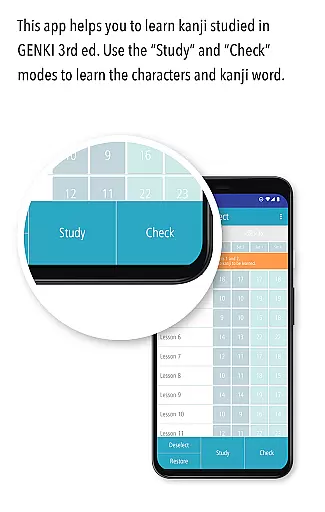
GENKI Kanji for 3rd Ed. is an educational app designed to help users learn and recognize 317 basic kanji characters through over 1,100 kanji words. Developed as part of the best-selling GENKI series for elementary Japanese learners, this app offers a structured yet flexible approach to mastering essential kanji. It features three main modes: Study, Check, and List, each tailored to enhance learning efficiency.
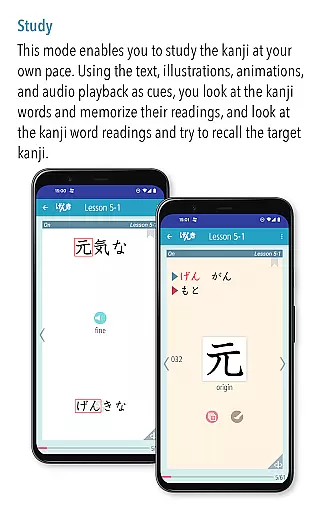
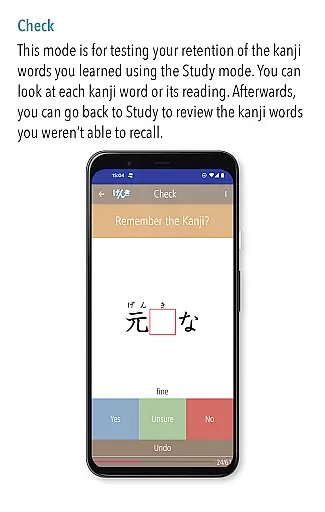
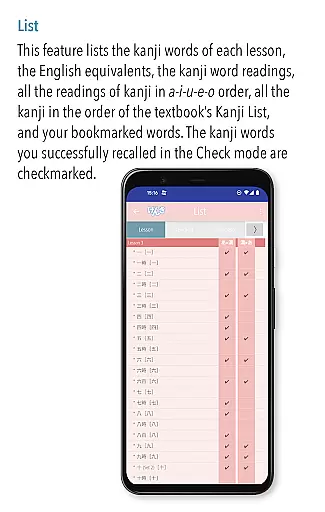
The Study mode provides audio recordings by native speakers, stroke order animations, mnemonic hints, and bookmarking options. The Check mode allows users to assess their progress by sorting mastered words from those still needing practice. Finally, the List mode displays various word lists with automatic tracking of mastered items, ensuring a comprehensive learning experience.
This app is ideal for students using the third edition of the GENKI textbook series who want to reinforce their kanji knowledge systematically. By combining visual aids, audio support, and self-assessment tools, it creates an engaging environment that promotes effective learning.
GENKI Kanji for 3rd Ed. stands out due to its innovative study methods and user-friendly interface. One key feature is the ability to customize the learning process through flexible viewing options in the Study mode. Users can listen to natural pronunciations, view stroke order animations, and access mnemonic illustrations taken from the popular "Kanji Look and Learn" resource.
The app also incorporates a unique self-checking system in the Check mode, which progressively removes mastered words from the study set. This ensures that users focus only on challenging kanji, optimizing their study time. Additionally, the List mode offers multiple organizational formats, including lesson order, a-i-u-e-o order, and alphabetical order, along with checkmarks for mastered words.
Other notable features include bookmarking functionality, searchable lists, and integration with the third edition of the GENKI kanji list. These elements collectively create a robust platform for mastering basic kanji efficiently and enjoyably.
When it comes to learning Japanese kanji, the accuracy and authority of educational content are paramount. GENKI Kanji for 3rd Ed. provides meticulously curated content based on the third edition of GENKI: An Integrated Course in Elementary Japanese, a series that has sold over 2.5 million copies. This app ensures that users learn more than 1,100 kanji words with correct readings and stroke orders, verified by experts in Japanese language education.
The app includes audio recordings of natural pronunciations by native speakers for all kanji words, enhancing the authenticity of the learning experience. Each kanji is accompanied by basic information, fun illustrations, mnemonic hints, and animations of stroke order, sourced from the popular learning resource 'Kanji Look and Learn.' These features not only make learning accurate but also engaging and effective.
Users can trust the structured lesson plans and lists arranged in various orders, such as a-i-u-e-o or alphabetical, which help track progress systematically. The app's authoritative content ensures learners acquire reliable knowledge, making it an indispensable tool for anyone serious about mastering basic kanji.
GENKI Kanji for 3rd Ed. offers personalized learning paths that adapt to individual study paces, allowing users to master 317 basic kanji through over 1,100 kanji words. The appu2019s three main modesu2014Study, Check, and Listu2014enable learners to customize their study sessions according to their needs and preferences. This flexibility ensures that each user can focus on areas where they need the most improvement, leading to a more efficient learning process.
In the Study mode, users can view kanji words, their readings, and target kanji repeatedly, bookmarking challenging words for later review. The Check mode helps learners assess their mastery by sorting words into mastered and unmastered categories, progressively removing those already learned from the study set. This method allows users to concentrate on just the kanji that challenge them, optimizing their study time.
The List mode displays various lists of all words and kanji covered, showing progress with checkmarks next to mastered entries. Users can search and review specific kanji from different lists, such as On/Kun or Serial # lists, ensuring comprehensive coverage. With these personalized features, GENKI Kanji for 3rd Ed. empowers learners to create a tailored study plan that maximizes their potential for success.
User-friendly interface
Audio recordings included
Customizable study options
Progress tracking system
Comprehensive word lists
OS10 or higher required
No ads but limited free content
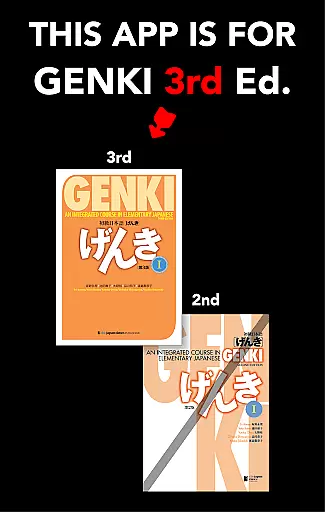
Specific to GENKI 3rd edition
Device compatibility issues
Premium version needed

An aviator’s preparation, study and test tool for FAA Knowledge Exams.
 3.90
3.90
Bebefinn and Baby Shark educational, animated videos & games for kids
3.40
2026 DVSA Driving Theory Test revision with Hazard Perception + Highway Code
4.60
Deal Craps (Practice Craps Payouts)
3.80
Pass your FAA written with flying colors - Study Buddy can help.
4.30
Explore numbers the Starfall way!
4.00
Enrich the experience of your visit to the Pantheon with our audiotour.
1.60
An aviator’s preparation, study and test tool for FAA Knowledge Exams.
4.10
Adventures await with Spider-Man and other Marvel characters!
4.10
Explore myths and gods across cultures with in-depth insights and stories.
5.00
Short Lessons for Better Finances, Health, Skills, Jobs & Relationships.
4.80
Gain new skills in 10 minutes
4.70
Turn scrolling hours into improving your knowledge, communication, intelligence
4.50
Professional Award-Winning Astronomy Star Map App With Telescope Control
4.40
Turns you phone or tablet into TI graphing calculator (ROM required).
4.20
For medical training - Visualize complex vein maps and structures in real-time.
4.10
An aviator’s preparation, study and test tool for FAA Knowledge Exams.
4.00
A collection of favorite stories from Daniel Tiger's Neighborhood
2.00
Pickleball guide complete with illustrated Pickleball drills and helpful info
4.4


User Reviews