
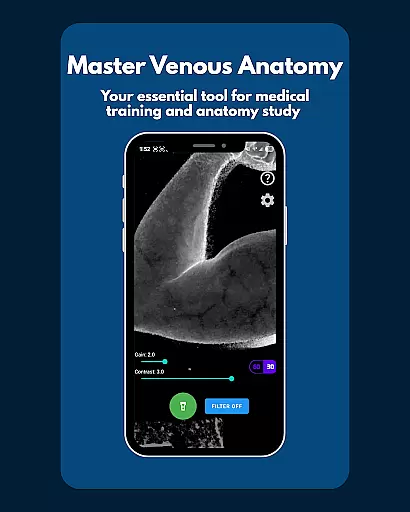
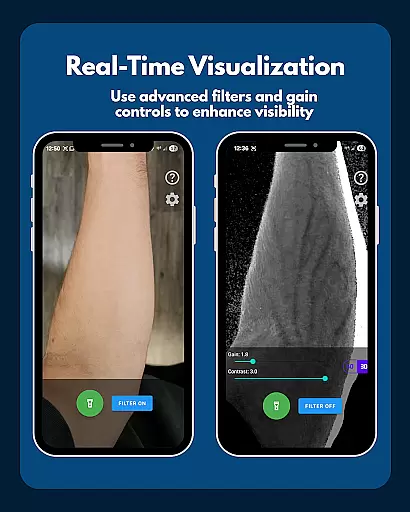
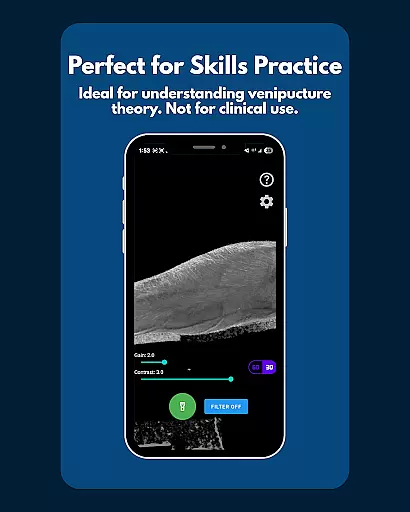
VeinFinder is an innovative educational tool designed to assist medical students and educators in mastering venous anatomy. Using advanced GPU-accelerated image processing, the app enhances vein visibility directly through your device's camera, eliminating the need for additional hardware. This makes it an invaluable resource for practical learning and teaching scenarios.
The app offers precise control over gain and contrast settings, ensuring optimal vein visualization across various skin tones and lighting conditions. With integrated flashlight support and on-device processing, VeinFinder provides a secure and private way to study anatomy. Whether preparing for exams or conducting classroom demonstrations, this app bridges the gap between theoretical knowledge and hands-on understanding.
VeinFinder stands out with its instant comparison feature, allowing users to toggle between enhanced and raw views for better comprehension. The precision controls enable fine-tuning of image settings, adapting to different environments and skin types. Low-light consistency is maintained through integrated flashlight management, ensuring clear visuals at all times.
All data processing occurs locally on the device, guaranteeing privacy and security. This feature is crucial for users who prioritize data protection. Additionally, VeinFinder's optimization for Samsung devices, while maintaining compatibility with most Android models, ensures a broad user base can benefit from its capabilities. Continuous updates further enhance performance, making it a reliable tool for educational purposes.
VeinFinder stands out in the realm of educational tools by providing highly accurate and authoritative content for students and educators focused on anatomy and physiology. The app leverages advanced GPU-accelerated image processing to enhance the visibility of veins, ensuring that users receive precise representations of venous structures directly through their device's camera.
This level of accuracy is crucial for those studying complex subjects like venipuncture and phlebotomy site mapping. VeinFinder's precision control feature allows users to fine-tune gain and contrast settings, optimizing vein visibility across diverse skin tones and lighting conditions. This ensures that the visual information provided is both reliable and adaptable to various learning environments.
Furthermore, VeinFinder is designed with privacy and security in mind. All image processing occurs locally on the device, meaning no data is collected or transmitted. This guarantees that the anatomical content viewed remains confidential and secure, which is essential for maintaining academic integrity and trust.
While VeinFinder does not offer traditional personalized learning paths like adaptive quizzes or tailored lesson plans, it provides a unique form of personalization through its adjustable features that cater to individual learning needs. Users can customize the app's settings to suit their specific study requirements, such as adjusting the flashlight control for low-light environments or choosing optimal areas of the body for vein visualization.
The app supports a variety of learning styles by enabling instant comparison between enhanced views and raw camera feeds. This toggle feature allows students to quickly grasp differences and understand venous anatomy in real-time, promoting an interactive and engaging learning experience. Such flexibility empowers learners to create their own personalized approaches to mastering complex anatomical concepts.
Moreover, VeinFinder's optimization for different devices and ongoing updates ensure that all users have access to the best possible performance. This commitment to continuous improvement means that each user benefits from a consistently high-quality educational tool that evolves with technological advancements and user feedback.
User-friendly interface
Advanced image processing
Private and secure
Compatibility with many devices
Regular updates
Limited to educational use
Performance varies by device
Dependent on lighting conditions
Not a medical device
Refund window is short

Explore myths and gods across cultures with in-depth insights and stories.
 5.00
5.00
Your best partner for learning Japanese words. Based on a best-selling textbook.
2.90
Stack the Countries makes learning world geography fun!
4.50
Discover Your Place in the Universe
4.70
Animals pop up and make sounds—learn names and noises in Peekaboo Barn!
4.3
Learn & Speak New Languages
4.70
Make your own game and world. Draw and animate characters
3.70
Learn to pass DMV permit tests. Driver license practice test 2025.
4.60
Adventures await with Spider-Man and other Marvel characters!
4.10
Childcare Management App: Daily sheets, sign in-out, billing and learning tools
4.70
Learn Words Daily in Just Minutes - Boost Your Language Skills Fast!
4.60
2026 DVSA Driving Theory Test revision with Hazard Perception + Highway Code
4.60
Dinosaurs coloring book game. Drawing and painting dinos.
4.50
Skelly is a fully poseable, anatomically correct reference skeleton for artists.
4.10
Break Language Barriers with AI—Learn Language Anytime, Anywhere!
4.00
Visit Daniel's house & make believe. Play doctor, make music, & feed fish.
3.20
scanner body part for fun Prank friends realistic scan effects
3.00
MONOPOLY JUNIOR brings Hasbro's classic the board game to life.
3.00
The official CCM Glossary app, including 700+ terms and definitions.
2.90


User Reviews