
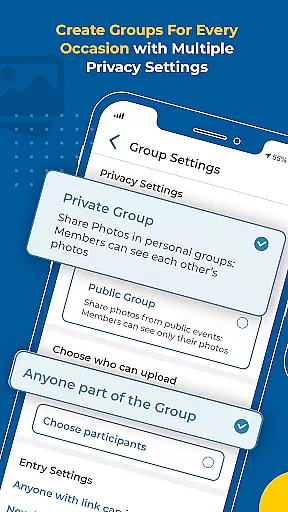


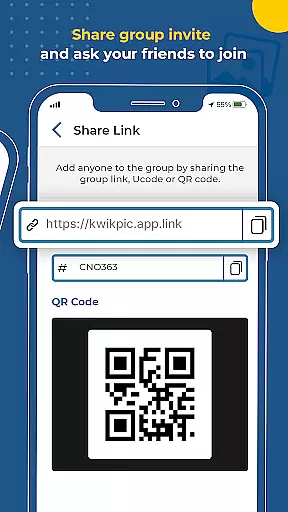
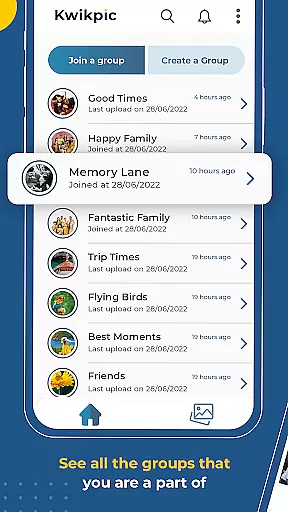
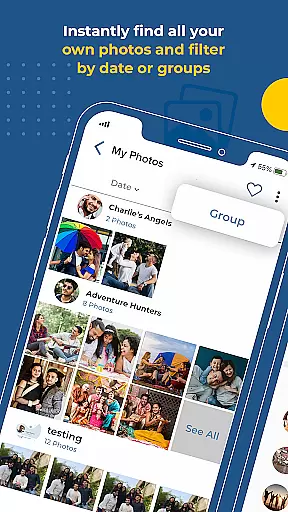
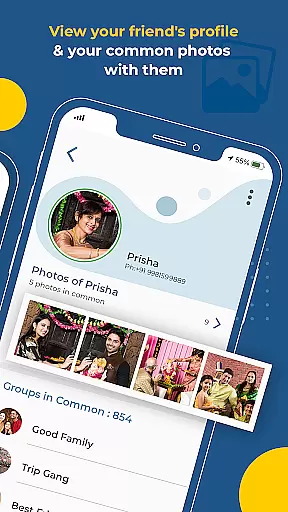
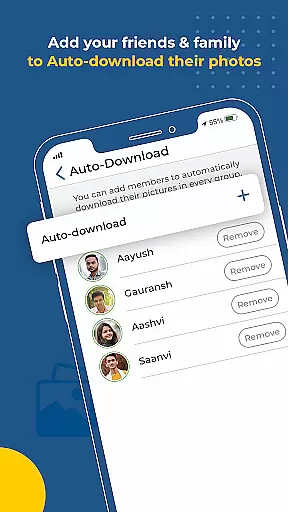
Kwikpic is an innovative photo management app designed specifically for event enthusiasts and professional photographers. The application's core functionality revolves around AI-powered face recognition technology, which enables users to effortlessly sort, tag, and share high-quality photos with relevant individuals. Whether you're capturing memories from a wedding, conference, or vacation, Kwikpic ensures that each image is preserved in its original quality while providing advanced features like instant face matching and group photo organization.
Beyond basic photo sharing, Kwikpic offers robust analytics tools to track impressions, downloads, and engagement metrics. This makes it an ideal solution for event organizers who need detailed insights into how their photos are being received. Additionally, the app supports seamless uploads from various cloud storage platforms, including Google Drive, ensuring maximum convenience for users. With Kwikpic, managing and distributing event photos has never been easier or more efficient.
Kwikpic stands out with its cutting-edge AI-driven features tailored for event photography. At the heart of the app lies its powerful face recognition system, which automatically identifies individuals in photos and groups them accordingly. This eliminates the tedious task of manually sorting through hundreds of images, saving users significant time and effort. Furthermore, the app's instant face-matching capability allows users to tag individuals and send notifications directly to their contacts, streamlining the photo-sharing process.
In addition to its core functionalities, Kwikpic provides comprehensive analytics tools that offer valuable insights into photo performance. Users can monitor metrics such as total impressions, downloads, and user engagement, empowering them to make data-driven decisions about their photography strategies. Another notable feature is the app's support for multiple cloud storage integrations, enabling users to upload images directly from their preferred platforms without compromising on quality. These advanced capabilities make Kwikpic an indispensable tool for anyone involved in event photography.
Task creation and detail customization are essential features for any event management app. Kwikpic excels in this area by offering users the ability to create tasks that involve uploading, tagging, and sharing photos with precision.
The app allows users to upload photos from various sources such as gallery, Google Drive, and other cloud storage platforms. Once uploaded, Kwikpic uses AI technology to instantly face match and tag individuals in the photos. This feature streamlines the process of organizing event photos by automating the tagging process, which would otherwise be tedious and time-consuming.
Furthermore, Kwikpic provides detailed customization options for each photo. Users can add descriptions, tag people, and even track analytics like total impressions and downloads. These capabilities ensure that every task created within the app is tailored to the user's specific needs, enhancing both efficiency and personalization.
By integrating these comprehensive task creation and customization features, Kwikpic not only simplifies photo management but also enriches the user experience, making it an invaluable tool for capturing and sharing memories from any event.
Reminder settings in Kwikpic play a crucial role in ensuring that users never miss an important moment or task related to their events. The app offers flexible reminder options that can be customized according to the user's preferences.
Upon uploading photos, users can set reminders to notify everyone who is tagged in the images. This feature leverages the appu2019s advanced face recognition technology to identify individuals and alert them when they appear in new photos. Such notifications ensure that all participants are promptly informed and can engage with the content as soon as it is available.
In addition to tagging notifications, Kwikpic allows users to configure reminders for other event-related activities. Whether itu2019s tracking the number of downloads or monitoring total impressions, users can set up alerts to stay updated on key metrics. This functionality helps maintain engagement and encourages timely interactions with the shared content.
Overall, Kwikpicu2019s robust reminder settings enhance the overall event experience by keeping all stakeholders informed and engaged, thereby fostering a more connected and responsive community around shared memories.
User-friendly interface
AI-powered face recognition
High-quality photo uploads
Comprehensive analytics dashboard
Cloud storage integration
Limited free storage
Premium features require subscription
Occasional processing delays
Notifications may be intrusive
Steep learning curve for beginners

PheedLoop Go! is the mobile event app for events powered by PheedLoop.
 4.40
4.40
Audio guide companion APP for SEE's Michelangelo's Sistine Chapel
3.50
Here you can choose tickets for films, performances, concerts and other events
4.60
Get live football here
4.30
Soft Proxy for Your Online World
4.1
TV Garden - World Live TV : Play & cast your videos seamlessly!
3.20
Discover events, experiences, and things to do near you - Anytime, Anywhere!
4.70
TodayTix is the easiest way to get tickets to the best shows in your city.
4.90
Plan your wedding for free on the go: vendors, budget, website and checklists!
4.80
Create invitation cards for birthdays, weddings, Christmas and more.
4.80
Save money on concert, sport, and theater tickets, and discover upcoming events.
4.80
Discover events & experiences in NYC, LA, Chicago, DC, Miami and more!
4.70
Octrober 2025: We've updated the MyGenMobile App with a new look and feel!
4.40
Track birthdays, habits & goals. Unlimited countdowns and count-ups
4.20
Buy and sell tickets to sports, concerts, theater, festivals, and comedy events
4.10
The world's largest selection of tickets is now at your fingertips
3.90
Local events, contests, and giveaways for local dads
3.70
The Official App
3.70
The official app of the Carmel Christkindlmarkt!
4.4


User Reviews