


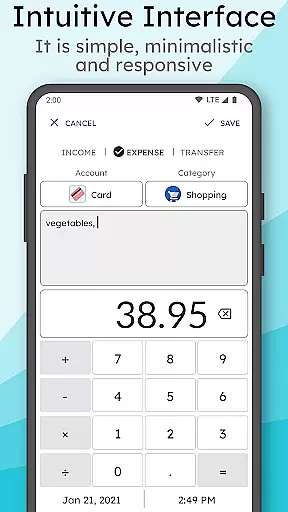
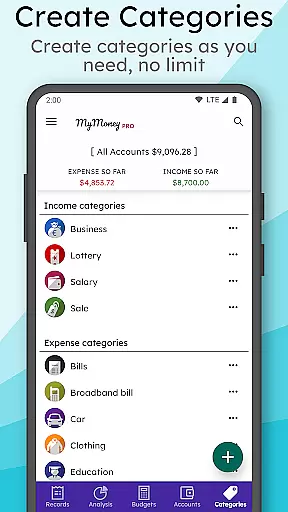
MyMoney Pro is a comprehensive personal finance management application designed to help users effectively track and control their spending. This budgeting app allows you to monitor your daily expenses through its intuitive expense tracker, while the built-in budget planner helps you set financial goals and stay within your limits. The app operates fully offline, ensuring that all your financial data remains private and accessible without an internet connection.
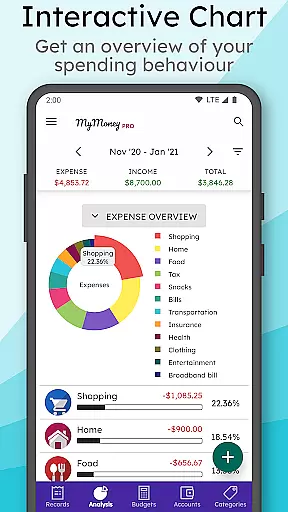
One of the standout features of MyMoney Pro is its powerful analysis tools. Users can view detailed charts and reports on their monthly income and expenses, helping them understand their spending habits better. Additionally, the app offers customizable categories for organizing transactions, multiple account management for wallets and cards, and personalized settings such as currency selection and category icons. With its user-friendly interface and smart homescreen widget, managing finances has never been easier or more efficient.
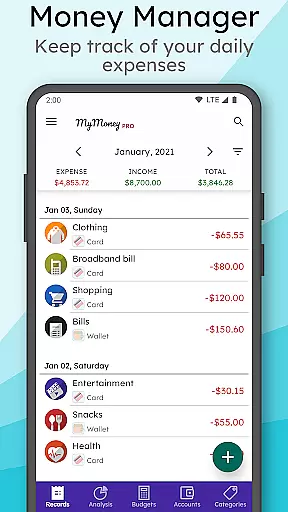
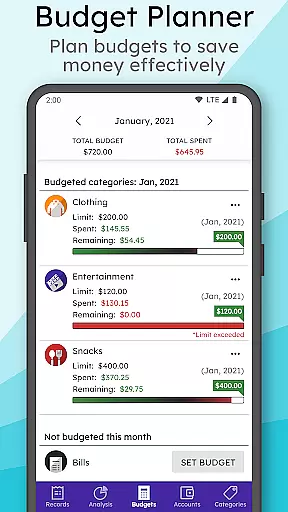
MyMoney Pro boasts a wide array of features that cater to various aspects of personal finance management. The Expense Manager allows users to categorize their income and expenses into predefined or custom categories like Cars, Foods, Clothing, etc., providing a clear overview of where money is being spent. The Budget Planner enables users to set monthly budgets for different categories, helping them avoid overspending and achieve their savings goals.
The app's Effective Analysis feature provides insightful charts and graphs that display monthly income and expense trends. This visual representation makes it easy to identify areas where adjustments can be made. Furthermore, MyMoney Pro includes a Smart Homescreen Widget that lets users quickly add new records and keep an eye on their balance at a glance. Other notable features include multiple account management, passcode protection for privacy, and the ability to export worksheets for printing records. These robust functionalities make MyMoney Pro a versatile tool for anyone looking to take control of their finances.
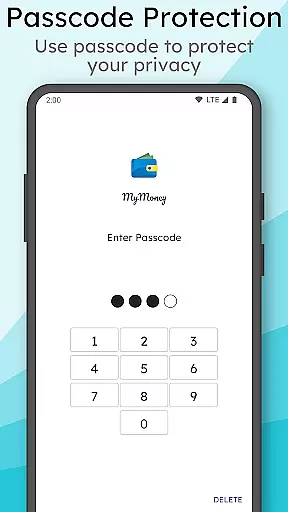
Account and fund security is a critical aspect of any financial management application. MyMoney Pro ensures the safety of your financial data through multiple layers of protection. The app provides passcode protection for privacy, which means only authorized users can access the app's content.
In addition to user authentication, MyMoney Pro allows you to keep your record data safe with backups. This feature ensures that even if your device is lost or damaged, your financial records are not compromised. You can also restore these backups when needed, providing peace of mind and continuity in managing your finances.
Furthermore, the app supports exporting worksheets, which can be used to print the records. This functionality not only facilitates offline record-keeping but also adds an extra layer of security by enabling physical storage of your financial data. With these comprehensive security measures, MyMoney Pro stands out as a reliable tool for managing personal finances safely.
A seamless transaction experience is essential for effective personal finance management. MyMoney Pro offers an intuitive interface that simplifies tracking expenses and managing budgets. By categorizing transactions into various categories such as Cars, Foods, Clothing, etc., it becomes easier to monitor where your money goes each month.
The budget planner feature helps users set spending limits on specific categories like coffee, ensuring they do not exceed their budget targets. This proactive approach aids in controlling spending behavior and encourages saving money. Additionally, the smart homescreen widget allows quick access to balance information and easy addition of new records on the go.
MyMoney Pro further enhances the transaction experience by providing detailed analysis tools. Users can view monthly income and expense breakdowns through clean charts, offering insights into spending habits and helping them make informed financial decisions. These features collectively create a robust platform for efficient and insightful personal finance management.
User-friendly interface
Comprehensive budgeting tools
Offline functionality
Customizable categories
Powerful analysis features
Limited free version
No automatic transaction import
Manual data entry required
Premium features locked behind paywall
Occasional bugs reported

Play for fun, earn for real. Collect rent by owning virtual land & get cashback
 4.60
4.60
BA Financial Calculator PRO – Perfect for CFA/FRM/CPA and finance professionals
4.90
Bill Manager is a simple app to help you keep track of your upcoming bills.
4.3
Early payday cash advance up to $150 a day with a max of $1,000 per pay period
4.70
PayMe helps you claim money from settlements on companies that harmed you.
4.80
Managing your money just got easier. Get the new Mobile app.
4.70
The Citi Mobile® App lets you manage your accounts virtually anytime, anywhere
4.80
Banking, Budgeting & Investing
4.60
Venmo is the fun and easy way to pay and get paid.
4.10
Companies owe you money.
4.80
Simple & secure international money transfers - for personal & business needs.
4.80
All expenses at a glance.
4.80
Your Big Financial Friend
4.70
Manage your credit card account with the Credit One Bank mobile app.
4.70
Send money and bitcoin easily. Invest, bank and do more with your money
4.70
Get a cash advance instantly. File taxes & cover unexpected bills in minutes.
4.60
Manage your prepaid cards and add to Google or Samsung Wallet.
4.60
Manage and cancel subscriptions, lower bills, track expenses, create budgets.
4.60
View BSC Transactions for multiple accounts
3.90


User Reviews