
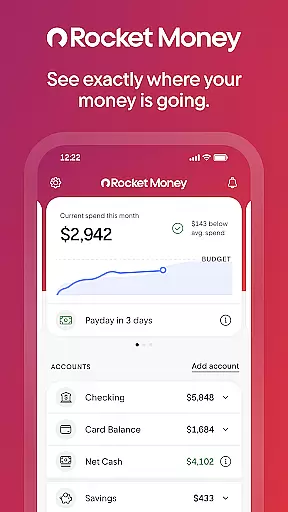

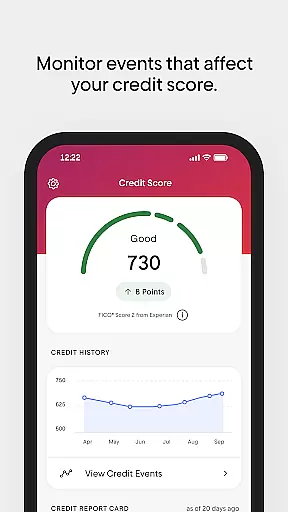
Rocket Money is a comprehensive personal finance application designed to help users take control of their financial lives. With over 5 million members, it offers tools for subscription management, bill negotiation, expense tracking, budgeting, automated savings, net worth monitoring, and credit score checking. The app provides bank-level security and privacy, ensuring your financial data remains protected.
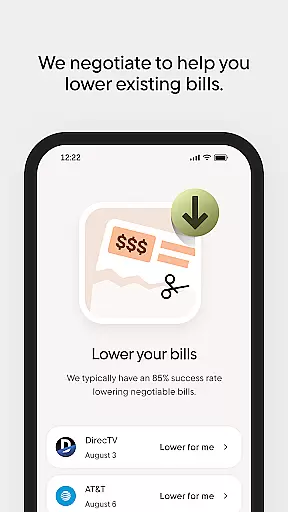
One of the standout features of Rocket Money is its ability to find and cancel forgotten subscriptions, helping users save money effortlessly. Additionally, the app's concierge service can lower bills by negotiating better rates on behalf of the user. Whether you're looking to create a personalized budget, automate your savings, or monitor your financial health through net worth tracking, Rocket Money provides an all-in-one solution that simplifies personal finance management.
This app is particularly useful for individuals who want to streamline their financial management processes. By linking all your accounts in one place, Rocket Money offers a centralized platform where you can manage subscriptions, track expenses, and monitor your financial progress without needing to switch between multiple apps or services.
Rocket Money stands out with its rich array of features tailored to simplify personal finance management. One key feature is its subscription management tool, which automatically detects and helps cancel forgotten subscriptions directly within the app. This functionality not only saves users money but also declutters their financial commitments.
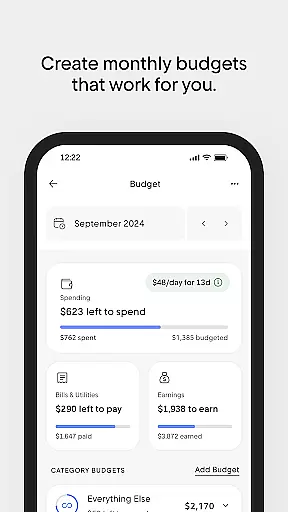
The app's bill negotiation service is another highlight. Rocket Money's concierge team identifies bills that can be lowered and negotiates better rates on behalf of the user, ensuring they get the best possible deals. Additionally, the budgeting tool allows users to set up personalized budgets that monitor spending by category, keeping them aligned with their financial goals.
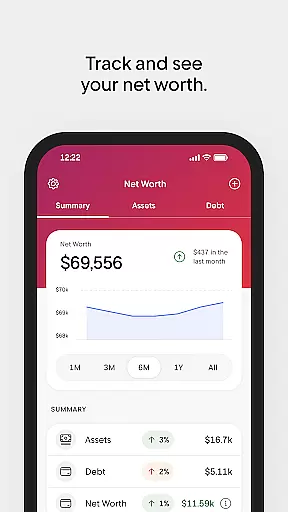
Automation is at the heart of Rocket Money's savings feature. Users can choose their savings goals and set preferred frequencies and amounts for automatic transfers, making saving effortless. Furthermore, the app provides a holistic view of users' financial health by tracking assets, debts, and investments to calculate net worth. This feature empowers users to understand and grow their financial standing over time.
In the realm of personal finance management, ensuring the security of user accounts and funds is paramount. Rocket Money employs bank-level security measures to protect your financial data and privacy. This includes advanced encryption protocols that safeguard your information against unauthorized access.
The app's dedication to privacy is evident through its stringent verification processes. Users can confidently link their financial accounts knowing that Rocket Money adheres to industry-leading standards for data protection. The implementation of features such as two-factor authentication adds an extra layer of security, making certain that only authorized users gain access to sensitive account details.
By prioritizing account and fund security, Rocket Money provides peace of mind to its over 5 million members. With secure login procedures and continuous monitoring for suspicious activities, users are empowered to take control of their financial lives without compromising on safety.
A seamless transaction experience is crucial for maintaining a healthy financial routine. Rocket Money excels in delivering real-time notifications for each transaction, keeping users informed about their spending habits instantly. This immediate feedback loop allows for better financial decision-making and helps prevent overdrafts.
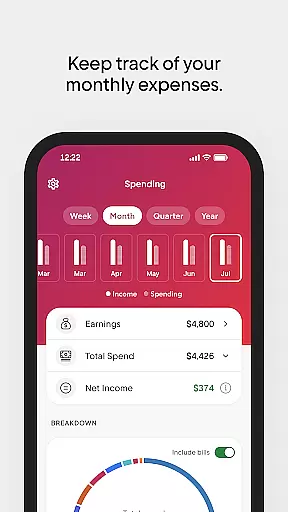
The app consolidates transactions across all linked accounts into one intuitive interface. By presenting a clear overview of monthly expenses, Rocket Money simplifies the process of tracking expenditures. Users benefit from organized categories that make it easier to understand where their money goes each month.
Moreover, Rocket Money enhances the transaction experience by enabling effortless budget adjustments based on actual spending patterns. With tools designed to monitor spending by category, users can stay aligned with their financial goals while enjoying the convenience of automated savings features that grow their reserves without requiring constant attention.
User-friendly interface
Comprehensive financial tools
Effective subscription management
Bill negotiation service
Automated savings feature
Limited international support
Premium features require subscription
Occasional syncing issues
Customer support response time
Some advanced features are complex

Play for fun, earn for real. Collect rent by owning virtual land & get cashback
 4.60
4.60
Earn cash & save money daily. Access instant cash advances* - no credit check!
4.50
Debt pay off. Build credit history. AI budget tool. Loan offers.
4.60
Retirement plan, IRA, retail and HSA customers serviced by Empower.
3.10
Money transfer made easy. Send money to friends and family with great rates.
4.70
All your crypto & stocks in one secure and trusted app.
4.40
Get, Earn, and Save Money
4.30
Amazing Financial Calculator. Based on HP 10bII, but easier to use!
4.40
Access State Farm accounts, policies, ID cards and more
4.60
Easy budgeting planning on a calendar!
4.80
All expenses at a glance.
4.80
Join 12M+ users. Instant cash advances, personal loans, build credit, save money
4.80
Money App - Earn Cash back, Fast Cash Advance, Personal Loan Offers, Banking
4.70
Currency Converter (200+ currencies) with live exchange rates and offline mode.
4.70
Powerful Money Manager, Expense & Savings Tracker, Budget Planner - Pro Version
4.70
Manage your prepaid cards and add to Google or Samsung Wallet.
4.60
The simplest way to budget, bank, save and invest.
4.50
Manage budget, save money, or file tax. Build, track & improve your credit score
4.40
Change the way you money with Credit Genie
4.30


User Reviews