
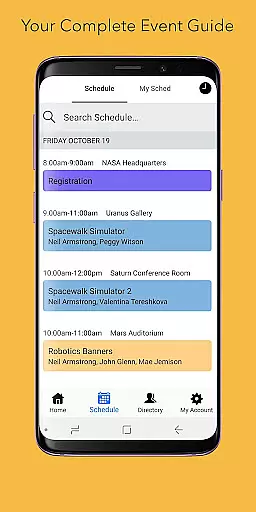
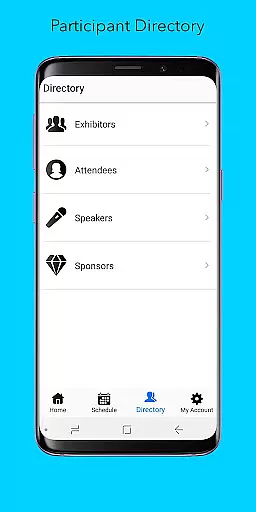
Sched is a leading platform for session registration and attendance management, designed to streamline the organization of complex multitrack events. This app allows event organizers and attendees to manage all event details in one place, enhancing the overall event experience.
With features like a full schedule display, personalization options, a comprehensive directory of speakers and exhibitors, and offline caching, Sched ensures users have access to key event information at their fingertips. Whether you're attending a conference, convention, or festival, Sched helps you make the most out of your event by providing tools that simplify planning and participation.
Sched offers a robust set of features tailored to enhance event management and attendance. One of its standout capabilities is the full schedule view, which lets users browse the entire event schedule conveniently without needing an event guide.
Personalization is another key feature, allowing attendees to create and modify their schedules online and on-the-go. The directory provides detailed professional profiles of speakers and exhibitors, enriching the user's understanding and engagement with the event. Additionally, offline caching ensures that users can access their schedules even without an internet connection, making it reliable in any situation.
These features collectively ensure that users can efficiently manage their event participation, stay informed, and engage more deeply with the content and people at the event.
Task creation and detail customization are essential features for event management platforms like Sched. This functionality allows event organizers to create detailed sessions, workshops, or presentations with specific information such as time, location, speaker details, and session descriptions.
Sched offers a comprehensive suite of tools for task creation. Organizers can easily input session details, categorize events, and manage complex multi-track schedules. The platform supports rich formatting options, enabling the addition of multimedia content, links, and documents to session descriptions, making each entry informative and engaging for attendees.
The benefits for users are significant. Attendees can access well-structured, detailed schedules that enhance their event experience. They can plan their participation by reviewing session specifics, understanding the context, and preparing questions in advance. This level of detail helps participants make informed decisions about which sessions to attend, optimizing their time and engagement.
For event organizers, the ability to customize session details means they can present a professional, well-organized event. This feature not only improves the attendee experience but also elevates the perceived value of the event itself, potentially leading to increased attendance and positive feedback.
Reminder settings play a crucial role in ensuring attendees do not miss important sessions at events managed through platforms like Sched. This feature allows users to set up personalized alerts for upcoming sessions, ensuring timely participation and enhancing overall event engagement.
Sched provides flexible reminder options. Users can configure notifications based on their preferences, choosing when and how they receive alerts. Whether it's a push notification, email, or both, attendees have the autonomy to tailor reminders according to their schedules and urgency requirements. Additionally, the platform supports multiple reminders per session, accommodating different time zones and personal routines.
The advantages of this feature are manifold. Attendees benefit from timely reminders that help them organize their day efficiently, reducing the risk of missing key sessions. This proactive approach ensures that participants remain engaged throughout the event, maximizing the value they derive from their attendance.
For event organizers, effective reminder settings contribute to higher session attendance rates and improved participant satisfaction. By facilitating better time management and reducing no-shows, Sched's reminder system enhances the overall success of events, fostering a more organized and enjoyable experience for all involved parties.
User-friendly interface
Comprehensive event management
Offline access
Real-time updates
Customizable schedules
Limited free features
Requires account creation
Occasional sync issues
Premium cost
Complexity for small events

An App for Bhutanese
 4.0
4.0
Track birthdays, habits & goals. Unlimited countdowns and count-ups
4.20
The Official Football Ticketing App for Fans in Qatar
4.5
Soft Proxy for Your Online World
4.1
RAISE-365 makes fundraising easy and fun!
3.20
Invitation Card Maker, Design & share wedding, birthday & party invites fast
4.40
Meet people over dinner
4.40
Thanksgiving Wishes, Thanksgiving Stickers & Animated GIF for Whatsapp Stickers
4.4
Freebie Games for Epic Games, Steam, Amazon, Rockstar etc.
4.40
TodayTix is the easiest way to get tickets to the best shows in your city.
4.90
Find Live Event Ticket Deals to Sports, Concerts, Festivals, & Comedy For Less!
4.80
Save money on concert, sport, and theater tickets, and discover upcoming events.
4.80
Manage all your events, leads, ticketing, payments and check-ins.
4.30
Introducing the official Magic: The Gathering app for mobile.
4.20
Buy tickets for any event!
3.90
Audio guide companion APP for SEE's Michelangelo's Sistine Chapel
3.50
TV Garden - World Live TV : Play & cast your videos seamlessly!
3.20
Mobile Event Guide for Greater NY Dental Meeting
4.2
Community for Mods, Addons, Melsaves, Melmods for Melon Playground
4.1


User Reviews