
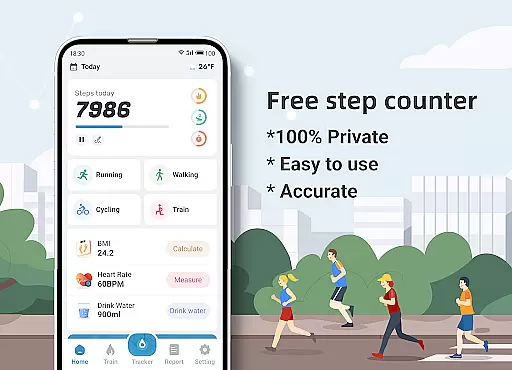
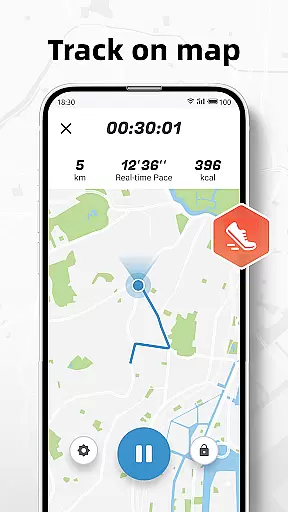
Step Counter - Pedometer & BMI is a comprehensive health and fitness application designed to track your daily steps, monitor BMI, and provide detailed activity reports. The app offers accurate step counting through your mobile device, eliminating the need for additional pedometer hardware. With integrated GPS functionality, users can visualize their walking or running routes on a map while the app records essential metrics such as distance, active time, and calories burned.
Beyond basic step tracking, the app includes specialized training plans tailored for different fitness levels, making it ideal for beginners and experienced users alike. Whether you're monitoring your daily activity or following structured training programs, Step Counter ensures your progress is measurable and motivating. Its privacy-focused design guarantees that all your health data remains confidential, providing peace of mind while you focus on achieving your fitness goals.
Step Counter - Pedometer & BMI stands out with its robust feature set tailored for health-conscious individuals. One of its core functionalities is the precise step-tracking system, which utilizes your phone's sensors to deliver reliable data. Users can adjust sensitivity settings to ensure accuracy based on their walking style or terrain. Additionally, the app provides advanced mapping capabilities, allowing users to trace their movement paths in real-time, enhancing outdoor activity experiences.
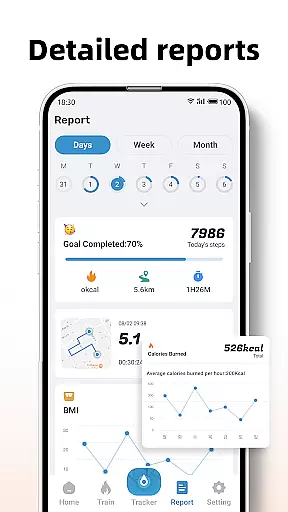
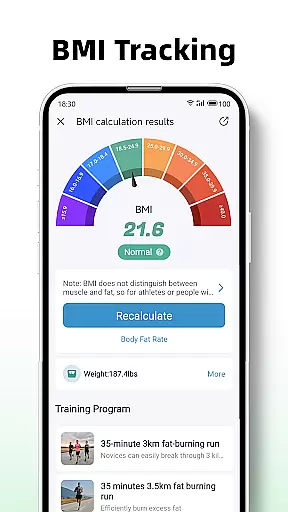
The app also excels in delivering actionable insights through its detailed reporting system. Daily, weekly, and monthly activity summaries are presented via intuitive graphs, helping users understand their progress over time. Training modes further enrich the experience by offering guided workout plans, such as 10-minute jogging sessions, complete with performance metrics like distance covered and calories burned. Moreover, the inclusion of BMI tracking empowers users to maintain a holistic view of their health, ensuring they stay informed about both physical activity and body composition.
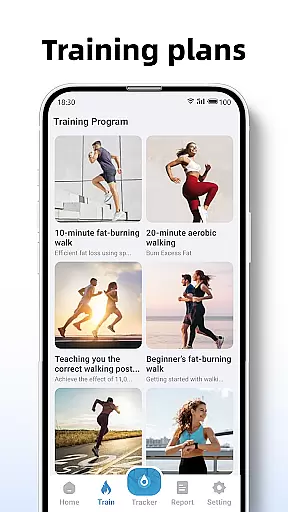
Personalized planning in fitness applications refers to the ability to tailor workout routines and health goals according to individual user needs. Step Counter - Pedometer & BMI excels in this area by offering customizable training plans that cater to different fitness levels and objectives.
The app provides various training modes, such as a 10-minute jogging plan, which users can select based on their preferences or fitness goals. These plans are not only about counting steps but also recording active time, distance, and calories burned during each session, ensuring a comprehensive approach to personal fitness management.
By integrating BMI tracking, the application further refines personalized planning. Users can calculate and monitor their BMI, using this data to adjust their fitness strategies and maintain optimal health. This feature empowers users with actionable insights into their physical condition, promoting informed decision-making.
Ultimately, the personalized planning offered by Step Counter enhances user engagement by delivering a tailored experience that adapts to individual progress and changing goals, making it an invaluable tool for anyone looking to improve their health systematically and sustainably.
Progress visualization is a critical component of any fitness app, providing users with a clear representation of their achievements and motivating continued effort. Step Counter - Pedometer & BMI offers robust visualization tools that display daily, weekly, and monthly reports through detailed graphs.
These visual representations allow users to easily track trends in their activity levels over time. By presenting step counts, distances walked, and calories burned in an accessible graphical format, the app makes it simple for users to understand their progress at a glance.
In addition to basic metrics, the app's detailed reports offer deeper insights into training effectiveness. Users can see how consistently they've followed their chosen training plans and evaluate improvements in key areas like endurance and calorie expenditure.
This focus on clear and informative progress visualization not only helps maintain user motivation but also supports better health outcomes by enabling data-driven adjustments to personal fitness strategies. With these tools, Step Counter ensures that users remain engaged and informed throughout their fitness journey.
User-friendly interface
Accurate step tracking
Detailed activity reports
Private data handling
Customizable sensitivity
Limited offline functionality
Requires correct user info
Device compatibility issues
No advanced fitness metrics
Basic UI design

Your plan in your pocket 24/7
 3.00
3.00
“Overcoming pain based on EMDR” helps you to alleviate chronic pain and stress.
4.10
Transform your body and soul with DBFFitness, with a 40-day fitness journey.
4.3
Pack of 66 calming lullabies for smooth fall asleep and relaxation
4.10
Eat smarter with Eato, your personal calorie counter and nutrition tracker!
4.40
Monitor, analyze, track, and convert blood sugar & help you control diabetes.
4.10
beat yesterday.
4.00
Manage your and your family's health information.
4.60
Jogging app for calorie counter and distance tracker. Running app to lose weight
4.20
Wall Pilates at home & Pilates workout for beginners for core and weight loss.
4.80
a fun app full of surprises :)
4.70
Measure your Pupil Distance for Eyeglasses and VR headsets in 3 quick steps.
4.70
Walk. Earn: Get rewarded for every step! Walk, move, and earn real rewards.
4.70
Effortlessly and naturally release anxiety by harnessing the power of your brain
4.60
Get lasting results with Chair Yoga, Wall Pilates, and Walking workouts!
4.60
Memory, mind & logic exercises. Puzzle games, IQ & brain test for kids & adults
4.50
Relax to calm sounds, white noise, music, guided meditation and bedtime stories
4.40
HRV4Training helps you optimize goals and improve performance. No sensors needed
3.30
Use your watch as a bike computer, heart rate monitor and cycling power meter
2.50


User Reviews