
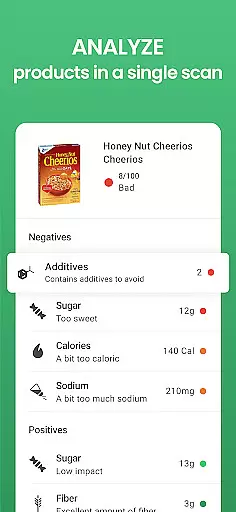
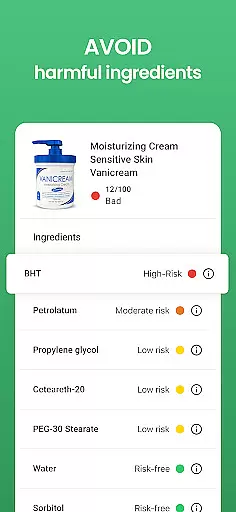
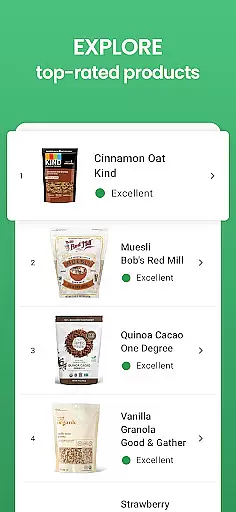
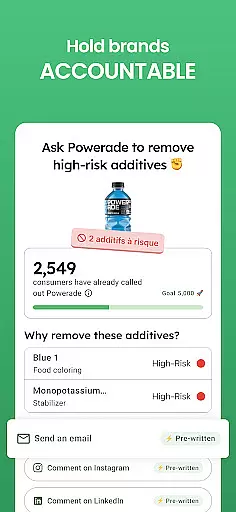

Yuka is a leading health and fitness application designed to empower consumers with clear information about the products they use daily. With over 77 million users, this app specializes in scanning food, beauty, and personal care items to evaluate their impact on your health. By simply scanning product barcodes, Yuka deciphers ingredient lists and provides an easy-to-understand color-coded rating system that ranges from excellent to poor. This feature allows users to make informed purchasing decisions based on nutritional value, additives, and organic quality.
In addition to its core scanning functionality, Yuka offers detailed product pages that explain the health ratings and provide alternatives for products deemed unhealthy. The app evaluates over 3 million food products and 2 million beauty products, ensuring comprehensive coverage across these categories. Whether you're shopping for groceries or personal care items, Yuka's independent evaluations ensure unbiased recommendations, making it an essential tool for health-conscious individuals.
Yuka stands out in the Health & Fitness category due to its robust features tailored to health-conscious consumers. One of its key functionalities is the ability to scan and analyze product ingredients using a scientifically-backed evaluation system. For food items, Yuka assesses nutritional value, additive content, and organic certification, while beauty products are evaluated based on ingredient risk levels derived from current scientific research.
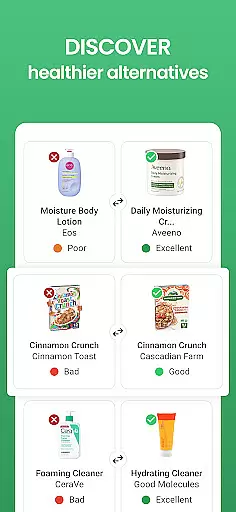
Beyond product analysis, Yuka offers personalized recommendations for healthier alternatives, ensuring users can easily switch to better options. The app also maintains complete independence from manufacturers and brands, guaranteeing objective evaluations free from external influence. With a user-friendly interface, Yuka makes it simple to access detailed product information, save favorite scans, and share findings with others. These features collectively enhance user engagement and promote healthier lifestyle choices.
Personalized planning in Yuka involves tailoring product recommendations based on the health impact of items you scan. This feature leverages an algorithm that evaluates food, beauty, and personal care products according to nutritional value, ingredient risk, and organic dimension.
The app provides a color-coded system indicating the healthiness of a product, which simplifies decision-making. If a scanned item receives a poor rating, Yuka suggests healthier alternatives, thus personalizing your shopping experience.
Users benefit from this feature as it adapts to their health needs over time. The more they use the app, the better it becomes at suggesting suitable products, ensuring purchases are aligned with personal health goals.
Progress visualization within Yuka is demonstrated through detailed analytics provided for each scanned product. Users can access comprehensive breakdowns that explain the grading of a product, enhancing understanding of its health implications.
This feature uses scientific research to assign risk levels to ingredients in beauty and personal care products, alongside evaluating food items. Such data empowers users to track their choices and observe improvements in the quality of products they select over time.
By consistently using Yuka's progress visualization tools, consumers gain insights into their purchasing patterns. This awareness supports informed decisions that contribute positively to long-term wellness objectives.
User-friendly interface
Comprehensive product database
Independent evaluations
Detailed health insights
Personalized recommendations
Limited offline functionality
Premium subscription required
Occasional scanning inaccuracies
Region-specific data gaps
Interface can feel cluttered

Live Heart Rate Pro - Real Time Heart & Workout Data For Wear OS & Bluetooth BLE
 3.20
3.20
Create powerful subliminal audio with custom affirmations and background music.
4.00
Binaural Beats - Fully Customizable Waves - Pure Sound - No Loops
4.50
Your AI pet BFF. Talk, play, and beat anxiety in this calming game.
4.60
Memory, mind & logic exercises. Puzzle games, IQ & brain test for kids & adults
4.50
Walk, track, and burn calories with step counter & GPS walking tracker
4.20
Track sleep cycle, relax with white noise, sleep sounds & smart alarm clock
3.80
Drink water reminder app. Track water intake. Smart simple hydration tracker.
4.70
Pedometer that gives you sweatcoins for steps. It pays to walk!
4.10
Meditation app, head space app provides calm music to help you meditate & sleep
5.00
Power-lifting, weightlifting and Wendler 531 app to track your workout program.
4.90
Easy to use step counter, calorie counter helps lose weight, count steps offline
4.80
Easy reconstitution calc for mixing peptides and creating protocols
4.70
Build Healthy Habits!
4.60
The OFFICIAL Couch to 5K® running training app! A 9 week walk-run workout plan.
4.50
The most accurate heart rate app to monitor and track your heart rate & pulse.
4.40
Your personal BP tracking companion, focus on helping you achieve wellness goal.
4.10
The Sleep Miracle Sound Machine: Soothes baby to sleep with a gentle "Shhh"
3.00
Insanity blocks of intense physical activity, short breaks of 30 seconds.
4.2


User Reviews