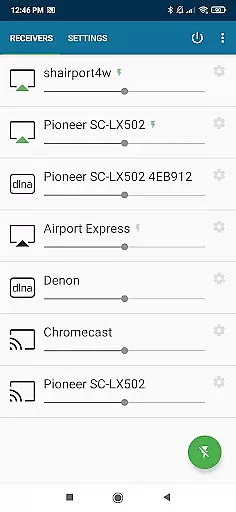
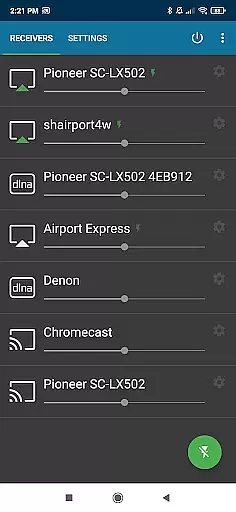
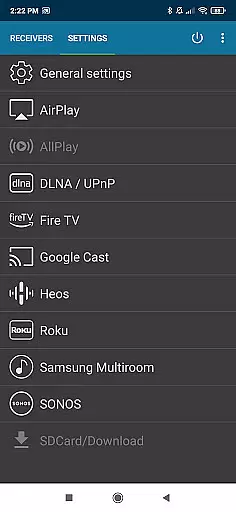
AirMusic is a versatile audio streaming application that allows users to stream audio from virtually any app to a wide range of receivers with just one click. Compatible with popular streaming services like YouTube Music, Deezer, Amazon Music, Apple Music, and Spotify, it supports devices such as SONOS, Apple TV, Chromecast, Fire TV, Smart TVs, AV-receivers, HomePod, Samsung Multiroom, Denon HEOS, Roku, Raspberry Pi, and Airport Express.
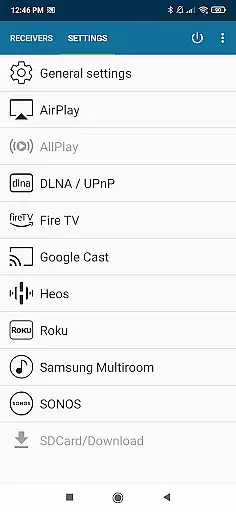
This app stands out by supporting the latest streaming technologies including Apple AirPlay, SONOS, Google Cast, DLNA, Amazon Fire TV, Samsung Multiroom, Denon HEOS, and Roku. Whether you're looking to enjoy music on your Apple TV, HomePod, or any AirPlay-enabled device, AirMusic has got you covered. It ensures seamless compatibility and an amazing entertainment experience by running in the background and enabling streaming with just one click.
AirMusic offers powerful features for Android users seeking an optimal audio streaming solution. The app runs efficiently in the background, allowing users to stream audio with just one click. This ease of use extends to its ability to send information and artwork to AirPlay or Google Cast-enabled receivers, enhancing the overall user experience.
Additionally, AirMusic supports Tasker and MacroDroid, enabling users to create widgets or automate their music streaming processes. These integrations provide flexibility and customization options that cater to both casual listeners and tech-savvy users. With these capabilities, AirMusic guarantees easy and seamless streaming of all your music across various devices and platforms.
AirMusic offers an extensive streaming solution that supports a wide range of music services including YouTube Music, Deezer, Amazon Music, Apple Music, and Spotify. This ensures users have access to a vast music library with millions of tracks across various genres.
The app guarantees the authenticity of its content by supporting only legitimate music streaming platforms. By integrating with verified services like SONOS, Google Cast, and DLNA-enabled devices, AirMusic provides users with high-quality audio while respecting copyright laws.
With compatibility across multiple streaming technologies, AirMusic allows seamless playback from numerous sources, ensuring that users can enjoy their favorite tunes without worrying about legal issues or content restrictions.
AirMusic excels in delivering superior audio quality by leveraging advanced streaming technologies such as Apple AirPlay, SONOS, and Google Cast. These protocols ensure minimal loss of sound fidelity during transmission, providing listeners with an immersive experience.
Users can stream audio to a variety of high-end receivers including Bang & Olufsen, Bowers & Wilkins, Yamaha, Bose, and Denon. The support for these premium brands highlights AirMusic's commitment to maintaining top-notch audio standards.
In addition to supporting high-resolution audio formats, AirMusic also sends metadata and artwork to compatible receivers, enhancing the overall listening experience. This attention to detail ensures that every track is enjoyed exactly as the artist intended.
User-friendly interface
Wide device compatibility
Efficient background operation
Supports multiple streaming technologies
Integration with automation apps
Limited support for certain apps
Android version restrictions
Additional steps for some services
Premium version required for full features
Occasional connectivity issues

 4.70
4.70
Turn your phone into a musical instrument from the future!
3.90
Powerful beat maker & DJ mixer to remix tracks, make music, & perform DJ mix
3.70
Simple & Intuitive Metronome
4.70
The only true audiophile music player with Hi-Fi audio rendering and DSP engine
3.90
Help you quickly get started with Shokz headphones
4.40
Powerful 10-Band equalizer pro with sound booster improves Android audio quality
4.30
Travel To The Music Universe
3.40
Uninterrupted Tunes, Unmatched Vibes
3.90
JBL PartyBox APP works with 110/310/710/120/320/520/Encore/Encore 2/Encore Ess 2
4.80
Your song collections with lyrics and chords on Android smartphones and tablets.
4.80
Brian Eno and Peter Chilvers’ acclaimed music app Bloom, radically reinvented.
4.80
Ultimate Sonos Controller
4.70
Your HD audio recorder on the go for music, meetings, ambience, animal sounds…
4.30
Time Guru will strengthen your internal sense of musical time via random muting.
4.30
Enjoy singing any song, no matter how high or low it is
4.30
VB-AUDIO Software / VBAN-Receptor allows listening to any VBAN Streams
4.10
The ultimate media player for Android devices
3.90
Control your MIDI USB or Bluetooth devices in app and avoid some trampling
3.30


User Reviews