



Capital One Auto Navigator is a comprehensive car shopping app designed to simplify the vehicle purchasing process. The app provides users with access to millions of new and used cars for sale across the nation, allowing them to find a vehicle that suits both their preferences and budget. With powerful search and filtering capabilities, users can customize their search by make, model, year, price, and more to quickly identify their ideal car.
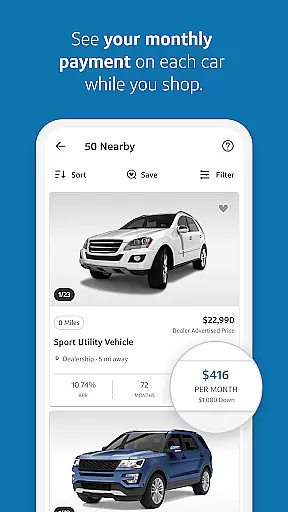
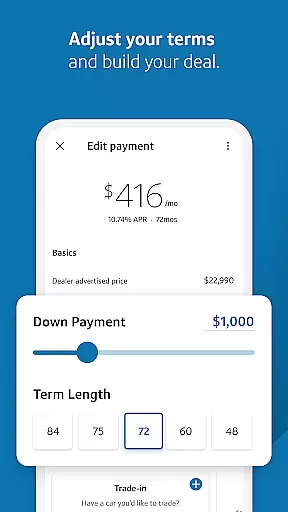
A standout feature of Auto Navigator is its integrated financing tools. Users can pre-qualify for an auto loan within minutes without affecting their credit score. After pre-qualification, they can view real monthly payments while browsing cars, enabling smarter financial decisions. Additionally, the app allows users to adjust down payments and loan terms to create personalized financing options. By bringing pre-qualification details to the dealership, users can save significant time during the car-buying process.
Capital One Auto Navigator offers several notable features that enhance the car-buying experience. First, the app's extensive inventory includes millions of vehicles, ensuring users have a wide selection to choose from. Each listing provides detailed information, including pricing, mileage, and vehicle specifications, helping users make informed decisions.
The app also excels in customization and convenience. Users can filter search results based on specific criteria such as fuel economy, body style, and mileage. Once a preferred vehicle is identified, users can contact dealers directly through the app to inquire about availability or schedule a visit. Another key feature is the ability to compare multiple saved vehicles side by side, making it easier to evaluate options.
Auto Navigator's financing tools are particularly innovative. The app provides instant pre-qualification for auto loans, displaying real rates and monthly payments tailored to each user's financial profile. Users can experiment with different down payment amounts and loan durations to determine the best deal for their budget. This transparency ensures users enter the dealership fully prepared, streamlining the entire car-buying process.
When it comes to purchasing a new or used car, having access to detailed vehicle information is crucial for making an informed decision. Capital One Auto Navigator provides comprehensive details on millions of cars for sale nationwide. Each vehicle listing includes essential specifications such as make, model, year, body style, mileage, and fuel economy.
The app's intuitive filtering system allows users to narrow down their search based on these specific parameters. Whether you prioritize fuel efficiency, body type, or a particular brand, the app ensures that you can customize your search to find cars that meet your exact requirements. This level of detail empowers buyers to choose a car that aligns perfectly with their preferences and needs.
Moreover, Capital One Auto Navigator offers the ability to save favorite cars and compare them side by side. This feature enables users to evaluate different vehicles easily, considering factors like price, features, and performance metrics. By providing transparent and thorough vehicle data, the app significantly enhances the car-buying experience, ensuring customers are well-informed before making any commitments.
One of the most significant advantages of using Capital One Auto Navigator is the unparalleled price transparency it offers. The app provides users with real rates and monthly payments while they shop for cars. This feature eliminates the guesswork involved in determining whether a vehicle fits within your financial plan.
Upon pre-qualifying for an auto loan through the app, users can see their personalized interest rates and monthly payments. This process is quick, taking only minutes, and does not impact your credit score. With this knowledge at hand, buyers can confidently shop for cars knowing exactly what they can afford.
Additionally, Capital One Auto Navigator allows users to adjust various financing options such as down payment amounts and term lengths. This flexibility helps create a customized financing plan that suits individual financial situations. Users can compare different monthly payment scenarios side by side, ensuring they select the best deal available. Such transparency not only simplifies the car-buying process but also builds trust between buyers and dealers.
User-friendly interface
Extensive vehicle database
Instant loan pre-qualification
Customizable search filters
Time-saving at dealerships
Limited to Capital One customers
Dealer availability varies
Requires personal financial data
No test drive scheduling
Occasional app performance issues

Easily notify car owners in urgent situations, safe, fast, multilingual.
 4.0
4.0
Better fuel to help keep you on the road
3.20
Get your personalized financing options and shop for used cars today!
4.20
Car Values, Research and More
4.80
Secure mobile payments & fuel savings at Phillips 66®, Conoco® and 76® stations
4.40
Take state-specific DMV permit tests and ace the exam.
3.90
O'Reilly Pro will streamline your parts lookup and ordering process!
3.20
Find Your Local Store or Shop Online for the Car, Truck, or SUV Parts You Need
4.70
Quick and easy car diagnostics to get you the right fix.
4.70
The Texaco App allows you to pay for fuel from the comfort of your car!
4.80
OBDII - ELM327 Terminal tool for 96-00 Volvos
4.50
Instantly redesign your car with AI. From sporty to futuristic, try it all.
4.50
Your Path to Driving Licensing Success Begins Here! Develop your driving skills.
4.40
Your car is talking. Start listening.
4.30
ODB2 based monitoring application for the Chevy Bolt (2017-2021)
4.00
OBD diagnostics, Live Data, DPF regeneration for BMW
4.00
Available in select states.
4.00
BlueDriver® is a Premium Diagnostic OBD2 Scan Tool. www.BlueDriver.com
3.90
Theme for Car Launcher
4.2


User Reviews