
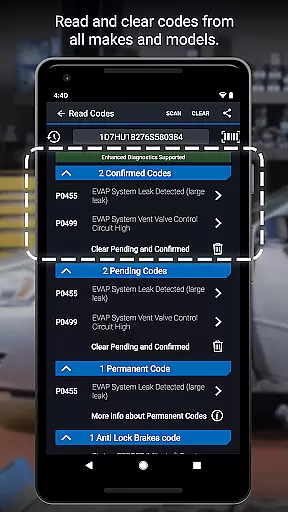
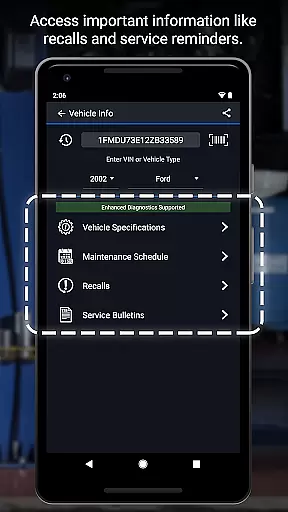
BlueDriver OBD2 Scan Tool is a professional-grade automotive diagnostic application that transforms your smartphone or tablet into an advanced vehicle scanning device. When paired with the BlueDriver Bluetooth Sensor, it provides comprehensive diagnostic capabilities including reading and clearing trouble codes for multiple systems such as engine, ABS, airbag, and transmission.
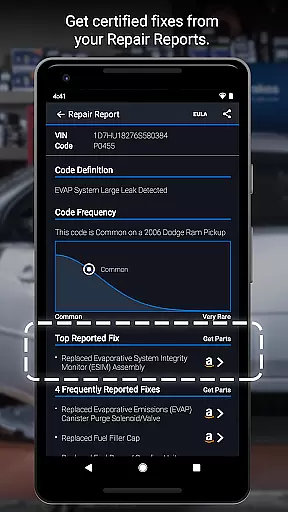
The app stands out with its ability to generate detailed Repair Reports specific to your vehicle's make, model, and year. It offers enhanced diagnostics coverage for major manufacturers and provides real-time data graphing without requiring any physical connections. Whether you're a professional mechanic or a DIY enthusiast, this tool helps you understand vehicle issues through clear explanations and actionable repair suggestions.
With over 1 million users worldwide, BlueDriver eliminates guesswork in automotive repairs by providing accurate diagnostic information and practical solutions based on millions of real-world fixes. The wireless functionality and multi-language support make it an essential tool for modern vehicle maintenance.
BlueDriver OBD2 Scan Tool distinguishes itself through several innovative features designed to enhance vehicle diagnostics. The app provides comprehensive code reading capabilities across multiple vehicle systems including engine, ABS, airbag, and transmission. Its unique Repair Report function generates professional-grade reports based on your specific vehicle and trouble codes, which can be saved and shared with ease.
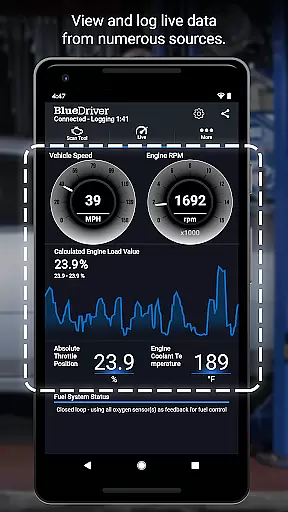
The application's enhanced diagnostics cover most major car manufacturers from 2005 onwards, with specialized support for brands like GM, Ford, Toyota, and Nissan. The live data monitoring feature presents multiple parameter IDs (PIDs) in interactive graphs, allowing users to visualize real-time vehicle performance metrics. Users can switch between metric and imperial units according to their preference.
What sets BlueDriver apart is its database of millions of verified real-world fixes, eliminating the need for subscription-based services. The app's wireless Bluetooth connectivity ensures convenient operation without cables, while its global compatibility and manufacturer-specific diagnostic protocols make it a versatile tool for both professional mechanics and automotive enthusiasts.
BlueDriver OBD2 Scan Tool provides comprehensive access to detailed vehicle information, empowering users with precise diagnostic data. This includes the ability to read and clear trouble codes across multiple systems such as ABS, airbag, transmission, and more.
The app generates professional-grade Repair Reports tailored to the exact vehicle and trouble code combination. These reports not only offer insights into current issues but also enable users to save and share these diagnostics effortlessly.
With enhanced diagnostics coverage for major brands like GM, Ford, Toyota, and others, BlueDriver ensures that users have the necessary tools to understand their vehicle's health comprehensively. The inclusion of live data viewing through multi-PID interactive graphing further enriches this understanding.
One of the standout features of BlueDriver is its commitment to price transparency. Unlike many diagnostic tools that require a subscription, BlueDriver offers its powerful functionalities without any recurring fees.
Users can preview Repair Reports by entering their VIN and trouble code, allowing them to understand potential costs and fixes before committing to a purchase. This openness extends to the app itself, which is free to install, though the BlueDriver Sensor is sold separately.
This approach ensures that users are fully aware of what they are paying for, whether itu2019s the initial cost of the sensor or any additional services they might choose to utilize in the future.
User-friendly interface
Comprehensive diagnostic coverage
Wireless Bluetooth functionality
Detailed Repair Reports
No subscription fees required
Sensor sold separately
Limited free features
Device compatibility issues
Occasional connection problems
Advanced features require premium sensor

The Smarter Way Forward
 3.30
3.30
OBD diagnostics, Live Data, DPF regeneration for BMW
4.00
Monitor specific TOYOTA parameters by adding this plugin to Torque Pro.
2.00
Wonder how much horsepower and torque your car/truck makes? Look no further.
3.40
Discover new and used cars in Syria easily! Browse ads and connect with sellers.
3.70
Car Sounds Engine Sounds app welcomes Auto Lovers to feel Car Simulator Sound
4.20
Take state-specific DMV permit tests and ace the exam.
3.90
Available in select states.
4.00
Easy connect & control your cars from afar. Remote Lock & unlock car and carplay
4.60
Listings of Tesla's with FSD - Included package
4.60
Digital Car Key/Launcher, Screen Mirror, Android Dashboard, Remote Wireless Link
4.40
Automotive Electrical Wiring Diagrams
4.40
Your Path to Driving Licensing Success Begins Here! Develop your driving skills.
4.40
myAudi offers users services and Audi connect services for Audi drivers
4.10
Blink Charging Mobile app makes finding an EV charger an intuitive experience.
3.80
Read and delete OBD codes with any ELM327 OBD scanner. Coding functions included
3.40
Easily notify car owners in urgent situations, safe, fast, multilingual.
4.5
Attention! This is the theme for the Car Launcher app
4.0
Theme for Car Launcher
4.5


User Reviews