
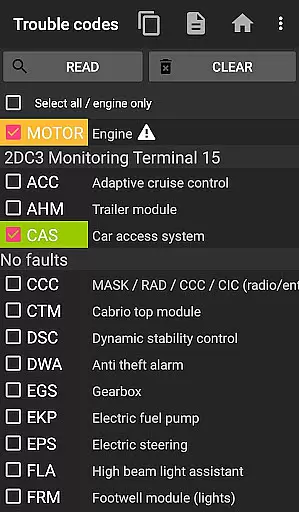
bimmer-tool is a comprehensive diagnostic application designed specifically for BMW car owners and enthusiasts. This app allows users to read and clear fault codes, request DPF regeneration, and access real-time engine data in compatible BMW models. With support for various OBD adapters, it provides an essential toolkit for monitoring vehicle health and performance.
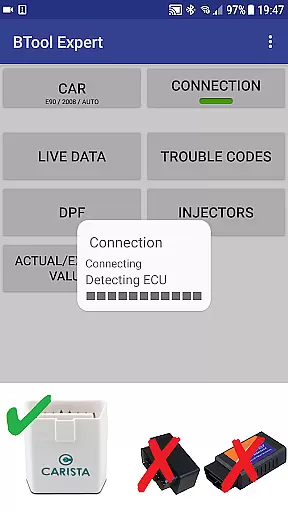
The application's functionality varies depending on the vehicle model year. For cars produced before 2008, a K+DCan USB cable connection is recommended for optimal performance. Newer models can utilize wireless ELM adapters or ENET cables, offering flexibility in connectivity options. Whether performing routine maintenance checks or diagnosing complex issues, bimmer-tool delivers valuable insights into your BMW's operational status.
By providing detailed vehicle information and advanced diagnostic capabilities, bimmer-tool empowers users to take control of their car maintenance. From tracking exhaust fumes pressure to resetting service intervals, this app transforms your smartphone into a powerful automotive diagnostic tool, saving both time and money on professional services.
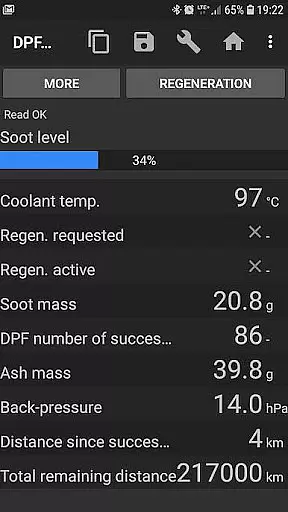
bimmer-tool stands out with its extensive range of specialized features tailored for BMW diagnostics. The app enables users to read detailed DPF regeneration status, request regeneration processes, and reset adaptation values after filter replacement. These functions are crucial for maintaining optimal diesel particulate filter performance, especially in modern BMW vehicles.
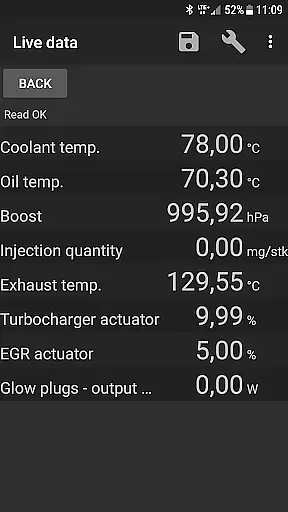
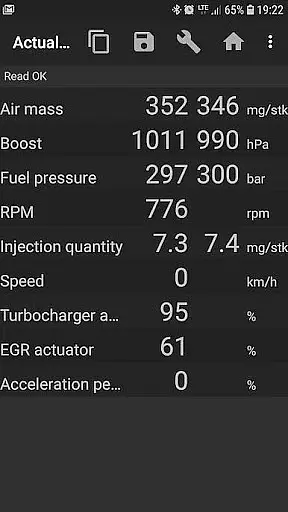
One of the app's key strengths lies in its ability to access real-time engine data. Users can monitor critical parameters such as air mass, intake manifold pressure, and fuel pressure, comparing actual values against expected ranges. The application also supports data logging to CSV files, allowing for thorough analysis and record-keeping of vehicle performance metrics over time.
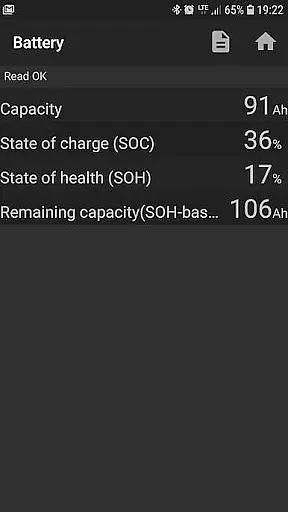
The app's compatibility with multiple connection types sets it apart from basic diagnostic tools. Whether using a reliable K+DCan USB cable for older models or leveraging wireless ELM adapters for newer vehicles, bimmer-tool ensures stable communication with the car's onboard systems. Advanced features like battery replacement registration and lamp circuit reset demonstrate the app's comprehensive approach to vehicle maintenance, making it an indispensable tool for BMW owners seeking detailed diagnostic capabilities.
bimmer-tool provides comprehensive access to detailed vehicle information, which is crucial for BMW owners who want to understand their car's health and performance. This app allows users to read engine live data, including parameters such as air mass, intake manifold pressure, and fuel pressure. These insights enable drivers to monitor their vehicle's condition in real-time and make informed decisions regarding maintenance and repairs.
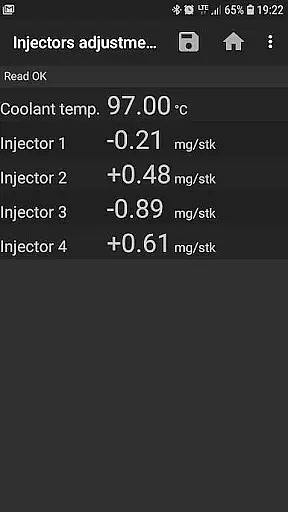
Additionally, the application supports reading injectors adjustments and exhaust fumes pressure, offering a deeper understanding of engine performance. By providing actual and expected values for various metrics, bimmer-tool empowers users with the knowledge needed to ensure optimal engine function. This level of detail is particularly beneficial when diagnosing issues or assessing the impact of recent repairs or modifications.
The ability to log data to a CSV file further enhances the utility of this feature. Users can analyze trends over time, compare performance before and after servicing, or share data with mechanics for expert advice. This functionality transforms the way BMW owners interact with their vehicles, shifting from reactive repairs to proactive maintenance strategies.
While bimmer-tool itself does not directly deal with monetary transactions, it promotes price transparency by detailing the costs associated with maintaining a BMW through its compatibility with various OBD adapters. The app recommends specific adapters like K+DCan USB cables, ENET adapters, and certain Bluetooth devices, each with its own price point and features. This guidance helps users make cost-effective choices when purchasing diagnostic tools.
Moreover, by enabling users to perform many diagnostic functions themselves, bimmer-tool reduces reliance on costly dealership services. For instance, the ability to read and clear fault codes, request DPF regeneration, and reset service intervals can save significant amounts on repair bills. This self-service approach ensures that BMW owners are fully aware of potential expenses and can plan accordingly.
The app also outlines limitations and requirements clearly, ensuring there are no hidden surprises. For example, it specifies that cars below model year 2008 may require a K+DCan USB cable connection for full functionality. Such upfront information about necessary equipment and possible constraints allows users to budget effectively and avoid unexpected costs down the line.
User-friendly interface
Comprehensive diagnostic tools
Wide adapter compatibility
Detailed engine data access
Regular feature updates
Limited old model support
Requires specific adapters
Complex setup process
Occasional connection issues
Premium features locked

Easily notify car owners in urgent situations, safe, fast, multilingual.
 4.2
4.2
OBD1 ECMs application. Data log or tune directly from your phone or tablet!
4.60
AlfaOBD software for Fiat Group cars native diagnostic
3.70
Autolist - The Largest Selection of Local Used Cars and Trucks
4.50
Blink Charging Mobile app makes finding an EV charger an intuitive experience.
3.80
AI Powered - Automotive Mechanic Assistant
4.30
Instant diesel savings. No credit checks or fees. Nationwide growing network.
4.40
Lexus app currently supports 2010 or newer vehicles (2018 or newer for Hawaii).
4.80
O'Reilly Pro will streamline your parts lookup and ordering process!
3.20
Shop, finance, or sell today.
4.80
Listings of Tesla's with FSD - Included package
4.60
Easy connect & control your cars from afar. Remote Lock & unlock car and carplay
4.60
On the CarShield app, you can view contracts, make payments, & request roadside.
4.40
A smarter way to park and reserve your spot ahead of time.
4.40
Ultimate OBD2 Car Scanner: Diagnostics, Service and Modification Tool
4.30
Taximeter; the professional's choice
4.30
myAudi offers users services and Audi connect services for Audi drivers
4.10
Club Car Wash Mobile App—the fast lane to managing your wash membership.
3.30
Monitor specific TOYOTA parameters by adding this plugin to Torque Pro.
2.00


User Reviews