
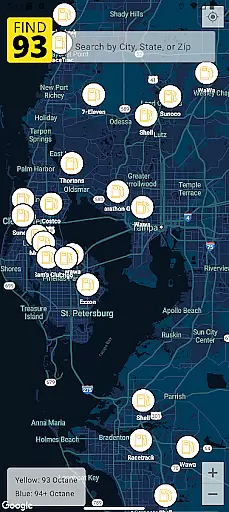
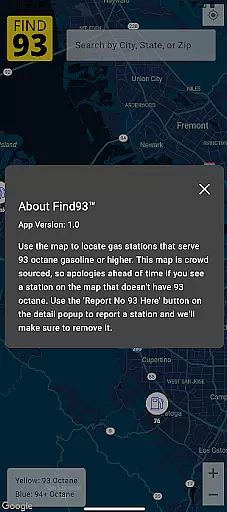

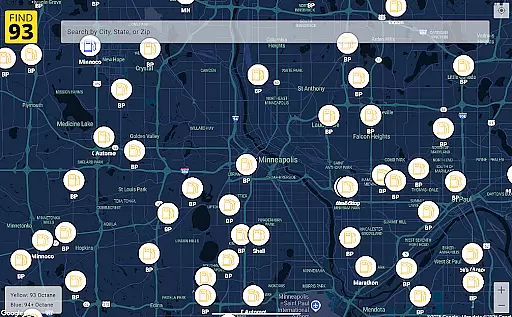
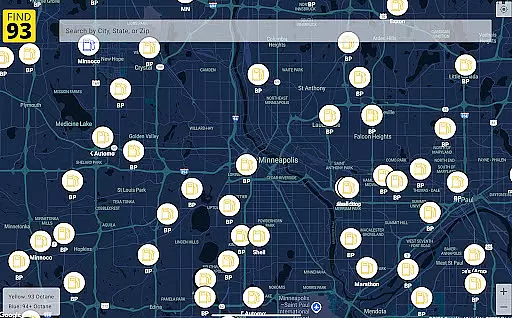
Find93 is a specialized navigation app designed to help drivers locate gas stations that offer 93 octane gasoline or higher. The app's core functionality revolves around its crowdsourced map system, which provides real-time information about premium fuel availability across the United States.
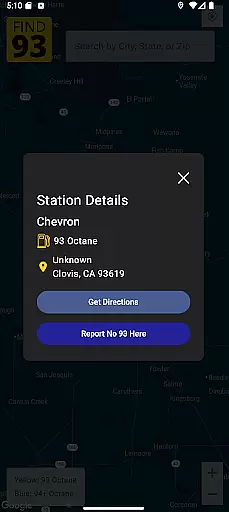
Beyond basic location services, Find93 offers detailed station information including fuel types, addresses, and additional descriptions. The app integrates seamlessly with major navigation platforms like Apple Maps, Google Maps, and Waze, making it an essential tool for road trips and daily commutes where premium fuel is required.
This application proves particularly valuable for owners of high-performance vehicles that require higher octane fuel, ensuring they can efficiently plan their refueling stops while traveling through unfamiliar areas.
Find93 distinguishes itself through several key features that enhance the user experience in finding premium fuel stations. The app's crowdsourced map system allows users to contribute real-time data about station availability, creating a dynamic and constantly updated resource for the community.
The reporting functionality enables users to flag stations that no longer carry 93 octane fuel through a simple tap interface. Each station listing includes comprehensive details such as brand name, precise location, available fuel types, and additional user-contributed notes about the station.
Find93's navigation integration stands out by offering multiple routing options through different mapping services. Users can choose their preferred navigation app directly from the station details page, streamlining the process of getting directions to their chosen fueling location.
Map accuracy is essential for any navigation app, and Find93 excels in this area by providing users with the most up-to-date information on gas stations that serve 93 octane or higher. This crowdsourced map relies on user contributions to ensure real-time data accuracy.
The app's community-driven approach means that every time a user reports a station that no longer serves 93 octane fuel, the map updates accordingly. This feature ensures that drivers can trust the locations displayed, making their search for the right fuel more efficient and reliable.
For users, this translates into confidence when planning trips or daily commutes. With accurate and detailed station information including names, addresses, and fuel types at their fingertips, they save time and avoid the frustration of arriving at outdated or incorrect locations.
Route planning in Find93 is designed to offer maximum convenience and flexibility. Once a suitable gas station is located on the appu2019s map, users can effortlessly navigate to it using their preferred navigation apps such as Apple Maps, Google Maps, or Waze.
This seamless integration with multiple navigation services allows drivers to choose the best route available based on current traffic conditions, distance, and personal preference. The ability to switch between different navigation apps ensures an optimal driving experience tailored to individual needs.
Ultimately, Find93u2019s route planning feature not only simplifies the process of finding high-octane fuel but also enhances overall travel efficiency. Drivers benefit from streamlined directions and peace of mind knowing they have chosen the most effective path to their destination.
User-friendly interface
Accurate crowdsourced data
Multiple navigation options
Detailed station information
Real-time reporting system
Limited to premium fuel
Dependent on user reports
No offline functionality
US-focused coverage
Occasional data delays

This app is military GPS coordinate systems helper. (MGRS, UTM & DMS Maps)
 4.80
4.80
Easy, Moderate and difficult offroad adventures.
4.00
Find shortest way and save energy . Distance and area calculator.
4.70
Your guide to the recreational opportunities of the Bureau of Land Management!
3.40
OpenCPN is a full featured ChartPlotter and Navigator for Android.
3.60
Instant diesel discounts - save big with each fill up!
4.40
Affordable rides and food delivery with incredible discounts in just one app.
4.50
Navigate via GPS Maps of GPS Voice Navigation, driving directions to find routes
3.60
Truck Safe GPS Navigation & Maps: Parking, Fuel, Diesel, Weight Station
4.80
Get there with the Waymo Driver — The World’s Most Experienced Driver™
4.90
Park in Chicago, NYC, Boston, SF, Houston & more!
4.70
ParkWhiz, an Arrive Mobility brand, part of the Arrive Network
4.30
Get matched with a nearby driver — you’ll be on your way in minutes.
4.30
Route schedules, maps, and real-time tracking of MTA buses in New York City.
4.20
Use GPS Maps and GPS Voice Navigation to find your way and get directions
4.10
GPS Navigation: Get map directions and find the shortest routes to avoid delays!
4.00
Explore Live Earth Map with 3D World Map & locate cites, mountains real time.
3.80
Explore offline maps with radar, satellite view, and real-time alerts.
3.60
Offline maps for phone and smart watch: topographic maps, satellite images...
3.30


User Reviews