




Groundwire by Acrobits is a premier SIP softphone client designed for both personal and professional communication needs. This application excels in delivering crystal-clear voice and video calls, supporting formats like Opus, G.729, H.264, and VP8. It ensures top-tier audio and video quality, making it ideal for users seeking reliable communication tools.
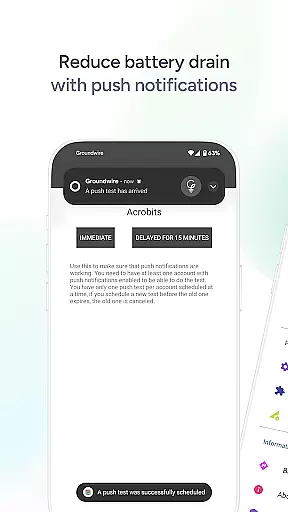
Beyond basic calling, Groundwire offers advanced features including military-grade encryption for secure conversations, efficient push notifications to conserve battery life, and seamless call transitions between Wi-Fi and mobile data. The app also supports instant messaging, call transfers, group calls, voicemail, and extensive customization options for SIP accounts. These capabilities make it a comprehensive solution for individuals and businesses looking to enhance their VoIP experience.
Whether you're managing business communications or staying connected with loved ones, Groundwire provides a robust platform that maximizes the potential of your VoIP service provider or PBX system. Its intuitive interface and customizable settings ensure a user-friendly experience while maintaining high standards of call quality and security.
Groundwire stands out with its rich feature set tailored for optimal communication experiences. One of its key highlights is the exceptional audio quality, supporting multiple codecs such as Opus and G.729, ensuring crystal-clear voice transmission. For video calls, the app supports HD resolutions up to 720p using H.264 and VP8 codecs, providing sharp and smooth visuals during virtual meetings or personal chats.
Security is paramount in Groundwire's design. The app employs military-grade encryption protocols to safeguard user conversations, ensuring privacy and confidentiality. Additionally, its battery-efficient architecture leverages optimized push notifications, allowing users to remain reachable without significant power consumption. The seamless transition between Wi-Fi and cellular data guarantees uninterrupted connectivity, even when switching networks.
Customization is another strong suit of Groundwire. Users can tailor SIP settings, user interface elements, and ringtones according to their preferences. The app also supports multi-device functionality and is future-ready with compatibility for 5G networks. With additional features like instant messaging, attended and unattended transfers, group calls, and voicemail, Groundwire positions itself as an all-encompassing communication tool suitable for diverse user requirements.
Real-time messaging speed and reliability are crucial for any communication app, ensuring that messages are delivered instantly and without fail. Acrobits Groundwire excels in this area by providing a robust platform where text-based communications are transmitted with minimal delay.
The app leverages advanced SIP technology to maintain a stable connection, which is vital for real-time messaging. This ensures that whether you're sending an instant message or engaging in a texting conversation, your messages will reach the recipient promptly.
Users benefit from this reliable messaging system as it allows them to stay connected with friends, family, and colleagues without worrying about message delivery issues. The peace of mind that comes with knowing your communications are being sent and received as intended adds significant value to the user experience.
Groundwire's commitment to quality extends beyond just voice and video calls; it encompasses all forms of communication within the app, making it a comprehensive tool for both personal and professional interactions.
Media sharing support is an essential feature for modern communication apps, allowing users to share photos, videos, and other files seamlessly. Acrobits Groundwire enhances its communication capabilities by offering extensive media sharing options, ensuring that users can exchange multimedia content effortlessly.
The app supports various file formats, enabling users to send and receive different types of media without compatibility issues. Whether it's a high-resolution image or a detailed document, Groundwire facilitates smooth transfers, maintaining the integrity and quality of the shared content.
This functionality enriches the user experience by complementing traditional text-based conversations with visual and interactive elements. Users can now express themselves more vividly and provide richer context to their discussions through shared media.
By integrating comprehensive media sharing features, Acrobits Groundwire positions itself as a versatile communication tool suitable for diverse needs, from casual chats to professional collaborations requiring detailed exchanges of information.
Crystal clear audio
HD video calls
Military-grade encryption
Battery efficiency
Seamless call transition
Requires VoIP provider
No free version
Complex setup
Limited customer support
High cost

Pure modern IRC experience for Android
 3.70
3.70
Enables Plus features of Quick Search.
4.4
Use this Dialer app alone or as a TREK: Total Interface companion.
4.70
A web browser that respects your privacy.
4.30
Google's fast and secure browser
4.10
Welcome to the future of phone service.
4.60
Messenger, an MMS & SMS messages app with Blockers, Driving mode & Private box
4.60
TeamSpeak - Secure Chat for Gaming & Business
3.10
Use this SMS app standalone or as a TREK: Total Interface companion.
4.30
We’re taking the yada yada out of wireless—now we’ve taken it out of your app.
4.70
Read OBD2 data and DTCs Create custom dashboards Enhanced diagnostics available
4.70
Useful. Social. Expressive.
4.70
Adblock & VPN Browser: Blocks banners, pop-ups and video ads, fast downloader!
4.60
Say “hello” to privacy.
4.60
Phone Dialer with Caller ID, Address Book & Contacts Manager.
4.30
Our Black Friday sale is here. Unlock special discounts on Proton Mail now.
4.30
Group Chat That’s Fun & Games
4.30
SMS Messenger is a lightning-fast messaging app.
4.20
Message and video call your family and friends in HD!
3.80


User Reviews