

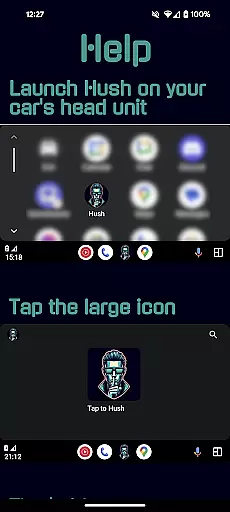
Hush is an innovative solution designed specifically for Android Auto users who want to enjoy Google Maps while listening to audio from apps that don't natively support Android Auto. The app addresses a common issue where changing the volume can cause Android Auto to switch to the last used audio app, creating a jarring and potentially dangerous driving experience. By playing a silent audio track in the background, Hush ensures you can safely adjust your vehicle's volume without unexpected audio interruptions.
This clever application acts as the active audio source, allowing you to listen to your preferred non-Android Auto apps without interference from services like Spotify or YouTube. Developed by someone who faced this exact problem in their Toyota Camry, Hush provides a practical workaround until manufacturers implement a permanent fix.
The key feature of Hush is its ability to play a continuous silent audio track that prevents Android Auto from switching audio sources when adjusting the volume. This simple yet effective solution maintains your chosen audio playback from unsupported apps, enhancing both safety and user experience while driving. The app runs seamlessly in the background, requiring minimal interaction once launched.
Hush is particularly beneficial for drivers who frequently use navigation apps alongside entertainment platforms not compatible with Android Auto. By acting as a buffer between these services, it eliminates sudden and distracting audio changes. Additionally, the app's lightweight design ensures it doesn't consume significant system resources, maintaining optimal device performance while providing peace of mind for drivers concerned about audio interruptions.
Detailed vehicle information is crucial for drivers who want to understand their car's compatibility with various apps and systems. Hush addresses a specific issue related to Android Auto, which affects certain vehicles including models like Toyota Camry.
The app provides detailed insight into how Android Auto interacts with your vehicle's audio system. It highlights known issues such as the resumption of the last used Android Auto audio app when adjusting volume during non-Android Auto audio playback.
By using Hush, users gain valuable information about their vehicle's audio behavior. This allows them to preemptively manage potential distractions caused by sudden audio switches between apps like YouTube and Spotify.
Understanding these interactions helps drivers maintain better control over their in-car audio experience, ensuring a safer and more enjoyable driving environment.
Price transparency is essential for users looking to download applications without hidden costs. Hush offers a straightforward pricing model that ensures users are fully aware of what they are getting without unexpected charges.
The app is designed to fix audio-related issues in vehicles, particularly those occurring with Android Auto usage. It does so without additional in-app purchases or subscription fees, making the cost clear from the outset.
Users can appreciate the value provided by Hush as it solves persistent problems experienced while driving. There are no premium versions or paywalls, just a solution focused on enhancing user safety and convenience.
This transparent approach builds trust with users, assuring them that they can enjoy uninterrupted audio experiences without worrying about unforeseen expenses.
Enhances driving safety
Prevents audio interruptions
Seamless background operation
Improves user experience
Lightweight and efficient
Limited to Android Auto
Requires manual launch
No visual interface
Single core functionality
Developer support only

Ultimate OBD2 Car Scanner: Diagnostics, Service and Modification Tool
 4.30
4.30
OBD diagnostics, Live Data, DPF regeneration for BMW
4.00
OBDII - ELM327 Terminal tool for 96-00 Volvos
4.50
DIY Vehicle Wheel Alignment
4.0
Secure mobile payments & fuel savings at Phillips 66®, Conoco® and 76® stations
4.40
Your car is talking. Start listening.
4.30
O'Reilly Pro will streamline your parts lookup and ordering process!
3.20
Find Your Local Store or Shop Online for the Car, Truck, or SUV Parts You Need
4.70
Easy connect & control your cars from afar. Remote Lock & unlock car and carplay
4.60
MySubaru: Download. Connect. Love.
4.70
Your go-to app for car, truck & SUV parts, DIY tools, and expert repair help.
4.70
Instantly redesign your car with AI. From sporty to futuristic, try it all.
4.50
Get price alerts, vehicle history details and more for cars near you!
4.50
Automotive Electrical Wiring Diagrams
4.40
Get your personalized financing options and shop for used cars today!
4.20
ODB2 based monitoring application for the Chevy Bolt (2017-2021)
4.00
Earn and save with Fuel Rewards®
3.20
Easily notify car owners in urgent situations, safe, fast, multilingual.
4.5
Attention! This is the theme for the Car Launcher app
4.0


User Reviews