
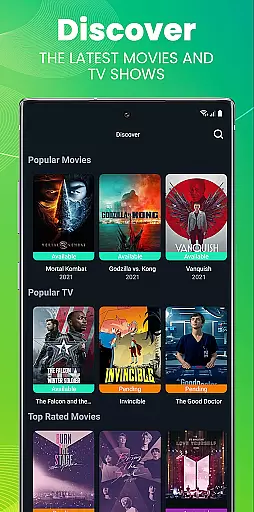
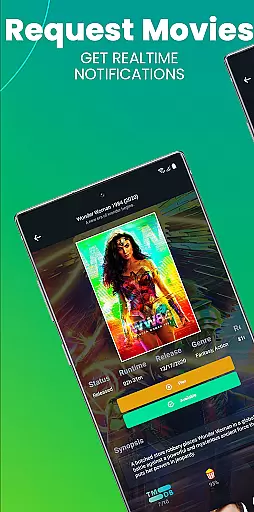
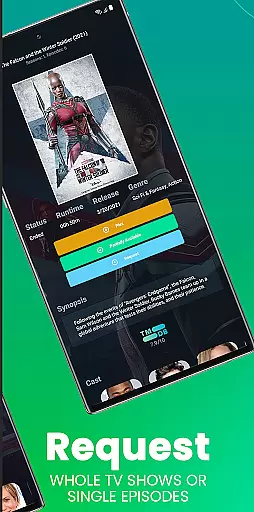
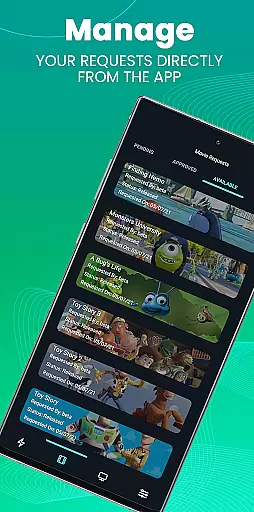
Ombi is a self-hosted entertainment management app that allows users to request content for Plex, Emby, or Jellyfin libraries. Designed for home media enthusiasts, it streamlines the process of requesting movies and TV shows by integrating with DVR tools. This creates an automated workflow from request to delivery.
The app requires an existing Ombi server (v4.0.13XX or later) and provides a seamless experience for both administrators and shared library users. By scanning a QR code in their Ombi profile, users can access the mobile interface, making it easy to manage requests on the go.
Ombi's standout feature is its ability to integrate with multiple media servers like Plex, Emby, and Jellyfin, enabling users to request content directly through the app. It supports various DVR tools, ensuring smooth end-to-end service for downloading and managing media files.
Another key feature is its QR-based login system, which simplifies user authentication. The app also offers customization options for administrators, allowing them to tailor permissions and settings. As a self-hosted solution, Ombi gives users complete control over their data while providing a collaborative platform for shared media libraries.
Ombi offers a diverse range of content options by integrating with Plex, Emby, and Jellyfin, allowing users to request TV shows and movies directly through the platform. This self-hosted web application ensures that users have access to the latest media by connecting with multiple DVR tools, creating an end-to-end experience for seamless content acquisition.
The app's ability to link with various entertainment platforms guarantees that users can enjoy fresh content regularly. By enabling shared users to request content independently, Ombi enhances user engagement and satisfaction. The integration with different services ensures that there is always something new and exciting available for every user's taste.
Moreover, Ombi's continuous updates promise evolving features over time, ensuring that the look and feel remain modern while adding more functionality. As the system evolves, users can expect even greater variety and freshness in their content options, keeping them engaged and entertained with minimal effort required on their part.
Ombi significantly boosts user engagement duration and retention by providing a seamless interface for requesting and managing media content. Users can log into Ombi, access their profiles, and scan a QR code to connect effortlessly with the service, enhancing ease of use and encouraging longer interaction periods.
The platform's design focuses on user-centric features such as independent content requests and automatic updates from linked DVR tools. These functionalities ensure that users remain actively engaged with the application, increasing both the time spent on the platform and overall retention rates as they return frequently to check on new requests and available content.
Additionally, Ombiu2019s commitment to evolving its features means that users will continue to find value in the app over time. With ongoing improvements and added functionalities, Ombi fosters a dynamic environment where users are motivated to stay connected, thus promoting sustained engagement and long-term retention.
User-friendly interface
Multi-platform integration
Customizable permissions
Self-hosted security
Seamless DVR tool support
Requires Ombi server
Limited standalone use
Dependent on third-party tools
No offline functionality
Setup complexity

Binge-worthy short dramas on DramaRush—engaging stories that fit your day.
 3.90
3.90
Exclusive creator communities
4.70
Browser for Chromecast to stream webvideos, online movies, IPTV & HD livestreams
4.40
Fire effects for your Philips Hue lights
4.20
Stories that spark in seconds.
4.80
Earn gift cards for playing games. Become a real game tester!
4.40
Stream live TV shows, sports, news, movies & more - all without cable.
3.00
Raise Christmas Magic with daily missions, magical scanners, and kindness.
4.2
World's largest dedicated anime collection
4.70
Pathfinder 2e initiative tracker with bestiary, HP, reaction, conditions, etc
4.80
Fun brain twisting challenge with trending Whirlpool Filter.
4.70
Scan sets, track your builds, and enjoy intuitive digital instructions.
4.70
Companion app for Elden Ring to track quests, bosses, progress and more.
4.70
Stream Online TV - Watch Live IPTV Playlist & Channel with Built-In Player
4.50
* Multiple Matches * Intuitive UI * Scoring Made Easy!
4.40
Connect. Discover. Control.
3.60
Stream videos to VIDAA & VEWD TVs from Hisense, Sharp, Skyworth, Vestel & TiVo
3.00
Unofficial Game Companion App” “Guides • Builds • Tips • Progression
4.1
Christmas Globe: Transform your Wear OS device into a festive timekeeper!
4.0


User Reviews