

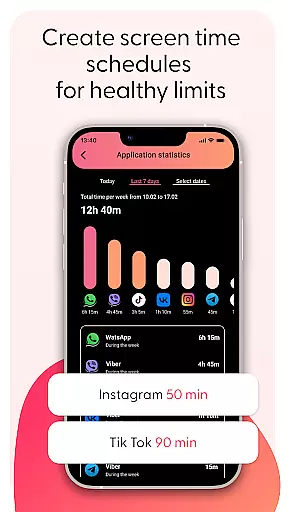
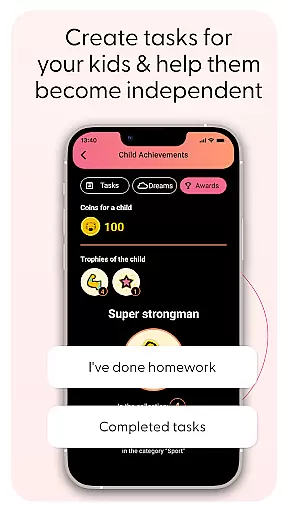
Kid Security is a cutting-edge parental control app that provides comprehensive protection for children both online and offline. The app's core functionality revolves around three main pillars: child safety monitoring, digital content control, and location tracking.
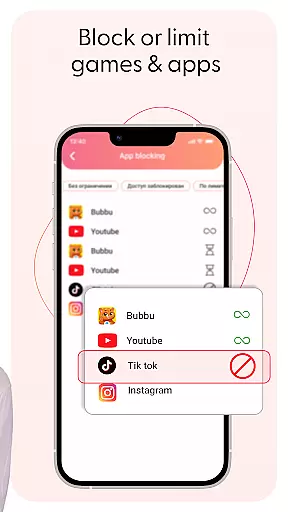
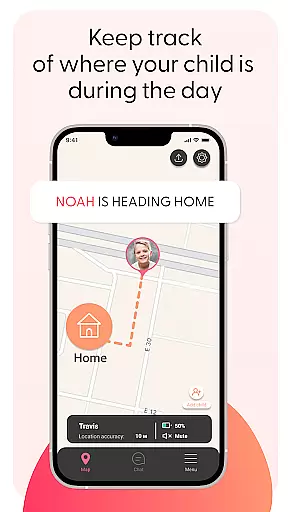
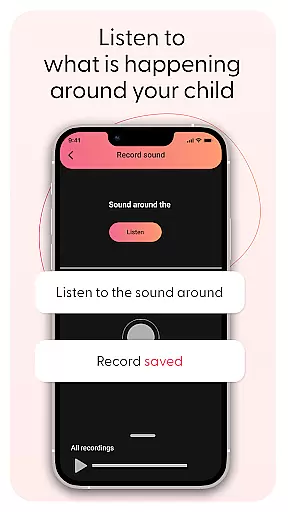
One of the standout features is the ability to listen to surrounding sounds through the child's phone, giving parents valuable insights into their child's environment. This feature works in tandem with robust application and website blocking capabilities, allowing parents to create a safe digital space. The app also includes GPS tracking with geofencing, enabling parents to set safe zones and receive instant alerts when boundaries are crossed.
This combination of features makes Kid Security particularly useful for modern families where digital and physical safety concerns intersect. Parents can now maintain better oversight of their children's activities while promoting healthy digital habits through screen time management features.
The app's feature set is designed to give parents maximum control over their children's safety. The Surround Sound Monitoring system allows discreet activation of the phone's microphone, providing real-time audio from the child's environment. This feature is complemented by advanced content filtering tools that enable parents to block inappropriate apps and websites.
Location tracking capabilities include real-time GPS monitoring and customizable geofences. Parents can set up multiple safe zones and receive immediate notifications when their child enters or leaves these areas. The app's interface is designed for ease of use, with all controls accessible through a simple dashboard.
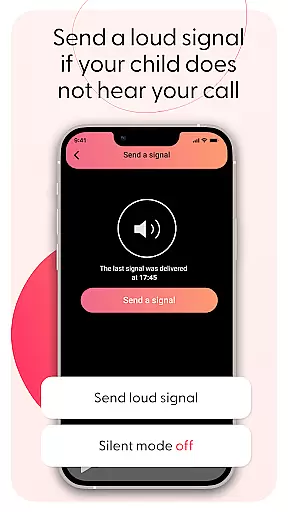
Additional features include voice chat functionality, profile management tools, and detailed usage statistics. These elements work together to create a comprehensive safety net that addresses both digital and physical security concerns, making it an indispensable tool for modern parenting.
When it comes to parenting applications, the credibility of content and expert validation form the backbone of user trust. Kid Security stands out in this aspect by offering features that are not only innovative but also grounded in child safety expertise. The app provides a comprehensive suite of tools designed with the guidance of child safety professionals, ensuring that every feature serves a meaningful purpose in protecting your child.
The surrounding sound monitoring functionality exemplifies this expert-backed approach. This feature isn't just about technology; it's about creating a safety mechanism that allows parents to make informed decisions based on real-world audio cues. Developed with insights from child psychologists and safety experts, this tool helps identify potentially risky environments without infringing on the child's sense of independence.
Furthermore, Kid Security's parental control features are regularly reviewed and updated according to the latest digital safety standards. The app-blocking functionalities aren't arbitrary; they're based on extensive research into age-appropriate content and digital behavior patterns. This ensures that when you set restrictions, you're implementing controls that genuinely align with professional recommendations for healthy digital habits.
Parents can feel confident knowing that every feature, from geofencing to app usage statistics, is backed by verified child development theories and safety protocols. This expert validation extends beyond mere functionality - it represents a commitment to providing reliable, science-based tools that genuinely help in raising children in today's digital world.
While primarily focused on safety, Kid Security also excels in growth tracking accuracy, providing parents with valuable insights into their child's developmental journey. The application goes beyond basic location tracking by offering detailed analytics about children's digital habits and movement patterns, painting a comprehensive picture of their daily activities.
The app's sophisticated algorithms track and analyze various aspects of children's interactions with their devices. Parents can access precise data about which applications their children use most frequently, how long they spend on different platforms, and what times of day they're most active. This information isn't just numbers on a screen; it's a window into understanding your child's interests, learning patterns, and social connections.
Moreover, the geolocation tracking system offers more than just real-time location data. It provides historical movement patterns that help parents identify regular routes, frequently visited places, and time spent at different locations. These insights become particularly valuable as children grow older and their mobility increases, allowing parents to observe how their child's world expands over time.
All tracking data is presented through intuitive visualizations that make it easy to understand trends and patterns. The accuracy of these metrics enables parents to have informed discussions about responsible device usage, time management, and personal safety. By combining precise tracking with clear presentation, Kid Security transforms raw data into meaningful information that supports both physical and digital growth monitoring.
Comprehensive safety features
Real-time location tracking
Advanced content filtering
User-friendly interface design
Innovative sound monitoring
Requires child's consent
Premium features locked
Dependent on internet connection
Limited free version
Privacy concerns possible

Free symptom & med tracker with expert-reviewed tips.
 4.30
4.30
SENSORYSOOTHE and SENSORSAFE: Making car seats smarter and families safer.
4.70
Find unique + popular baby names for your little peanut.
4.30
Discover fun videos, kids songs, bedtime stories and games
3.60
The 10 development leaps of your baby | newborn milestones & leap days tracker
4.10
It is a screen time management tool for games and mobile applications
4.50
App/Game blocker & GPS tracker
4.50
The Most Trusted Co-Parenting App.
4.60
Parental control: child monitoring app, screen time control, GPS child tracker
4.40
Introduce real food to baby with First Foods® Database, baby led weaning BLW
4.80
Pinardin - Smart Parental Control, Online Safety & GPS Tracking!
4.80
Advanced baby tracking, expert sleep help & parenting support for every stage.
4.80
All-in-one pregnancy app, contraction timer, kick counter & due date calculator
4.40
Join over 1MM parents & professionals who've used OFW to navigate co-parenting
4.40
Babysitting video camera - Turn your two phones or tablets into a single nanny.
4.40
Affirmations | Stories | Bible
4.10
Educational resource for parents to inspire creativity in their children.
4.00
Save money on diapers. Get the Pampers Rewards app.
3.90
Track pregnancy health and wellness with pregnant tracker from healthcare advice
4.1


User Reviews