
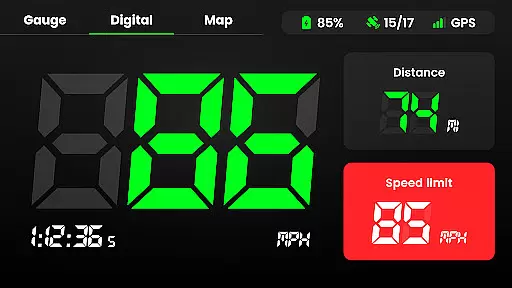
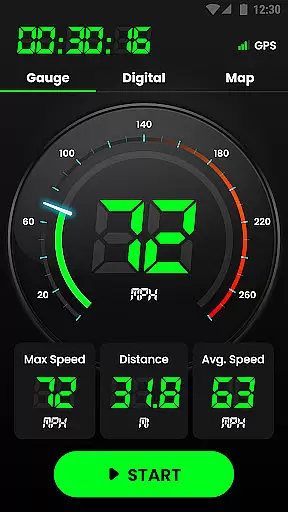
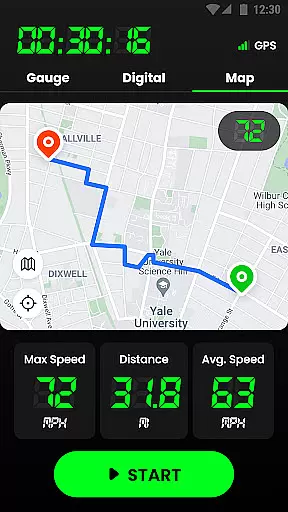
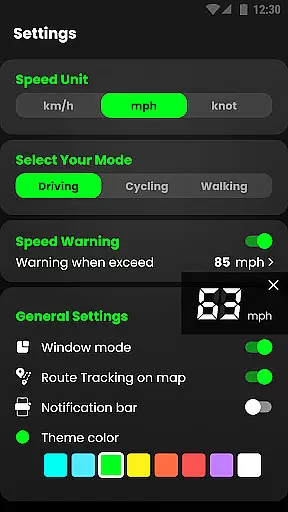
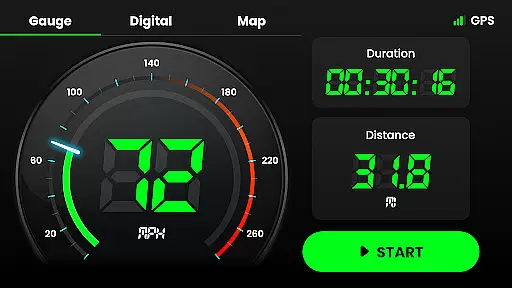
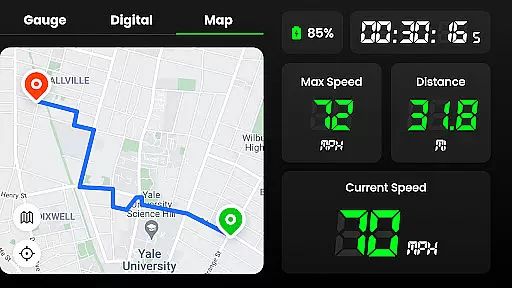
Speedometer is a highly accurate GPS-based speed tracking application designed to measure the velocity of various modes of transportation. The app provides users with both digital and analog displays of their current speed and distance, making it versatile for different preferences. Whether you're driving, cycling, or even walking, this app ensures precise speed monitoring and real-time location tracking through GPS navigation.
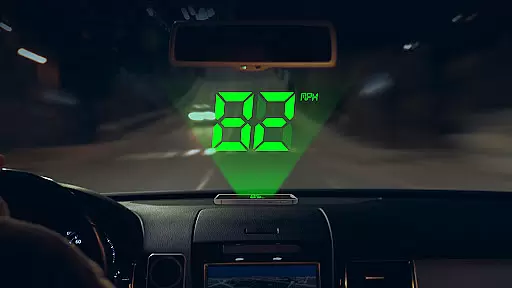
One of the standout features of Speedometer is its ability to function offline, ensuring that users can rely on it even in areas with poor internet connectivity. Additionally, the app offers a Heads-Up Display (HUD) mode, which mirrors your speed onto your car's windshield, enhancing safety while driving. With options to switch between different units such as kilometers per hour (km/h), miles per hour (mph), and knots, this app caters to a global audience. Its intuitive interface allows users to easily track their journeys, set speed limits, and receive alerts when those limits are exceeded.
The app also includes advanced functionalities like trail mapping, speed limit alerts, and detailed statistics including average speed, maximum speed, and total mileage. These features make it an ideal tool for anyone looking to monitor their travel history, daily commutes, or athletic performance. Whether replacing a broken vehicle speedometer or tracking fitness goals, Speedometer delivers reliable data and enhances user safety.
Speedometer stands out due to its comprehensive feature set tailored for accuracy and convenience. One of its core functionalities is the dual-mode display, offering both digital and analog speedometer views. This flexibility allows users to choose their preferred style while receiving real-time updates on their speed and distance traveled. The inclusion of GPS navigation ensures that users can accurately track their routes, even without an active internet connection, making it especially useful in remote areas.
Another notable feature is the app’s Heads-Up Display (HUD) mode, which projects the speed readings onto the windshield, allowing drivers to keep their eyes on the road. Users can customize their experience by setting speed limits and receiving instant notifications via vibrations or audio alerts if they exceed these limits. Furthermore, the app supports multiple units of measurement, including km/h, mph, and knots, catering to international users and various types of vehicles, from cars to boats.
Additional functionalities include detailed journey tracking, where users can review metrics such as average speed, maximum speed, and total distance covered. The app also records starting and ending points, trip duration, and historical route data. With customizable themes, portrait and landscape modes, and battery-friendly performance, Speedometer combines aesthetics with practicality. Its small widget display and notification bar integration ensure that critical information is always accessible without disrupting other activities.
Map accuracy is essential for any navigation or tracking application, and Speedometer excels in this area. The app utilizes advanced GPS technology to provide real-time location data with impressive precision. Whether you're driving, cycling, or walking, users can trust that their position on the map reflects their true location.
The GPS Speedometer & Odometer app ensures that map updates are timely and smooth, minimizing discrepancies between the user's actual location and what is displayed on-screen. This level of accuracy allows for precise tracking of journeys and reliable recording of trails, which is particularly beneficial when internet connectivity is poor or non-existent.
For those who require exact measurements of distances traveled, the app's accurate mapping capabilities mean that every route taken is recorded with detail and precision. Users will appreciate the reliability of the distance tracker feature, which keeps a historical account of travel information without missing any details.
Route planning is a critical component of any maps and navigation app, and Speedometer offers an intuitive solution for plotting courses. With its ability to quickly display real-time location data, users can efficiently plan their routes whether they're on a bicycle, motorcycle, or car. The app provides clear visual cues and easy-to-read maps that make navigating from point A to B seamless.
In addition to basic route mapping, Speedometer includes features such as speed limit alerts and head-up display (HUD) mode, enhancing the route planning experience by keeping drivers informed and focused on the road ahead. These tools help ensure that users not only reach their destination but do so safely and within legal speed limits.
Moreover, the flexibility to switch between different speed units and view modes means that each journey can be tailored to the user's preference, making every trip more personalized and efficient. By integrating these comprehensive route planning features, Speedometer stands out as a versatile tool for all your navigational needs.
User-friendly interface
Accurate GPS tracking
Offline functionality
Customizable speed alerts
Multiple unit options
Limited free features
Battery consumption
Occasional GPS lag
Ads in free version
Premium subscription cost

Compass is an accurate compass and a great tool for any outdoor activities
 4.5
4.5
Explore a light pollution map to find suitable dark sky locations for observing.
4.30
Turn your tablet or Android powered unit into a full blow Android Auto headunit.
2.30
Order a cab online. An affordable taxi ride and driver in no time. What a bolt!
4.80
Navigate confidently with our precise Digital Compass app & Direction Compass!
4.70
Get directions, Maps, GPS navigation & GPS Maps using GPS App
4.10
Gas Station & Fuel Rewards Points
3.70
Find radar, speed camera, flight tracker. Use hud, location tracker, speedometer
4.20
Use GPS Maps and GPS Voice Navigation to find your way and get directions
4.10
Navigate with your watch and keep the phone in your pocket!
4.60
Route tracker, Speedometer, Odometer, Fuel, HUD mode, save route as .GPX
4.40
Find radar maps, GPS coordinates, altitude, offline maps, location, travel route
4.40
Phone Tracker and GPS Location Sharing
4.20
Simple & easy to use a compass app. Get accurate directions.
4.20
Route Planner is travel map to get turn by turn navigation & driving directions
3.90
Get real-time bus and train schedules for easy, hassle-free city transportation.
3.90
Discover over 800 points of interest along the canal.
3.70
Navigate via GPS Maps of GPS Voice Navigation, driving directions to find routes
3.60
Ride CTA, Metra & Pace: Manage your fares, buy Metra tickets, get arrivals.
3.00


User Reviews