
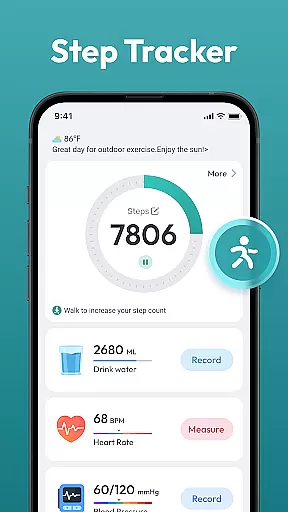
Step Counter - Pedometer App is a comprehensive health and fitness tool designed to help users track their daily physical activity. This app automatically counts steps and measures distance traveled, making it ideal for those looking to monitor their walking or running routines.
In addition to basic step counting, the app offers advanced features such as daily, weekly, and monthly activity charts, training courses, and health data tracking. These functionalities enable users to set and achieve fitness goals, such as reaching 10,000 steps per day, without the need for any wearable devices.
Whether you're aiming to lose weight, maintain a healthy lifestyle, or simply stay motivated with your fitness journey, Step Counter - Pedometer App provides the tools necessary to track progress and stay committed to your health objectives.
Step Counter - Pedometer App stands out with its automatic step counting feature, ensuring accurate tracking of your movements throughout the day. Compatible with most Android devices, this app eliminates the need for additional wearable technology, making it accessible to a wide range of users.
The app's interface is user-friendly, offering easy navigation through various features such as detailed activity charts and personalized training programs. Users can view their progress over time and adjust their fitness plans accordingly, ensuring continuous improvement and goal attainment.
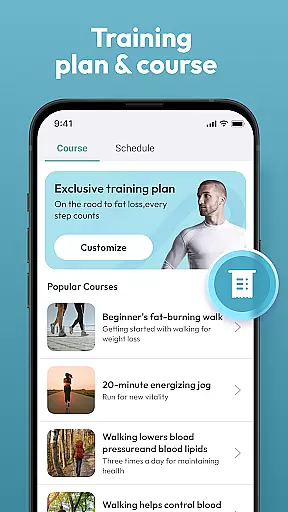
Moreover, the app supports tracking of multiple health metrics, providing a holistic view of your fitness journey. With integrated training courses and plans, users receive guidance and motivation to enhance their physical activities and achieve better health outcomes.
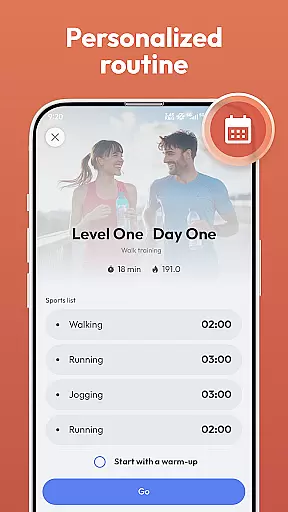
Personalized planning in a fitness app refers to the ability to create tailored workout and health plans that adapt to individual user needs. Step Counter - Pedometer App offers personalized planning by analyzing your daily activity data and setting realistic goals based on your lifestyle.
The app achieves this through automatic step counting and tracking various health data without the need for any wearable devices. It intelligently evaluates your progress and adjusts targets, ensuring that you stay motivated and challenged according to your personal fitness journey.
Users benefit from having a virtual personal trainer in their pocket that provides training courses and plans designed to help them reach their health objectives. Whether it's losing weight or staying active, the app adapts its recommendations to support your aspirations.
This level of customization ensures that each user has a unique experience with the app, enhancing engagement and promoting long-term use as part of a healthier lifestyle.
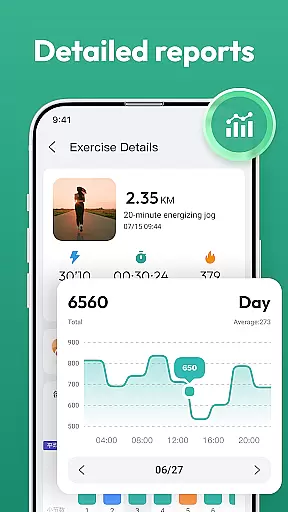
Progress visualization is an essential feature in fitness apps, allowing users to see their achievements and improvements over time. The Step Counter - Pedometer App excels in this area by providing detailed daily, weekly, and monthly charts that display step counts and other tracked health metrics.
By presenting data through clear and informative graphs, the app makes it easy for users to monitor trends in their physical activity levels. This visual feedback helps maintain motivation as users can easily track how close they are to reaching milestones such as the 10,000 steps per day goal.
Moreover, these visuals serve not only as records but also as motivational tools; seeing consistent progress encourages continued effort towards maintaining an active lifestyle. With no additional hardware required, all you need is your smartphone to keep tabs on your fitness journey.
Ultimately, effective progress visualization empowers individuals with insights into their habits while celebrating accomplishments along the wayu2014a key factor in sustaining commitment to personal health goals.
User-friendly design
Accurate step tracking
No wearables required
Detailed progress charts
Free to use
Limited to Android
Battery consumption
Requires phone carry
No live coaching
Ads may appear

For Absolute Novices to Strength Training. Simple. Effective.
 4.40
4.40
Easy reconstitution calc for mixing peptides and creating protocols
4.70
Using Recognise™ has been shown to reduce pain, and improve performance.
4.0
Memory, mind & logic exercises. Puzzle games, IQ & brain test for kids & adults
4.50
Track heart rate & HRV in 30s! Get live health insights and anomaly alerts
4.40
Personal step counter for you, private and accurate
4.50
Focus on BP & Health
3.80
Jogging app for calorie counter and distance tracker. Running app to lose weight
4.20
Mood journal, habits, self-care tracker, self-love
4.90
Meditation app, head space app provides calm music to help you meditate & sleep
5.00
Home workouts for fitness & fast bodybuilding at home - no equipment needed.
4.90
Easy access to health benefits
4.70
Point, scan, and unlock truth in every bite.
4.50
Chair Workout: Women's Edition for safe, flexible, and personalized fitness.
4.40
Monitor, analyze, track, and convert blood sugar & help you control diabetes.
4.10
Pedometer that gives you sweatcoins for steps. It pays to walk!
4.10
Control your sleep in real-time wearing Garmin device
3.60
GloryFit is a companion app for the smart bracelet.
3.60
Text notifications, button control, heart monitor & more for your Amazfit.
2.40


User Reviews