
The Everything Key is a powerful utility app designed to unlock the hidden potential of your device's hardware button. With its intuitive remapping capabilities, you can transform that underutilized button into a productivity powerhouse. The app allows users to assign custom actions to both double-press and triple-press gestures, giving you instant access to your most-used apps and functions.
What sets The Everything Key apart is its commitment to simplicity and privacy. The clean, minimalist interface makes it easy to manage your key mappings, while the app's use of Android's Accessibility Service ensures your personal information remains protected. Whether you want to launch your camera, favorite messaging app, or essential utilities with a simple press combination, this tool puts control back in your hands without requiring root access or complex setup.
This app is especially valuable for users of specific Nothing Technology devices, where it creates a seamless integration experience through personalized device recognition and stunning visual design. It's the perfect solution for those who want to maximize their device's functionality while maintaining complete control over their privacy and user experience.
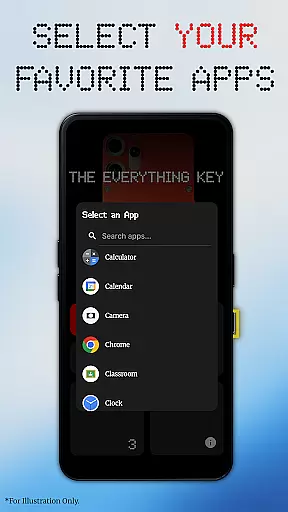
The Everything Key stands out with its comprehensive feature set that gives users unprecedented control over their device's hardware button. At its core, the app provides powerful remapping capabilities that allow you to assign different applications to both double-press and triple-press actions. This flexibility enables you to create a personalized shortcut system that matches your unique usage patterns and preferences.
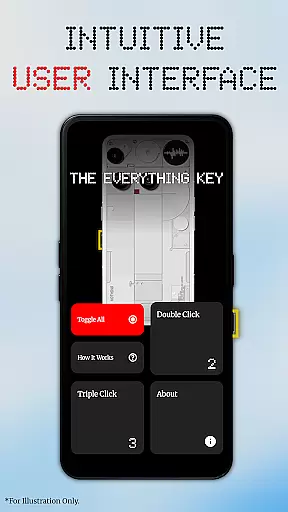
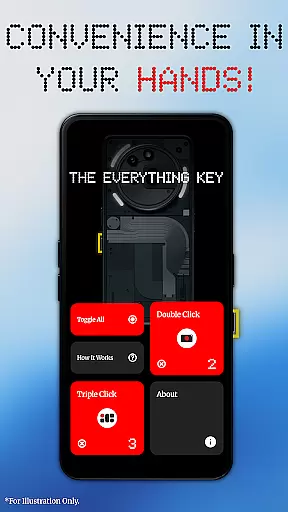
The app's advanced control features make management effortless. Each mapped application appears as an interactive card in the main interface, allowing you to quickly toggle its activation status or permanently remove it using the 'X' icon. The innovative 'Toggle All' function lets you activate or deactivate your entire set of mappings with a single tap, providing maximum convenience when you need to temporarily disable the customizations.
Unlike many similar tools, The Everything Key operates without requiring root access or complex ADB commands. Its implementation of Android's Accessibility Service is focused solely on detecting hardware button events (specifically KEYCODE_UNKNOWN / Key 0) from supported devices' 'Essential Key', ensuring your privacy remains intact. The app also offers a personalized first-launch experience where you can select your specific device model and color for a beautifully integrated background display.
The Everything Key excels in providing precise and effective core functionality by allowing users to remap their device's hardware button. This feature is crucial for those who wish to enhance their productivity without the need for complex configurations or rooting their devices.
Through an intuitive interface, users can assign specific actions such as launching a camera or a favorite app with simple double or triple presses. The app ensures that these mappings are accurately registered and swiftly executed, offering a seamless user experience.
This remapping capability not only empowers users to customize their device according to their preferences but also significantly boosts efficiency. By transforming a limited-use button into a versatile tool, The Everything Key delivers tangible value to its users.
A standout feature of The Everything Key is its beautifully minimalist and intuitive user interface, inspired by the Nothing aesthetic. This design choice ensures that users can easily navigate through the app and manage their key mappings without any learning curve.
The interface provides clear visual indicators showing which apps are mapped to the hardware button and whether these mappings are active. Users can effortlessly enable or disable actions, un-map apps, or toggle all mappings at once using straightforward controls.
By prioritizing simplicity and intuitiveness, The Everything Key makes advanced customization accessible to everyone. Its clean design enhances usability, ensuring that even those unfamiliar with tech jargon can personalize their device with ease.
Intuitive interface
No root required
Advanced remapping
Privacy-focused
Device-specific optimization
Limited device support
Requires accessibility permission
No iOS version
Specific hardware dependency
Third-party development

pdf merge, word to pdf, jpg to pdf, edit pdf, convert to pdf and much more!
 4.20
4.20
Transfer Files, APK from Phone to Watch & Install.
4.3
A convenient photo, video, and file recovery tool.
4.00
Learn the vast amount of system information about device and monitor it's state
4.70
Small and simple app to Verify Root Access and BusyBox Install!
4.70
Planner and Tracker for Stardew Valley
4.60
Fast Video Downloader, Movie Downloader, Torrent Downloader & Adblock Browser
4.70
Download any file easily and quickly with Downloader
4.1
Protect your device with antivirus, storage cleanup, and system monitoring
4.70
Unit and currency converter with easy and simple UI.
4.80
App to pay for FUTO Keyboard
4.60
PC precision for mobile gaming: dominate with keyboard and mouse!
4.30
Making emulation easy for everyone!
4.30
Remote for Roku, Fire TV, Samsung TV, LG TV, Android TV, Chromecast and VIZIO TV
4.20
Detect hidden spy camera with advanced scanning {{ Premium version }}
4.00
Smart and comfortable browsing experience.
3.80
Safely recover deleted photos, videos, and files with a single easy tap.
3.70
A non-root local ADB shell client. READ BELOW!
3.40
PDF Reader - Document Viewer: Read, Manage & Organize Your Documents
3.10


User Reviews