

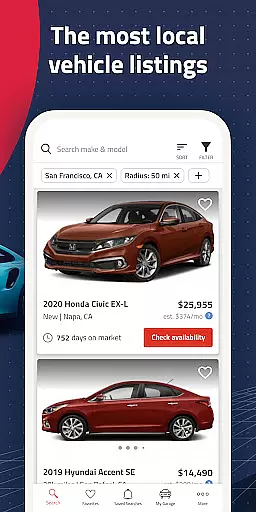


Autolist is a comprehensive car-buying application designed to simplify the process of finding used cars. With access to millions of listings from thousands of sources, it aggregates the largest selection of local cars, trucks, and SUVs in one place. This app stands out by offering an extensive filtering system that allows users to narrow down their choices by price, year, color, and features. Autolist also provides valuable tools such as price history and Listimate values, which empower buyers to make informed decisions and negotiate fair prices. Whether you're a first-time car buyer or looking to upgrade your vehicle, Autolist streamlines the search process and ensures you find the perfect ride at the best possible price.
The app's intuitive interface and powerful search capabilities make it easy for users to browse through countless options efficiently. Additionally, Autolist facilitates direct communication with dealers or private sellers via call, text, or email directly from the app. This feature not only enhances convenience but also speeds up the buying process. By saving searches and favorites, users can receive immediate updates on new inventory and price drops, ensuring they never miss out on a great deal. Autolist's commitment to user satisfaction and its recognition by reputable sources like CNET and The New York Times underscore its reliability and effectiveness in the auto-buying space.
Autolist offers a robust set of features tailored to enhance the car-buying experience. One of its standout functionalities is the extensive filtering system, allowing users to refine their search based on specific criteria such as price range, vehicle year, exterior and interior colors, and installed features. This granular control helps buyers quickly identify vehicles that meet their exact needs. Furthermore, the app's integration with thousands of listing sources ensures that users have access to the most comprehensive and up-to-date inventory available.
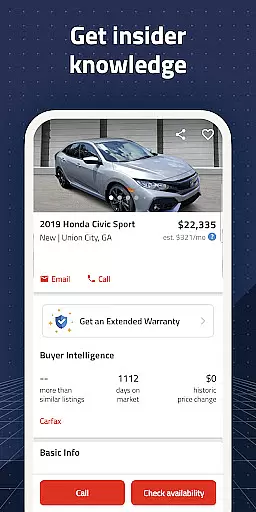
In addition to its powerful search capabilities, Autolist provides valuable insights through its price history and Listimate value tools. These features enable users to understand market trends and estimate fair pricing, equipping them with the knowledge needed to negotiate effectively. The app also supports seamless communication with sellers, allowing users to call, text, or email directly from the platform. This streamlined interaction simplifies scheduling test drives and obtaining quotes. Moreover, Autolist's notification system keeps users informed about new listings and price changes, ensuring they stay ahead in their car-buying journey.
Another significant advantage of Autolist is its user-centric design, which prioritizes ease of use and accessibility. The app's interface is intuitive, making it simple for users of all tech-savviness levels to navigate and utilize its features effectively. By consolidating listings from various sources into a single platform, Autolist eliminates the need to visit multiple websites or apps, saving users time and effort. Its recognition by esteemed publications further validates its innovative approach and commitment to delivering a superior car-buying experience.
When searching for a used car, having access to comprehensive vehicle details is crucial for making an informed decision. Autolist provides extensive data on each listing, including specifications such as make, model, year, mileage, and installed features.
The app aggregates information from thousands of sources, ensuring that users have the most up-to-date and accurate details about the vehicles they are interested in. This includes not only basic specs but also specifics like interior and exterior color options.
With Autolist's detailed filters, users can refine their search based on various criteria, ensuring they find a car that meets all their requirements. This level of detail empowers buyers to make confident decisions when selecting their next vehicle.
By offering this depth of information, Autolist ensures that users can thoroughly evaluate potential purchases before contacting dealers or private sellers, streamlining the car-buying process significantly.
Price transparency is essential in the car-buying process, and Autolist excels in providing clear pricing information. The app offers complete price history for each vehicle, allowing users to understand how the price has changed over time.
In addition to historical data, Autolist features Listimate values, which help users gauge whether a listed price is fair. This tool uses advanced algorithms to estimate the current market value of vehicles, empowering buyers during negotiations.
Users can also filter searches by price range, ensuring they only see cars within their budget. This feature helps prevent wasted time on listings that don't meet financial criteria.
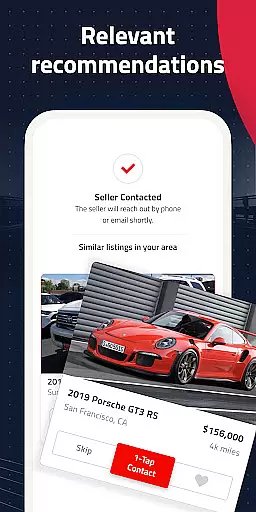
Furthermore, Autolist enables direct communication with sellers through call, text, or email functions within the app. This facilitates quick inquiries about pricing and availability, making the negotiation process more efficient and transparent for all parties involved.
User-friendly interface
Comprehensive car listings
Powerful filtering options
Price history insights
Direct seller communication
Limited international listings
No financing options
Occasional data delays
Ads within the app
Requires constant updates

Ultimate OBD2 Car Scanner: Diagnostics, Service and Modification Tool
 4.30
4.30
Realtime Charts is a plugin for the Torque Pro App (OBD 2 & Car)
4.20
Practice the drills within MotoJitsu Master Riding Program Volume 1 & 2!
4.80
Boost profits and hit your goals faster with GigU's amazing tools for gigworkers
4.00
AI Powered - Automotive Mechanic Assistant
4.30
Monitor your behind-the-wheel behavior to become a safer driver and save.
4.10
DMV practice test 2025: Driver License permit test & written test for all states
4.70
Find, search, and browse 40,000+ used cars, SUVs, and trucks.
4.50
O'Reilly Pro will streamline your parts lookup and ordering process!
3.20
MySubaru: Download. Connect. Love.
4.70
Oil change service & coupons for car maintenance at Valvoline Instant Oil Change
4.70
Your go-to app for car, truck & SUV parts, DIY tools, and expert repair help.
4.70
Browse millions of cars, track vehicle listings or sell your car today
4.70
CVT diagnostics with ELM327 for Nissan-based vehicles
4.40
A smarter way to park and reserve your spot ahead of time.
4.40
A full featured, real-time transit locator system
4.30
Control maps, media and messaging, with the Google Assistant while you drive
4.10
Simplify your drive
3.90
Take state-specific DMV permit tests and ace the exam.
3.90


User Reviews