
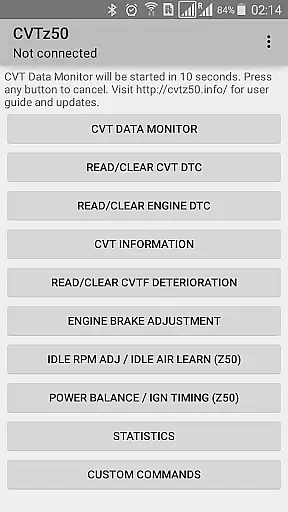
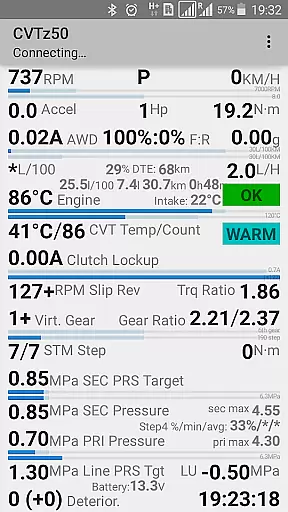
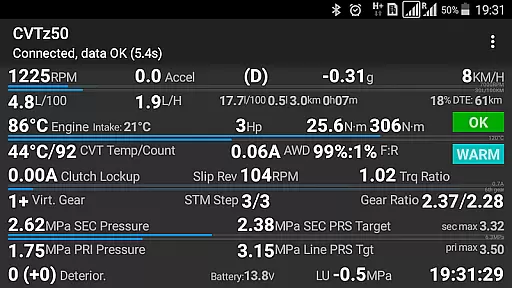
CVTz50 is a specialized diagnostic tool designed for vehicles equipped with Jatco CVTs. This application allows users to read and clear both CVT and engine diagnostic trouble codes, as well as monitor real-time CVT parameters through the CVT Data Monitor feature. With compatibility across Nissan Murano Z50/Z51 and select other models from Nissan, Mitsubishi, and Renault, it serves automotive professionals and enthusiasts.
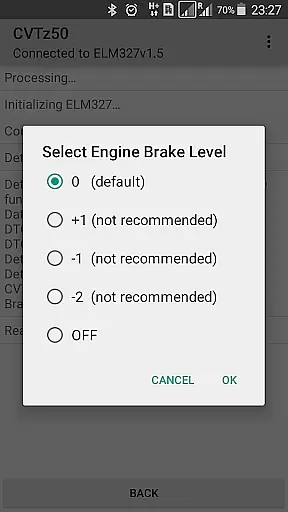
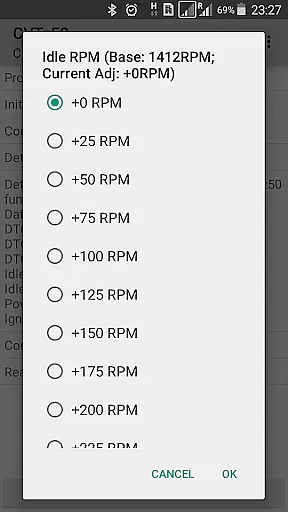
The app provides advanced functionalities such as adjusting engine braking levels, idle RPM, ignition timing, and performing idle air volume learning for specific models. Additionally, it collects monthly statistics on crucial CVT metrics. To ensure device compatibility, users are encouraged to try the CVTz50 DEMO version before purchasing.
CVTz50 stands out with its comprehensive diagnostic capabilities tailored specifically for CVTs. The main features include reading and clearing diagnostic trouble codes for both the CVT and engine systems, which is essential for maintaining vehicle health. The CVT Data Monitor offers real-time tracking of critical transmission parameters like temperature, pressures, gear ratios, and more.
One notable function is the ability to adjust mechanical settings such as engine braking levels and idle RPM, along with performing idle air volume learning for certain older models. Furthermore, the app supports a wide range of vehicles and requires an ELM327 adapter for operation. These features collectively provide a robust toolkit for diagnosing and fine-tuning CVT-equipped vehicles.
CVTz50 provides comprehensive diagnostic data specifically for vehicles equipped with Jatco CVT transmissions. The application reads and clears both CVT and engine diagnostic trouble codes, giving users detailed insights into their vehicle's health.
One of the key features is the CVT Data Monitor, which offers real-time monitoring of crucial transmission parameters. Users can track CVT fluid temperature, pressures, gear ratios, step motor position, and torque converter lockup status. This level of detail enables precise diagnostics and timely maintenance decisions.
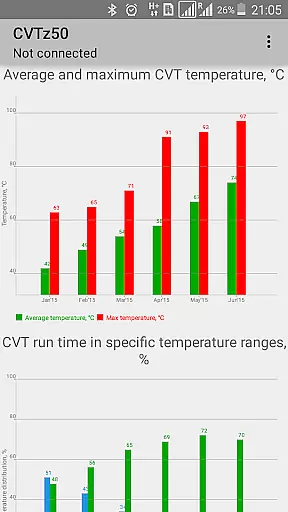
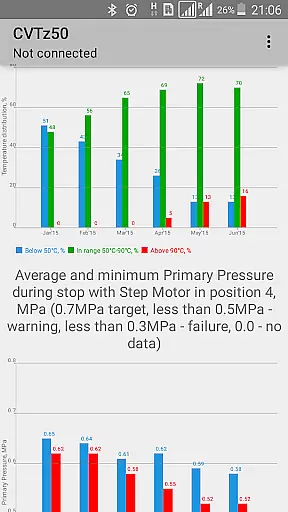
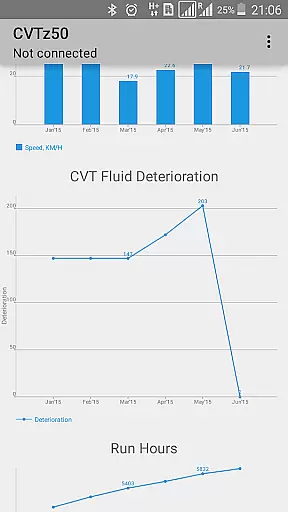
The application also tracks CVT fluid deterioration levels and collects monthly statistics on various operating parameters including temperature conditions, pressures, mileage, and fluid quality. These historical records help users understand long-term trends in their vehicle's performance and plan maintenance accordingly.
Unlike many automotive diagnostic tools, CVTz50 maintains complete price transparency by offering a free DEMO version. This allows potential users to verify compatibility with their specific ELM327 adapter and vehicle before committing to purchase.
The application supports a wide range of vehicles including Nissan Murano Z50/Z51, Teana, X-Trail, Qashqai, Juke, Note, Tiida, Sentra, Wingroad; Mitsubishi Outlander, Lancer; and Renault Koleos. The developer clearly lists these supported models, helping users make informed decisions about compatibility.
Hardware requirements are straightforward and clearly stated: Android 4.2+ devices and ELM327 adapters revision 1.5 or lower. The application notes that functionality may be limited with non-genuine adapters of revision 2.0+, setting clear expectations about required equipment and potential limitations.
User-friendly interface
Comprehensive diagnostic tools
Real-time data monitoring
Wide vehicle compatibility
Advanced adjustment options
Requires specific hardware
Limited to CVT-equipped cars
Potential compatibility issues
Complex for beginners
Additional costs for full version

Taximeter; the professional's choice
 4.30
4.30
OBD diagnostics, Live Data, DPF regeneration for BMW
4.00
Monitor specific TOYOTA parameters by adding this plugin to Torque Pro.
2.00
AlfaOBD software for Fiat Group cars native diagnostic
3.70
Buy and sell your boat
4.70
Autolist - The Largest Selection of Local Used Cars and Trucks
4.50
Take state-specific DMV permit tests and ace the exam.
3.90
MySubaru: Download. Connect. Love.
4.70
Quick and easy car diagnostics to get you the right fix.
4.70
Play what you want through Android Auto
4.90
Car Values, Research and More
4.80
Lexus app currently supports 2010 or newer vehicles (2018 or newer for Hawaii).
4.80
Marathon ARCO Rewards members earn rewards & apply the rewards for fuel savings!
4.80
Find Your Local Store or Shop Online for the Car, Truck, or SUV Parts You Need
4.70
Find, search, and browse 40,000+ used cars, SUVs, and trucks.
4.50
Automotive Electrical Wiring Diagrams
4.40
Boost profits and hit your goals faster with GigU's amazing tools for gigworkers
4.00
Available in select states.
4.00
The Smarter Way Forward
3.30


User Reviews