
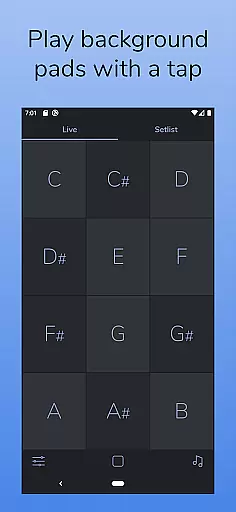
AutoPad is a versatile ambient pad loop application designed to enhance live performances and recordings with seamlessly looped sample-based drones. The app provides users with an effortless way to incorporate tasteful soundscapes into their mixes, simply by tapping a key. It supports natural crossfades between keys, ensuring smooth transitions during performances.
The app comes equipped with 10 expertly crafted pad sounds that create unique atmospheres in all 12 musical keys. Additionally, AutoPad offers advanced features such as a built-in metronome for band synchronization, MIDI compatibility for external controllers, and adjustable parameters including crossfade time, filters, reverb, pan, and volume. Its dark color scheme ensures optimal visibility on stage.
AutoPad is particularly well-suited for musicians performing in live settings, especially within worship music contexts. The pads are designed to be played softly and continuously, providing subtle harmonic structure without overpowering the main performance. This makes it an ideal tool for creating immersive ambient backgrounds that complement live instrumentation.
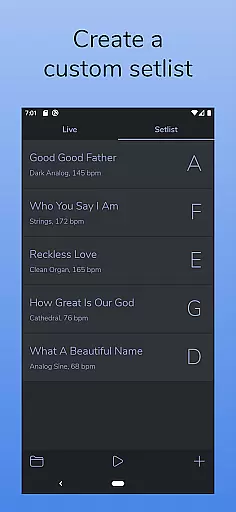
AutoPad stands out with its dual operational modes: LIVE mode for instant access to all twelve musical keys, and SETLIST mode for creating customized song lists. This flexibility allows musicians to adapt the app to various performance scenarios, whether they need quick key changes or pre-planned setlists.
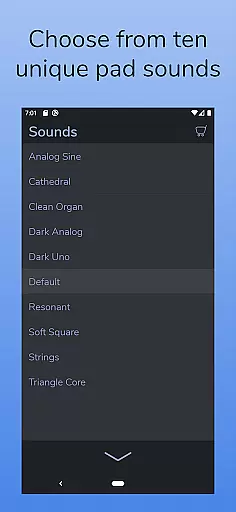
The application includes 10 professionally designed pad sounds, each offering distinct atmospheres across all 12 keys. Users can further expand their sound library through in-app purchases or by importing custom WAV files. The built-in metronome feature helps maintain precise timing during performances, eliminating the need for additional tracking equipment.
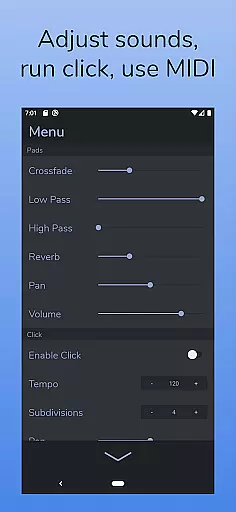
Advanced control options include adjustable crossfade times, two filters, reverb amount, pan, and volume settings. These parameters give users complete control over their soundscapes. Additionally, the app's MIDI compatibility (with physical controllers) enables seamless integration with existing setups, while its eye-friendly dark theme ensures optimal visibility in low-light performance environments.
AutoPad offers a diverse music library that caters to various ambient sound needs. With 10 carefully designed pad sounds included, each provides a unique atmosphere across all 12 musical keys.
The app also supports expansion of the sound library through in-app purchases or by importing personal WAV files, thus enhancing its music library size significantly.
Regarding copyright authenticity, users can be assured that the sounds provided are intended for use in live performances and recordings without legal concerns, making it a reliable tool for musicians.
This combination of a rich, expandable music library with verified copyright authenticity ensures that AutoPad is a trustworthy resource for ambient pad loops.
AutoPad delivers exceptional audio quality with features such as natural crossfades between keys, which ensure smooth transitions and maintain the integrity of live performances.
Users have control over audio parameters including crossfade time, two filters, reverb amount, pan, and volume via the app's menu, allowing for customization of the audio output to suit individual preferences.
Additionally, the inclusion of a built-in metronome helps keep bands in sync, contributing to an overall high-quality audio experience during performances.
With MIDI compatibility for external controllers, AutoPad further enhances audio quality options by enabling precise triggering of pads, offering musicians versatile and professional-grade audio capabilities.
Intuitive interface
Seamless key transitions
Versatile sound library
Built-in metronome
MIDI compatibility
Limited file format support
No virtual MIDI on Android
Basic free sound pack
Complex for beginners
Occasional latency issues

Gorgeous UI, Powerful music Search and Equalizer, the great choice for you!
 4.70
4.70
DJ Music Mixer - DJ Remix: remix songs, make beat music & record mix of DJ.
4.40
Next generation modular control surface
4.10
Enjoy singing any song, no matter how high or low it is
4.30
No wifi music app. Mp3 offline. Tuner radio, young radio music. Music downloader
4.20
The original SP-1200 experience on your iPad
4.20
Manage your Sonos system directly from your home-screen!
4.40
Travel To The Music Universe
3.40
Play your music offline without limits
4.80
Music, News & Sports Radio Tuner App. Tune in Live FM & AM Radio Stations.
4.80
Brian Eno and Peter Chilvers’ acclaimed music app Bloom, radically reinvented.
4.80
Make songs with AI! Any genre, custom lyric, song generator for music creation!
4.80
Listen to live FM radio stations, sports, music and news on global radios online
4.70
SqueezePlayer turns your Android phone or tablet into a SqueezeBox on its own!
4.60
Learn the notes on the guitar fretboard fast with this easy and fun app
4.60
Fun & Easy Voice Changer – Record, Edit & Add Hilarious Effects!
4.50
Save hundreds of dollars for a physical strobe tuner and instead use this app.
4.50
Play KORG’s revolutionary touch-based instrument on a variety of devices.
4.40
USB audio recording and playback finally possible on Android 3.1 or higher!
3.90


User Reviews