
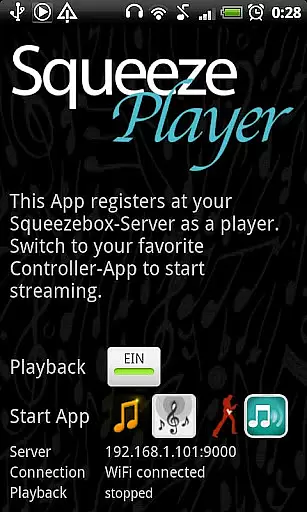
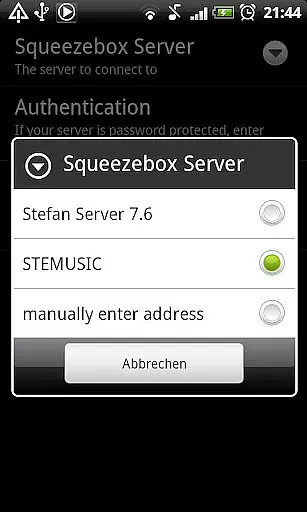
SqueezePlayer transforms your Android device into a powerful streaming tool, enabling you to access all your Logitech Squeezebox content on the go. This app allows seamless streaming of local music libraries, internet radio stations, and popular music services like Last.FM, Deezer, and WiMP.
Designed for audiophiles who demand flexibility, SqueezePlayer supports various audio formats including FLAC, MP3, WAV, and PCM. The app requires a Logitech Media Server setup but offers impressive integration capabilities with third-party control apps, making it a versatile solution for wireless music enjoyment.
The app's standout feature is its ability to turn any Android device into a full-fledged Squeezebox player without requiring physical hardware. It supports both Wi-Fi and mobile data streaming, giving users complete freedom to enjoy their music collection anywhere.
SqueezePlayer offers advanced networking options, including 3G streaming through proper router configuration. While it focuses solely on playback functionality, the app integrates seamlessly with multiple control applications such as OrangeSqueeze and SqueezeCommander, providing users with comprehensive remote management options.
When it comes to streaming music, the size and authenticity of a music library are crucial factors for an enriching user experience. SqueezePlayer offers access to an extensive music library through your Squeezebox-Server, allowing you to stream local music, internet radio stations, or songs from various apps like Last.FM, Deezer, or WiMP directly to your Android device.
The application supports popular music formats such as FLAC, MP3, WAV, and PCM natively, ensuring high-quality playback without the need for additional conversion. Moreover, your Squeezebox Server can transcode other file types like Ogg and mp4 to compatible formats on the fly, expanding the range of playable content.
With SqueezePlayer, users can be confident in the authenticity of their music streams, as they are accessing their personal collections or legitimate services integrated with the Squeezebox ecosystem. This guarantees that all music is streamed legally and respects copyright laws, providing peace of mind while enjoying a diverse selection of audio content.
Audio quality is paramount for audiophiles and casual listeners alike. SqueezePlayer excels in delivering pristine audio by supporting high-fidelity formats like FLAC and WAV, which are decoded directly on your Android device. This ensures minimal loss of quality during playback, offering a listening experience that's as close to the original recording as possible.
In addition to native format support, SqueezePlayer leverages the capabilities of the Squeezebox-Server to provide transcoding options. This means even if your files aren't in a natively supported format, the server can convert them to FLAC or MP3 in real-time, maintaining a balance between compatibility and sound quality.
Whether you're at home or on the go, SqueezePlayer allows you to enjoy your music via WiFi or mobile connection without compromising on audio quality. The flexibility to stream over different network conditions makes it an ideal choice for those who demand excellent sound reproduction across various scenarios.
Wide format compatibility
Seamless third-party integration
Excellent sound quality
Flexible streaming options
Regular updates
Requires server setup
No standalone control
Limited format support on Touch
Complex network configuration
Some services unsupported

Time Trainer: accurate metronome w tools to help you develop your internal time!
 4.20
4.20
Remove ads permanently from Music Visualizer
4.5
Background pads for your band
3.80
No wifi music app. Mp3 offline. Tuner radio, young radio music. Music downloader
4.20
Music, News & Sports Radio Tuner App. Tune in Live FM & AM Radio Stations.
4.80
Learn and play 2M+ music tabs & chords on guitar, ukulele, bass, and more
4.30
Offline Music Player&MP3 Player with themes, equalizer, lyrics, music play mode
4.60
Slow music down without changing pitch.
3.70
Manage your Sonos system directly from your home-screen!
4.40
Voice recorder - Audio recorder. Best recorder for recording
4.90
Recording studio w/ 10k beats, pro vocal FX and a network of 20M rappers & fans!
4.60
Over 100 million tracks available for high quality streaming and download
4.60
AI Music Maker: Generate And Compose AI Tunes & AI Songs & AI Music & AI Melody!
4.60
A synth that really lets you shape your sounds!
4.50
The alternative folder based music player.
4.20
Offline and always ad-free - stream in the highest quality available.
4.10
USB audio recording and playback finally possible on Android 3.1 or higher!
3.90
MilkDrop for Android TV
3.00
Make music anywhere. Turn your device into an instrument.
4.1


User Reviews