
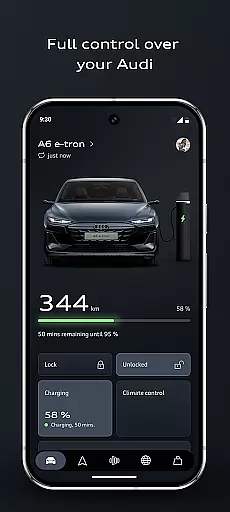

myAudi is an advanced mobile application designed specifically for Audi vehicle owners, enabling them to seamlessly interact with their cars through a user-friendly interface. The app offers smart design and intuitive operation, providing users with new functions and enhancements to familiar features. With myAudi, you can control important vehicle functions remotely, plan efficient routes using the intelligent route planner, and receive real-time information from the AI-supported Audi assistant. Whether you drive a fully electric, combustion, or e-hybrid Audi, this app enhances your driving experience by making it smarter, more connected, and more convenient.
The app's latest version includes noticeable improvements such as optimized app routines for preconditioning your Audi and planning charging processes. It also features a digital key function, allowing you to lock, unlock, or start your Audi via smartphone. These capabilities ensure that Audi drivers have a smarter, more connected, and convenient driving experience regardless of their vehicle type.
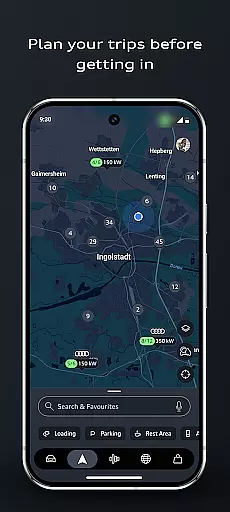
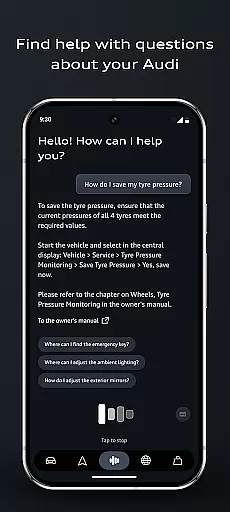
myAudi boasts a variety of sophisticated features tailored to enhance the user's interaction with their Audi vehicle. One standout feature is the AI-supported Audi assistant, which provides real-time information about your vehicle without needing to consult the owner's manual. This assistant understands your queries and delivers clear, actionable answers instantly. Another significant feature is the improved route planner, which incorporates real-time traffic data, current range, and charge scheduling, ensuring that every journey is as efficient as possible.
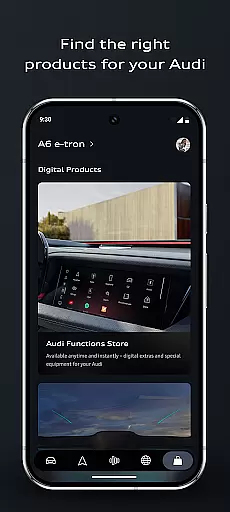
In addition to these, the app offers individual upgrades through its new shopping area, where users can discover on-demand functions and Audi connect services based on their vehicle configuration. The digital key functionality allows users to lock, unlock, or start their Audi with their smartphone and share access effortlessly. App routines enable users to automate everyday tasks based on time, location, or vehicle status, while remote vehicle control lets users find their vehicle, check lighting, or pre-start the air conditioning. These features collectively contribute to a highly personalized and convenient user experience.
Detailed vehicle information is a cornerstone of the myAudi app, providing users with comprehensive data about their Audi. This feature encompasses everything from basic specifications to advanced performance metrics, ensuring that owners have a complete understanding of their vehicle's capabilities.
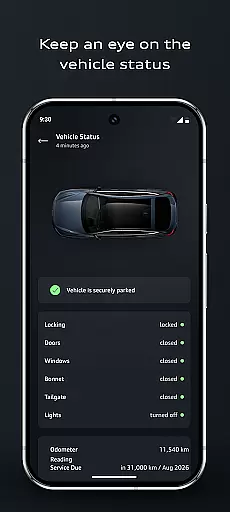
The myAudi app takes detailed vehicle information to the next level by integrating real-time data and status updates. Users can remotely check critical aspects such as fuel level, battery status, and maintenance alerts through an intuitive interface. The app also displays tire pressure, oil levels, and service history, helping owners maintain optimal vehicle condition.
This level of detail offers significant benefits to Audi owners. By having instant access to vital vehicle statistics, users can make informed decisions about maintenance, driving habits, and necessary repairs. The app's ability to monitor range and charging status proves particularly valuable for electric and hybrid vehicle owners.
Ultimately, this feature transforms how drivers interact with their vehicles. Rather than relying on traditional dashboard indicators or waiting for service reminders, the myAudi app empowers users with proactive vehicle management tools. This comprehensive information system enhances both convenience and vehicle longevity, making ownership more efficient and enjoyable.
Price transparency in automotive applications serves as a crucial factor for consumers seeking clarity in vehicle-related expenses. The myAudi app addresses this need by providing clear information about various costs associated with vehicle ownership and optional upgrades.
The app features a dedicated shopping area where users can explore additional functions and Audi connect services. Each offering comes with detailed pricing information, allowing owners to understand the value proposition of different features. From subscription-based services to one-time purchases, the app presents all financial details in an organized manner.
This transparent approach benefits users by eliminating hidden fees and unexpected charges. Customers can make informed decisions about which features to add to their vehicles, whether it's enhanced connectivity options or performance upgrades. The app also helps users plan their expenses by showing clear breakdowns of costs for different services.
Moreover, price transparency extends beyond optional features to include charging costs and efficiency planning. The intelligent route planner incorporates charging station prices and scheduling, enabling users to optimize their travel expenses. This comprehensive financial visibility strengthens customer trust and enhances the overall ownership experience.
User-friendly interface
Real-time vehicle info
Remote vehicle control
Efficient route planning
Customizable app routines
Limited to Audi vehicles
Requires internet connection
Premium feature costs
Complex setup process
Occasional bugs reported

The Smarter Way Forward
 3.30
3.30
Monitor specific TOYOTA parameters by adding this plugin to Torque Pro.
2.00
Wonder how much horsepower and torque your car/truck makes? Look no further.
3.40
DIY Vehicle Wheel Alignment
4.0
Theme for Car Launcher
4.5
CVT diagnostics with ELM327 for Nissan-based vehicles
4.40
Discover new and used cars in Syria easily! Browse ads and connect with sellers.
3.70
AI Powered - Automotive Mechanic Assistant
4.30
Trip computer+car diagnostic tool with widest variety of features and dashboard!
4.70
Take Control of Your Car
4.80
Car Values, Research and More
4.80
7-Day Returns on All Cars
4.80
Marathon ARCO Rewards members earn rewards & apply the rewards for fuel savings!
4.80
Listings of Tesla's with FSD - Included package
4.60
DMV Test Pro offers all the updated FREE DMV tests online.
4.60
Digital Car Key/Launcher, Screen Mirror, Android Dashboard, Remote Wireless Link
4.40
Instant diesel savings. No credit checks or fees. Nationwide growing network.
4.40
Control maps, media and messaging, with the Google Assistant while you drive
4.10
Available in select states.
4.00


User Reviews