
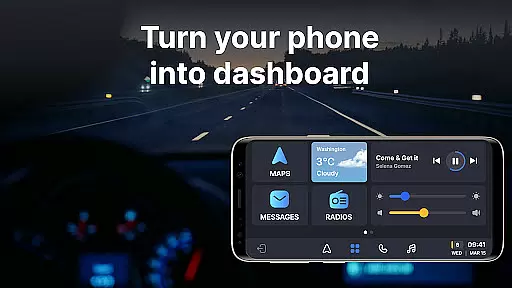
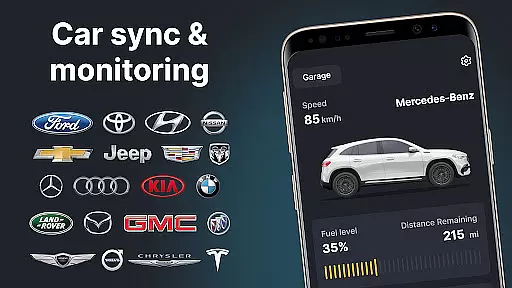
Auto Sync for Android/Car Play is a comprehensive vehicle management app that transforms your smartphone into an advanced car dashboard. The app provides real-time monitoring of essential car metrics such as fuel level, battery status, engine oil life, and tire pressure through seamless integration with Apple CarPlay and Android Auto systems. This ensures drivers can maintain safety standards while enjoying enhanced convenience during their journeys.
Beyond basic monitoring, the app features a wireless Driving Mode that optimizes the driving experience by enabling easy access to navigation maps, hands-free calling, and music controls. Its Digital Garage functionality allows users to manage multiple vehicles within a single interface, making it invaluable for owners of various car brands. With additional features like digital car key capabilities and screen mirroring, Auto Sync delivers both utility and innovation in one package.
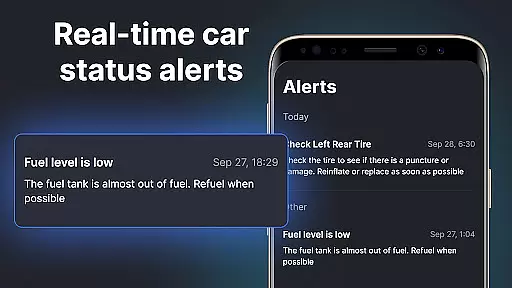
The app's standout feature is its ability to sync wirelessly with Apple CarPlay and Android Auto, creating a unified interface for all your driving needs. It offers detailed insights into your vehicle's condition via a customizable car dashboard, which displays critical data points including mileage, engine performance, and maintenance alerts. These real-time updates empower users to address potential issues proactively, ensuring optimal vehicle health at all times.
Another notable aspect is the Driving Mode, designed to minimize distractions while maximizing accessibility. By transforming your phone into a dedicated car display, it allows you to navigate, communicate, and entertain without taking your eyes off the road. Additionally, the Digital Garage feature simplifies multi-vehicle ownership by consolidating information from different cars into one platform, supporting a wide range of brands. This versatility makes Auto Sync an indispensable tool for modern drivers seeking efficiency and connectivity.
Auto Sync for Android/Car Play provides comprehensive vehicle data, ensuring drivers have critical information at their fingertips. The app displays essential details such as fuel level, battery status, engine oil life, mileage, and tire pressure directly on the car dashboard.
This real-time monitoring system empowers users to maintain their vehicles proactively. By receiving instant notifications about potential issues, drivers can address maintenance needs promptly, preventing minor problems from becoming major repairs.
The application's digital interface serves as a virtual vehicle health monitor, presenting complex technical data in an easily understandable format. This feature particularly benefits modern vehicle owners who want to stay informed about their car's condition without consulting physical manuals or visiting service centers.
With support for various car brands including Tesla, BMW, and Toyota, this app delivers consistent and reliable vehicle information across different makes and models. The detailed vehicle statistics help drivers make informed decisions about maintenance schedules and driving habits.
While primarily focused on vehicle information, Auto Sync for Android/Car Play maintains clear pricing policies for its premium features. The application offers a transparent subscription model that allows users to choose the level of service that best suits their needs.
Users can access basic vehicle monitoring features free of charge, while advanced functionalities like digital car key management and extended analytics require a subscription. This straightforward pricing structure enables drivers to plan their expenses accordingly.
The app's marketplace presents additional services and products with clearly displayed prices. Whether it's maintenance packages or accessory purchases, customers can make informed financial decisions based on visible costs.
Regular updates ensure that pricing remains competitive within the automotive app market. The developers maintain open communication about any changes in service costs, fostering trust between the company and its user base.
User-friendly interface
Real-time vehicle monitoring
Supports multiple car brands
Wireless connectivity options
Comprehensive safety alerts
Limited offline functionality
Premium features require subscription
Occasional syncing delays
High system requirements
Brand compatibility issues

Practice the drills within MotoJitsu Master Riding Program Volume 1 & 2!
 4.80
4.80
OBDII - ELM327 Terminal tool for 96-00 Volvos
4.50
* This app needs an adapter cable and a certain OBD2 adapter to work *
4.20
A full featured, real-time transit locator system
4.30
Boost profits and hit your goals faster with GigU's amazing tools for gigworkers
4.00
BlueDriver® is a Premium Diagnostic OBD2 Scan Tool. www.BlueDriver.com
3.90
Lexus app currently supports 2010 or newer vehicles (2018 or newer for Hawaii).
4.80
Shop cars & see your financing
4.60
Autotrader is your online solution for buying and selling new and used cars.
4.40
Take Control of Your Car
4.80
Easy connect & control your cars from afar. Remote Lock & unlock car and carplay
4.60
Launcher for use in the car
4.40
Instant diesel savings. No credit checks or fees. Nationwide growing network.
4.40
Car Sounds Engine Sounds app welcomes Auto Lovers to feel Car Simulator Sound
4.20
Control maps, media and messaging, with the Google Assistant while you drive
4.10
OBD diagnostics, Live Data, DPF regeneration for BMW
4.00
O'Reilly Pro will streamline your parts lookup and ordering process!
3.20
Attention! This is the theme for the Car Launcher app
4.3
Ferrari inspired analog & digital watch face with quick access and premium style
4.3


User Reviews