
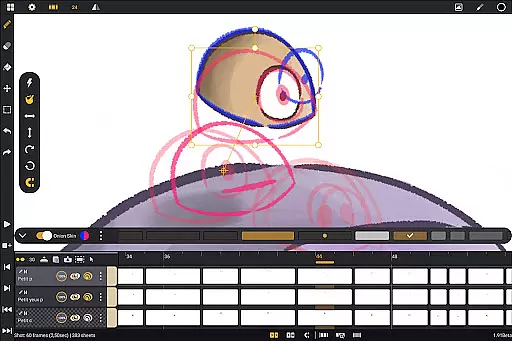
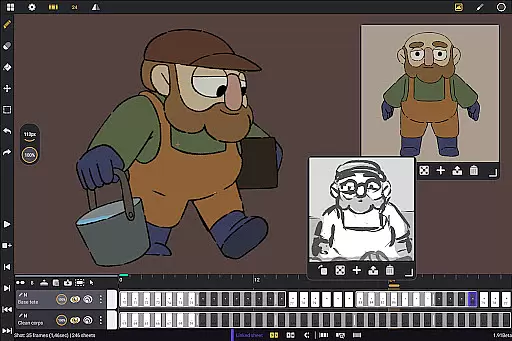
Callipeg is a professional-grade 2D hand-drawn animation application tailored for both professional animators and beginners. It provides an all-in-one animation studio experience directly on Android devices, optimized for tablets with stylus support. The app offers essential tools such as adjustable frame rates up to 60fps, canvas sizes reaching 4K resolution, and unlimited layer support for various media types including drawing, video, and audio.
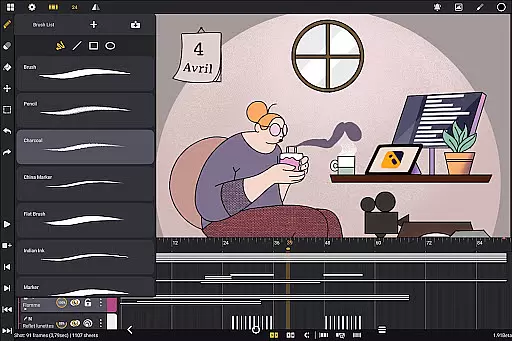
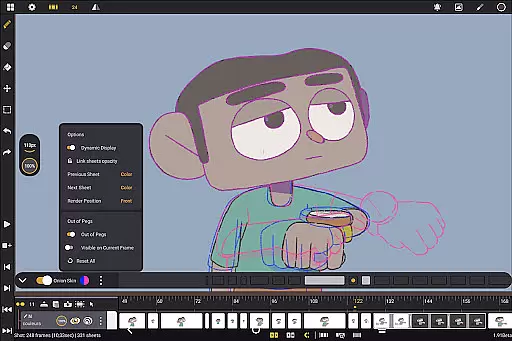
With its intuitive interface, Callipeg allows users to organize their projects studio-style through drag-and-drop functionality, color tagging, and filtering options. Animators can utilize comprehensive drawing tools with customizable brushes and color management features. The app also includes specialized animation tools like onion skinning with adjustable opacity and playback gestures. These features make it suitable for creating professional-quality animations or practicing basic techniques.
The true value of Callipeg lies in its ability to transform any Android tablet into a powerful animation workstation without requiring a subscription model. This makes it an accessible solution for artists who need professional tools while working remotely or traveling. Its compatibility with industry-standard file formats ensures seamless integration with existing workflows.
Callipeg stands out with its extensive feature set designed specifically for 2D animation professionals. One of its key characteristics is the studio-like organization system that lets users structure their projects using scenes, folders, and color tags. The integrated search function enables quick asset retrieval, while customizable workspace settings allow both right- and left-handed artists to optimize their interface preferences.
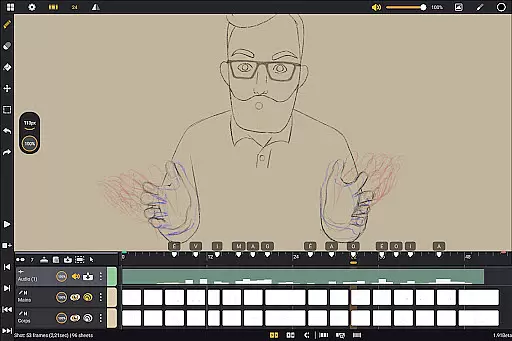
The app's technical capabilities are equally impressive. Users can work with frame rates ranging from 12 to 60 frames per second and canvas sizes up to 4K resolution. The unlimited layer support accommodates various media types, including drawing layers, video clips, and audio tracks. This flexibility enables complex animation techniques such as rotoscoping and lip-syncing. Additionally, the comprehensive drawing tools provide multiple brush types with detailed customization options for smoothing, texture, and tip shape.
What truly sets Callipeg apart is its specialized animation-focused tools. The onion skinning feature displays up to eight frames before and after the current frame with adjustable opacity and color settings. The app supports pressure-sensitive styluses, delivering a natural drawing experience. Furthermore, its flexible import/export options in multiple formats (.mp4, .gif, .png, .psd) ensure compatibility with other professional software, making it a versatile tool for both independent creators and studio environments.
In the realm of digital art and animation, having a comprehensive set of creative tools is essential for bringing ideas to life. Callipeg stands out by offering a complete suite of features that cater to both professional animators and beginners alike. The app provides an extensive range of drawing instruments including pencils, charcoal, ink, and more, each customizable with settings for smoothing, tip shape, and texture.
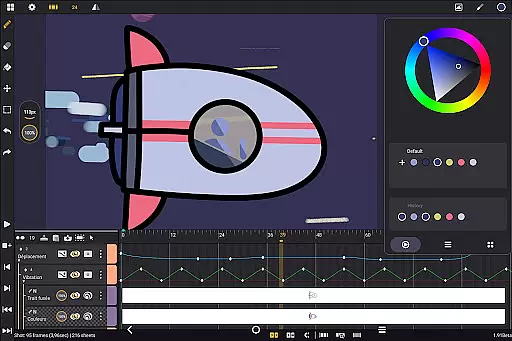
Furthermore, Callipeg supports unlimited layers of various types such as drawing, video, transformation, audio, or group layers. This allows artists to import images, video clips, and audio files for advanced techniques like rotoscopy or lip-syncing. With support for high frame rates and canvas sizes up to 4K, users can achieve professional-grade results on their Android devices.
The inclusion of studio-like organization features means creators can efficiently manage their projects through color tags, filters, and an integrated search function. Such meticulous asset management ensures that whether you're developing storyboards or producing complete shots, your workflow remains uninterrupted and productive.
Flexibility in canvas size and format compatibility is crucial for accommodating diverse artistic visions and industry standards. Callipeg excels in this area by providing a large canvas option that supports resolutions up to 4K. This ensures that every detail of your artwork is captured with precision, meeting the rigorous demands of professional animators.
Artists using Callipeg have the freedom to adjust frame rates according to their project needs, choosing from options like 12, 24, 25, 30, or 60 frames per second. This adaptability extends to export formats as well; animations can be saved in multiple formats including .mp4, .gif, .png, .tga, .psd, and .peg, facilitating seamless integration with other software used in post-production.
Additionally, the app's customizable workspace enhances its format flexibility. Users can switch between right- and left-handed interfaces, reposition sidebars, and invert the canvas to check proportions. These features collectively empower creators to tailor their environment precisely to their preferences, ensuring optimal comfort and efficiency while working on intricate designs.
User-friendly interface
Professional-grade tools
No subscription required
Excellent stylus support
Regular updates
Android-only platform
Steeper learning curve
Limited advanced features
Occasional performance issues
Fewer tutorials

Discover Cartoon Dream : Unleash Your Creativity with CuttingEdge AI
 4.50
4.50
Stylish letters, Stylish Keyboard, Symbols, Emojis, Cool nickname
4.40
Design your dream room with AI. Get decor ideas & plan home interiors
3.90
Passport size photo maker, create ID photo and visa photo in seconds
4.80
Painting, drawing, & sketching
4.50
Turn your drawings into flipbook-style animations with simple creative tools
4.60
AI Tattoo Generator: Create Tattoo Designs & Get Ideas! Ink & Stencil Maker
4.50
How to draw anime step by step for beginner easily by AR drawing sketch & paint.
3.60
AI-powered photo & video creation—fast, fun, and effortless with Quick Actions
4.60
Novices can also easily complete diamond painting masters
4.70
Draw beautiful mandala's very easily
4.60
Create neon drawing with magic doodle and fun doodle art effects!
4.50
Remove Background, Magic Eraser, Photo Enhancer, Story Templates, Collage Maker
4.30
Beauty Camera - Selfie Camera is the ultimate beauty camera and selfie app
4.30
Digital Drawing: Draw & Paint
4.10
Sketch and paint on your device with the feel and freedom of drawing on paper
4.00
AI Art Generator transforms your words into AI generated art & paintings.
3.70
Your homescreen as an elegant glass with customized blur, lighting, and visuals.
3.70
Experience next-gen icons with a modern liquid glass look.
3.60


User Reviews