



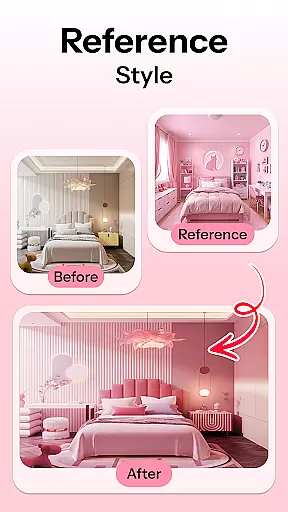
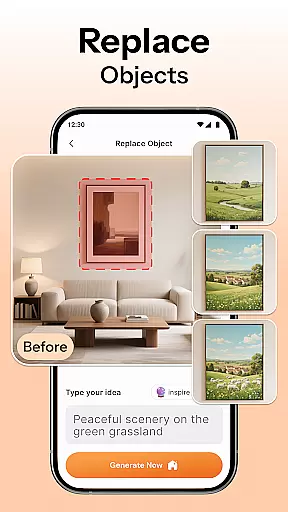
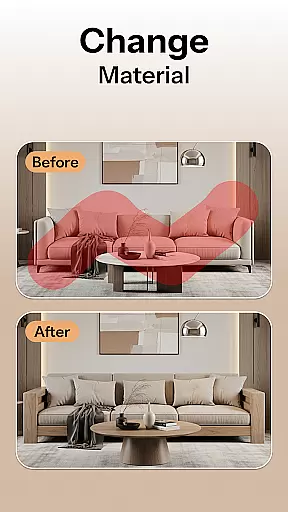
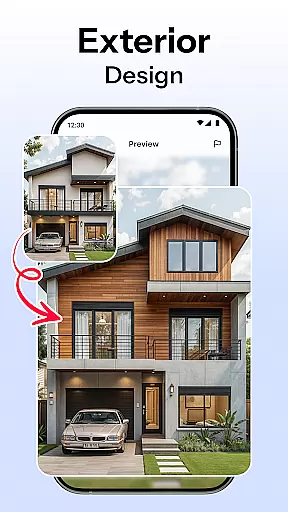

HomeMagic is an innovative AI-powered interior design application that transforms the way users approach home decoration. The app's core functionality lies in its ability to instantly generate professional-grade interior designs based on user-provided photos and selected style preferences. Whether you're redesigning a single room or planning a complete home makeover, HomeMagic provides realistic visualizations across various design themes including Modern, Retro, Tropical, and Cyberpunk styles.
Beyond basic design generation, the application offers advanced features such as smart furniture layout planning, wall color experimentation, and flooring texture visualization. These tools enable users to optimize their space while exploring different aesthetic combinations. The app particularly shines in its before-and-after comparison feature, allowing users to make informed decisions about their design choices. HomeMagic serves as an essential tool for homeowners, renters, interior designers, and real estate professionals seeking efficient and cost-effective design solutions.
The true value of HomeMagic lies in its ability to democratize professional interior design services. By providing sophisticated design capabilities through an accessible mobile interface, it empowers users to visualize and implement their dream spaces without requiring extensive design expertise or expensive consultations. This makes it especially valuable for those planning renovations, refreshing rental spaces, or preparing properties for market presentation.
HomeMagic distinguishes itself through several key features that enhance the interior design process. The AI Interior Design Generator stands out as the flagship functionality, capable of processing user-uploaded photos and transforming them into multiple professionally-designed room concepts within seconds. This feature supports an impressive range of design styles, from contemporary minimalism to vintage aesthetics, catering to diverse user preferences.
The application's Room Makeover Preview goes beyond simple image manipulation by providing realistic design samples that consider spatial relationships and lighting conditions. Meanwhile, the Smart Furniture Layout Planner utilizes artificial intelligence to suggest optimal arrangements of furniture, lighting fixtures, and decorative elements, helping users maximize their available space efficiently. The Home Decor Ideas & Style Filters feature enables experimentation with various aesthetic elements, including wall colors, flooring materials, and furniture combinations.
Additional notable features include the Before & After Comparison tool, which allows side-by-side visualization of original and redesigned spaces, and the comprehensive design saving system that lets users build personal galleries of their favorite concepts. These features collectively create a robust platform for both casual design exploration and professional project planning, making HomeMagic a versatile solution for various interior design needs.
When it comes to designing your dream space, having access to a comprehensive set of creative tools is essential. HomeMagic offers an extensive suite of features that cater to every aspect of interior design. From AI-generated room transformations to customizable style filters, the app ensures that no creative idea is left unexplored.
The application's AI Interior Design Generator allows users to upload photos and experiment with various aesthetics such as Modern, Retro, Tropical, and more. This feature not only broadens the scope of personalization but also makes professional-grade design accessible to everyone.
Additionally, HomeMagic provides a Smart Furniture Layout Planner, enabling users to optimize their spaces with ease. Whether you're rearranging existing furniture or exploring new purchases, this tool helps visualize different configurations, ensuring both functionality and aesthetic appeal.
Flexibility in design presentation is crucial for both amateur decorators and professional interior designers. HomeMagic excels in offering canvas and format flexibility that adapts to diverse project requirements. Users can easily adjust wall colors, flooring textures, and furniture arrangements to suit their specific needs.
The app supports high-quality image exports, allowing users to save and share their designs effortlessly. This feature is particularly beneficial for those collaborating with interior designers or seeking approval from clients or family members.
Moreover, HomeMagic includes a Before & After Comparison tool, which lets users view their original space alongside the AI-enhanced version. This side-by-side analysis aids in making informed decisions and fine-tuning details until the desired outcome is achieved.
User-friendly interface
Wide style variety
Quick rendering
Cost-effective
Professional results
Requires good photos
Internet connection
Premium features
Learning curve
Device compatibility

Art of Combination Wear OS Watch faces (for Wear OS 5+ devices)
 3.00
3.00
Digital Drawing: Draw & Paint
4.10
Your Essential Color Theory Guide: Red, Yellow, Blue (RYB)
4.4
Create color palette from Image, RGB & RYB Color wheel harmonies, Color Scheme
4.50
Digital, Abstract, Classic - all types of color wheels in one app!
4.60
Minecraft & Roblox Clothes
4.70
Get an overview over all your embroidery threads, projects and more.
4.60
Create cute cat emojis & PFPs! Fun, custom avatars for cat lovers.
3.70
An intuitive, high-performance painting app that lets you focus on creating
4.40
Convert image to JPG PNG HEIC PDF, support almost all kinds of image formats
4.70
Digital illustration drawing & painting pad app to paint Anime and Manga art
4.50
Create neon drawing with magic doodle and fun doodle art effects!
4.50
Video AI: Revolutionize Your Content Creation with Advanced Video Generation
4.50
Unleash Your Creativity with Draw Cartoon - AR Drawing App
4.10
Sketch and paint on your device with the feel and freedom of drawing on paper
4.00
Art of Combination Wear OS Watch faces (for Wear OS 5+ devices)
3.90
Sketch, trace and master AR drawing with awesome anime art!
3.30
Inky runs Inkscape on Android devices and Chromebooks
2.90
Art of Combination Wear OS Watch faces
4.0


User Reviews