
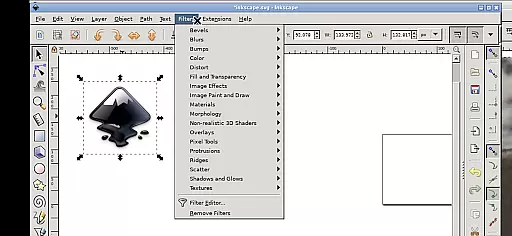
Inky is a powerful vector graphics editor that brings the full functionality of Inkscape to your mobile device. This app allows users to create and edit vector images in Scalable Vector Graphics (SVG) format, while also supporting other file types for import and export. With professional support and a comprehensive feature set, it's an ideal tool for designers on the go.
The application supports primitive vector shapes, text manipulation, color gradients, and raster image tracing. It provides intuitive touch-based controls optimized for Android devices, making complex design work possible even on smaller screens. Whether you're creating graphics for web or print, Inky delivers desktop-grade capabilities in a mobile environment.
Inky stands out with its complete adaptation of Inkscape's desktop features for mobile use. The app supports all essential vector editing tools including shapes, paths, text elements, and gradient fills. Advanced functions like object transformations, layer management, and Bezier curve editing are fully implemented.
Specifically designed for Android, Inky incorporates touch-friendly interface elements. Users can zoom via pinch gestures, pan with press-and-hold movements, and access contextual menus through two-finger taps. The app seamlessly integrates with Android's file system, providing direct access to Documents and Pictures folders without requiring manual file transfers.
For power users, Inky maintains compatibility with Inkscape's native SVG format and preserves all professional design capabilities. The app runs in a Linux environment on Android, ensuring consistent performance and reliability across different devices.
Inky offers a comprehensive suite of creative tools that cater to both professional designers and hobbyists. The app provides full-featured vector graphics editing capabilities, allowing users to create intricate designs with ease.
With Inkscape at its core, Inky supports the creation of primitive vector shapes such as rectangles, ellipses, polygons, arcs, spirals, stars, and even 3D boxes. These elements can be filled with solid colors, patterns, or gradients, and their borders can be customized with adjustable transparency.
The app also enables the import and export of various file formats, facilitating a seamless workflow with other design tools. Additionally, users can embed and trace raster graphics, transforming photos and other raster sources into scalable vector images.
Manipulating created shapes is intuitive, thanks to transformation features like moving, rotating, scaling, and skewing. This versatility ensures that every artistic vision can be realized without compromise.
Inky stands out for its exceptional canvas and format flexibility, empowering users to work on projects of any size and scope. The app's support for Scalable Vector Graphics (SVG) format ensures that designs remain crisp and clear at any resolution.
Designers can take advantage of the vast workspace provided by Inky, creating everything from small icons to large-scale illustrations without worrying about pixelation or quality loss. The ability to zoom in and out with pinch gestures makes navigating complex designs effortless.
File management within Inky is streamlined through useful links in the home directory, connecting to essential locations like Documents and Pictures folders across Android devices. This integration eliminates the need for cumbersome file imports and exports.
Furthermore, Inky maintains compatibility with numerous file formats beyond SVG, accommodating diverse project requirements and ensuring smooth collaboration with other design software. This adaptability makes it an indispensable tool for creative professionals.
Full-featured vector editor
Professional design tools
Seamless file integration
Touch-optimized interface
Open-source flexibility
Steep learning curve
Small screen limitations
Requires powerful hardware
Limited mobile-specific features
Complex gesture controls

AI generated images & photos, turn your words into drawing, painting & pictures.
 4.30
4.30
Stylish letters, Stylish Keyboard, Symbols, Emojis, Cool nickname
4.40
Design your dream room with AI. Get decor ideas & plan home interiors
3.90
Unleash your drawing and painting potential
4.50
Art of Combination Wear OS Watch faces
4.3
Unleash Your Creativity with Draw Cartoon - AR Drawing App
4.10
Draw anime easily with AR guidance, sketch templates & trace tools!
3.10
Minecraft & Roblox Clothes
4.70
Image resizer to resize, crop, rotate, flip, change dpi photo or picture in bulk
4.60
Convert image to JPG PNG HEIC PDF, support almost all kinds of image formats
4.70
Digital, Abstract, Classic - all types of color wheels in one app!
4.60
Video AI: Revolutionize Your Content Creation with Advanced Video Generation
4.50
Trace, draw, and create art with AR - from memes to masterpieces!
4.30
800+ Drawing, Painting Lessons App to Practice, Sketch & Paint Art.
4.30
Create stylish invitation cards using templates for weddings, birthdays & RSVP.
4.20
AI Face Swap, Video Effects Editor, Realtime Morph, Funny Video FX,AI Filters
3.70
Experience next-gen icons with a modern liquid glass look.
3.60
Meet the magic aı 3d photo generator and smart AI video generator app.
3.20
Pose and morph realistic male and female models! 3D poser app
3.00


User Reviews