
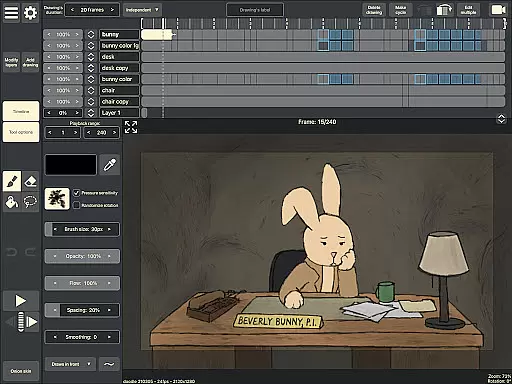
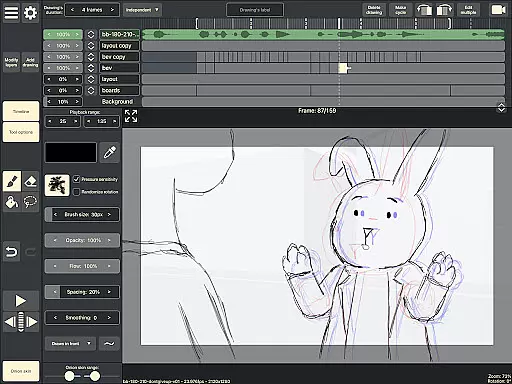
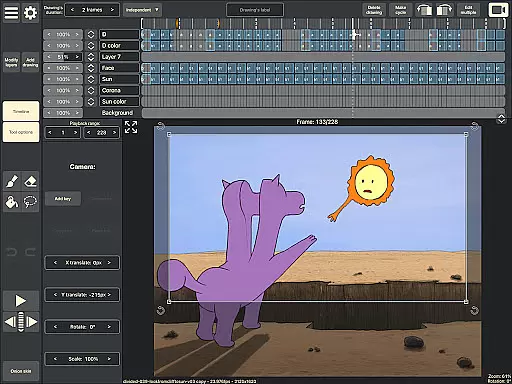
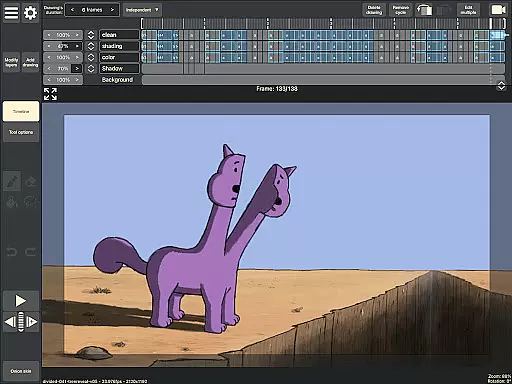
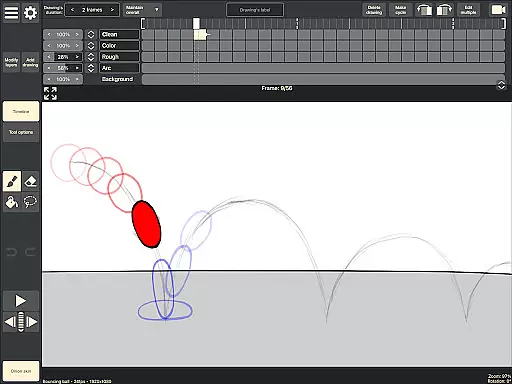
RoughAnimator is a professional-grade hand-drawn animation app designed for both Android and desktop platforms. This powerful tool provides animators with everything needed to create traditional frame-by-frame animations anywhere. With its robust feature set, the app caters to professional animators while remaining accessible to beginners.
The application includes advanced tools such as onion skinning, timeline control with unlimited layers, and customizable drawing settings. Users can import audio for lip-syncing, video for rotoscoping, and export their work in various formats including Quicktime video, GIFs, or image sequences. RoughAnimator projects are compatible with industry-standard software like Adobe Flash/Animate, After Effects, and Toon Boom Harmony.
RoughAnimator stands out with its comprehensive set of animation features. The app's timeline allows users to work with unlimited layers and easily adjust exposure lengths for individual drawings, supporting both pose-to-pose and straight-ahead animation techniques. Its onion skinning functionality helps animators maintain consistency between frames.
The app supports pressure-sensitive devices like the Samsung S-Pen, giving users precise control over their drawings. Animators can preview playback, scrub along the timeline, and customize brushes to suit their style. With options to control framerate and resolution, users can fine-tune their animations for optimal quality. The ability to export projects to multiple formats makes it versatile for different workflows.
What sets RoughAnimator apart is its seamless integration with professional animation pipelines. Projects created in the app can be imported into industry-leading software such as Adobe Animate, After Effects, and Toon Boom Harmony, making it an ideal tool for both independent creators and studio professionals.
Creative tools are essential for artists and animators to bring their visions to life. RoughAnimator offers a comprehensive suite of features that cater to both professional animators and beginners alike.
This application provides users with unlimited layers on the timeline, customizable brushes, onion skinning, and the ability to import audio and video for advanced animation techniques like lip syncing and rotoscoping. These tools ensure that creators have everything they need to produce high-quality hand-drawn animations.
By supporting pressure-sensitive devices such as the Samsung S-Pen, RoughAnimator enhances the drawing experience, allowing for more precise control over brush strokes. This level of detail and customization empowers users to create animations that truly reflect their artistic vision.
The app's compatibility with industry-standard software like Adobe Flash/Animate, After Effects, and Toon Boom Harmony further extends its utility, making it a versatile tool for professional projects. Animators can seamlessly integrate their work from RoughAnimator into larger production pipelines.
Flexibility in canvas size and format options is crucial for animators who need to adapt their work for different platforms and mediums. RoughAnimator excels in providing users with the freedom to control various aspects of their animation projects.
Users can adjust the frame rate and resolution of their animations, ensuring that the final output meets the specific requirements of any project. Whether creating content for social media, film, or broadcast, animators have the power to optimize their work accordingly.
The ability to export animations in multiple formats including Quicktime video, GIF, or image sequences adds another layer of versatility. This feature allows creators to choose the best format for their intended audience or platform, enhancing the accessibility and reach of their work.
Furthermore, RoughAnimator's availability on both mobile and desktop platforms ensures that users can work flexibly across devices. This cross-platform support enables animators to start a project on their Android device and continue refining it on a desktop, maintaining consistency and quality throughout the creative process.
Professional-grade tools
User-friendly interface
Cross-platform compatibility
Industry-standard integration
Flexible export options
Steep learning curve
Requires powerful hardware
Limited free features
No automatic tweening
Occasional performance issues

AI generated images & photos, turn your words into drawing, painting & pictures.
 4.30
4.30
Floor Plan Creator lets you create, edit and share floor plans.
4.00
Create trending AI photos & videos with powerful effects and 3D styles.
3.20
Photo blender app to create overlay photos & double exposure.
4.40
Passport size photo maker, create ID photo and visa photo in seconds
4.80
Digital, Abstract, Classic - all types of color wheels in one app!
4.60
Create cute cat emojis & PFPs! Fun, custom avatars for cat lovers.
3.70
How to draw anime step by step for beginner easily by AR drawing sketch & paint.
3.60
Unleash your inner artist! Sketchar: AR Drawing for Limitless Creativity
4.40
Mobile pixel art editor. Simple. Fast. Portable.
4.80
Draw on screen: FP sDraw is a simple and lightweight drawing app
4.70
Your AI soulmate — meaningful chats, and unique emotional moments
4.70
The perfect place to start sketching! Use Sketchbook to draw and paint sketches.
4.50
Video AI: Revolutionize Your Content Creation with Advanced Video Generation
4.50
AI Tattoo Generator: Create Tattoo Designs & Get Ideas! Ink & Stencil Maker
4.50
Create stylish invitation cards using templates for weddings, birthdays & RSVP.
4.20
Create Logos, Tattoos, AI Art & more with our AI Photo Generator & Design Editor
4.20
Resize photos and print photos in exact size with our powerful photo printer!
3.80
Draw anime easily with AR guidance, sketch templates & trace tools!
3.10


User Reviews