


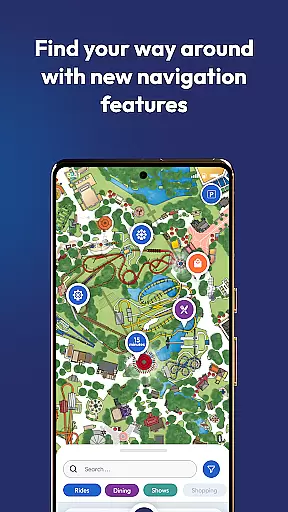
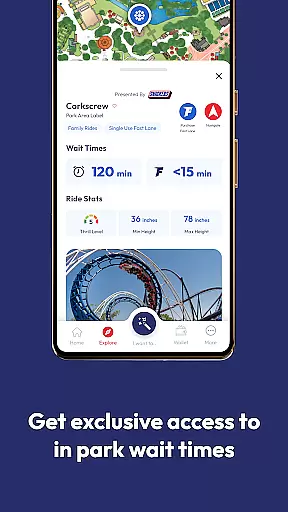
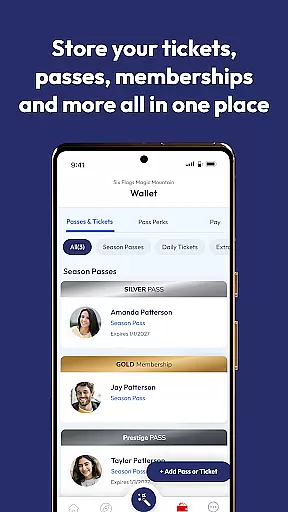


Six Flags is a comprehensive travel and local app that provides users with unparalleled access to all 41 Six Flags amusement and water parks. The app allows you to manage tickets, passes, memberships, and more through a single account. With features like personalized offers, real-time ride wait times, and interactive park maps, it ensures a seamless park experience.
Additionally, the app offers practical tools such as food ordering, parking spot marking, and photo pass management. Whether you're planning your visit or navigating the park, Six Flags enhances convenience and fun, making it an essential companion for park-goers.
The Six Flags app boasts a variety of features designed to enhance your park experience. One standout feature is the interactive map, which helps you navigate the parks with ease. It provides step-by-step directions to rides, shows, and dining options, along with real-time wait times for attractions.
Another key feature is the ability to order food directly from the app, allowing you to skip lines and enjoy meals at your convenience. The app also supports augmented reality games at select parks, adding an extra layer of entertainment. These innovative features collectively ensure a smooth, enjoyable, and personalized visit to any Six Flags park.
When it comes to planning your visit to one of the 41 Six Flags parks, the authenticity of your bookings is paramount. The Six Flags mobile app ensures that every ticket, pass, or membership you purchase is legitimate and directly linked to your account.
This exclusive access through a Six Flags account means any purchase made with the same email address as your account after creation will automatically show up in your app. This seamless integration provides not only convenience but also peace of mind knowing that your reservations are secure and officially recognized by Six Flags.
Moreover, the app's ability to display personalized offers for your home park adds an extra layer of assurance that the booking process is both genuine and tailored to enhance your amusement park experience.
The Six Flags app excels in providing price transparency across its offerings, ensuring users have a clear understanding of costs associated with tickets, passes, memberships, and in-park purchases like the Single Use Fast Lane for select rides.
By centralizing these options within the app, Six Flags empowers visitors to make informed decisions about their spending. Whether you're ordering food directly from the mobile app or buying tickets, you'll know exactly what you're paying for without hidden fees or surprises.
This openness extends to viewing Pass Perks and finding food options that meet dietary restrictions, making certain that guests can budget effectively and enjoy their visit with full knowledge of financial commitments.
User-friendly interface
Comprehensive park access
Real-time updates
Personalized offers
Interactive map
Limited AR availability
Occasional bugs
Membership required
In-app purchases
Heavy on battery

View current Idaho road conditions, road cameras, and timelapse videos.
 4.0
4.0
A tool for outdoor activities.
4.30
Save on gas and convenience with the earnify™ App
4.70
Find the best prices, pay for the cheapest gas, and save on every fill up
3.30
Replace your car trips with the world’s largest shared electric vehicle company.
4.90
Get real-time traffic, directions, search and find places
4.10
Link & locate for real-time child & family safety: GPS tracker for families
4.40
Rent the perfect car for wherever you’re going
4.90
Manage your travel on Delta with access to boarding passes, flight info & more.
4.80
Find the perfect vacation rental. Search from over 2 million properties.
4.80
Book now to save with exclusive travel deals on hotels, flights, cars & packages
4.70
The United app puts valuable travel information in the palm of your hand.
4.70
Take JetBlue everywhere you go! Book, manage and check in for your trips & more.
4.60
Vacationing on CARNIVAL? Maximize your fun on board with the ultimate cruise app
4.60
The best way to book travel
4.60
Navigate your world faster and easier with voice navigation & street view map
4.20
Iowa 511 is the Iowa Department of Transportation's traveler information app.
3.80
Maps Speedometer shows your current speed in any app
3.60
Mix of explore game, travel mapping & tracking to memorize everywhere you go
3.60


User Reviews