
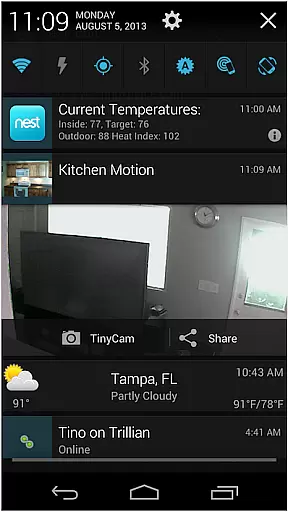
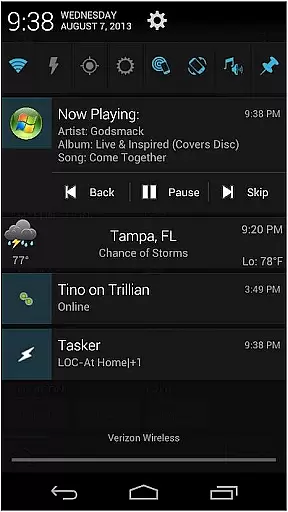
AutoNotification Unlock Key is a productivity-enhancing application that unlocks the full potential of AutoNotification. By purchasing this key, users gain access to advanced features for automating notifications and integrating them with various applications and services. This tool is particularly useful for professionals who rely on timely alerts and seamless information flow across devices.
The app works as a license key and must be used alongside the main AutoNotification app. It enables power users to create complex notification workflows, customize their notification settings extensively, and integrate with third-party apps like Tasker. With this unlock key, users can maximize their productivity by ensuring they never miss an important alert or update.
This app's standout feature is its ability to unlock premium functionalities within AutoNotification, allowing for more sophisticated automation setups. Users can create intricate notification rules, set up custom actions based on received notifications, and enjoy deeper integration with other productivity tools.
Another notable feature is the enhanced customization options. Power users can fine-tune how notifications are displayed, handled, and processed. The unlock key also enables advanced filtering capabilities, giving users precise control over which notifications are acted upon and how they're managed. These features collectively help streamline workflows and optimize device interactions.
Additionally, the unlock key provides access to exclusive support channels and regular updates. This ensures users always have access to the latest features and improvements, maintaining optimal performance and compatibility with new Android versions and third-party applications.
Effective task management is essential for productivity applications, serving as the backbone for organizing and executing tasks efficiently. AutoNotification Unlock Key enhances this core functionality by unlocking advanced features within the main AutoNotification app. This includes customizable notifications that allow users to prioritize and manage their tasks seamlessly.
The application achieves this through deep integration with Android's notification system, enabling users to create context-aware alerts and actions. These notifications are not just reminders but actionable items that can trigger specific workflows or commands across different apps on the device. This interconnected approach ensures that no critical task slips through the cracks.
For users, this means an elevated ability to stay on top of their responsibilities without being overwhelmed by unnecessary information. The unlock key provides options such as wearable support, which extends these capabilities to smartwatches, ensuring constant connectivity and access to vital notifications even when away from the phone.
In todayu2019s multi-device world, reliable cross-device synchronization is crucial for maintaining consistency and availability of data across platforms. AutoNotification Unlock Key excels in this area by enhancing the synchronization capabilities of the primary app. It allows real-time updates and seamless transitions between devices like smartphones, tablets, and wearables.
This reliability is achieved through robust backend processes that ensure all devices linked to a user's account receive updates instantaneously. Whether it's adjusting notification settings or receiving new alerts, changes made on one device reflect immediately on others. This feature leverages cloud technology to maintain a persistent connection, thus minimizing delays and discrepancies.
Users benefit significantly from this synchronized environment as they can switch between devices effortlessly while maintaining continuity in their workflow. For instance, setting up a reminder on your phone automatically syncs with your smartwatch, providing timely alerts regardless of where you are or what device you have at hand.
Unlocks full functionality
Extensive customization
Advanced automation
Regular updates
Premium support
Separate purchase
Requires main app
Complex setup
Android only
Learning curve

Protect and view your important info on your phone and tablet with eWallet®
 4.80
4.80
ID.me Authenticator is a simple and free Two Factor Authentication solution
3.50
Enjoy classic gameplay with customizable features and retro-style graphics.
4.30
Translate text/voice/photos in 150+ languages. Offline & fast translator app.
4.50
Calendar 2023 widget for Android. Appointment scheduler, planner, and reminder
4.60
Best Tool for the professionals Electrician, Electrical contractors, etc.
4.90
Use powerful, industry-leading AI tools to generate visual charts from any data
4.80
Scan paperwork into PDF/JPG, generate your own e-signature and send fax or email
4.70
Set up, print, and get support—in one place
4.20
We're working to become the best machining app on the market! www.cncdirt.com
4.80
A beautiful digital clock with autostart and many other functions
4.70
Functional QR scanner and barcode reader that requires little storage space.
4.60
Subscribe to Webcal & .ics calendars and keep them up-to-date!
4.50
Font maker keyboard with your own handwriting
4.10
The ultimate file manager for rooted devices. The original and still the best.
4.00
Take control of your clipboard with Clipper!
3.90
⏰ Finally a timer app which can run multiple timers simultaneously on your watch
3.90
Auto-shutoff Alarm with Sunrise, Sunset & Fixed Options.
3.50
Create study competitions, track your hours, and stay consistent with friends
4.0


User Reviews