
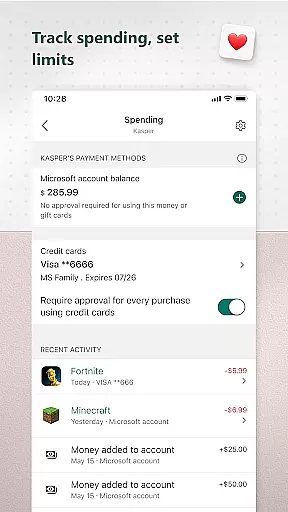
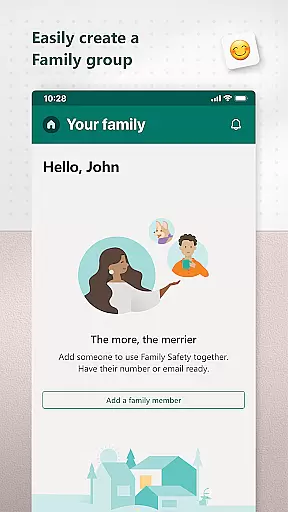
Microsoft Family Safety is a comprehensive parenting app designed to help families develop healthy digital habits while ensuring children's safety online. The app allows parents to set up parental controls, including content filters for kid-friendly browsing on Microsoft Edge and restrictions on inappropriate apps and games.
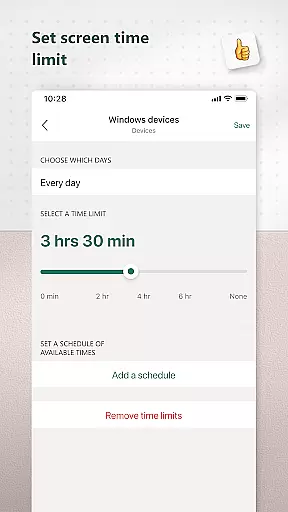
One of the key features is screen time management, where parents can establish limits on app and game usage across Android, Xbox, and Windows devices. Additionally, activity reports provide insights into children's digital activity, helping parents guide their kids' online behavior through informed discussions.
This app is particularly useful for modern families looking to balance digital engagement with real-world experiences. By offering both protection and independence, Microsoft Family Safety enables parents to create a safer digital environment while allowing children to explore responsibly.
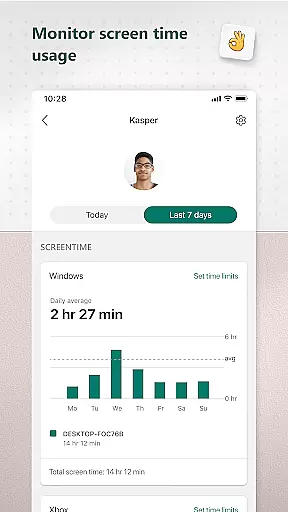
Microsoft Family Safety offers an array of robust features tailored for both parents and children. For parents, the app provides detailed activity reports that include screen time logs and weekly summaries, helping them understand their family's digital habits better.
The screen time management feature lets parents set specific time limits on apps and games across multiple platforms like Xbox, Windows, and Android. Parents can also receive notifications when their child requests additional screen time, ensuring they stay informed and in control.
Content filters are another significant aspect, enabling safe browsing by restricting access to inappropriate websites and apps. These features collectively ensure a safer digital space, promoting responsible internet usage among children while giving parents peace of mind.
Microsoft Family Safety provides reliable parenting content that is validated by experts in child safety and digital wellness. The app ensures that all features are designed with the well-being of children in mind.
The parental controls offered by Microsoft Family Safety are developed based on extensive research into online safety and age-appropriate content. This means parents can trust the app to filter out inappropriate apps, games, and websites effectively.
By using this app, parents gain access to activity reports that summarize their children's screen time and online activities. These reports help initiate meaningful conversations between parents and children about responsible internet usage.
Furthermore, Microsoft collaborates with experts to ensure that its content filters and screen time management tools adhere to the highest standards of safety and effectiveness. This collaboration helps maintain a secure digital environment for kids while allowing them to learn and grow independently.
Microsoft Family Safety offers accurate growth tracking through detailed activity logs and weekly email summaries. Parents can monitor their children's digital habits and understand how they spend their time online.
The app provides precise data on screen time across various devices such as Xbox, Windows, and Android. By setting specific limits for apps and games, parents can manage their children's device usage effectively.
With real-time notifications when children request more screen time, parents can make informed decisions about adjusting these limits. This feature ensures that children develop healthy digital habits without compromising their independence.
Additionally, the integration of accessibility and app usage permissions allows for comprehensive monitoring. This enables parents to block unauthorized apps and ensure their children only interact with approved content, thus supporting their overall growth and development.
User-friendly interface
Comprehensive activity reports
Multi-platform support
Effective content filters
Real-time notifications
Limited third-party app control
Requires child's consent
Some features are platform-specific
Premium features need subscription
Dependent on Microsoft ecosystem

Free symptom & med tracker with expert-reviewed tips.
 4.30
4.30
Cherish every beat - capture your baby's heart sounds with our app
4.30
SemLog aims to raise awareness among families and their children
3.40
Keep track of your stored breastmilk
4.40
Track your labor contractions
4.90
Track pregnancy health and wellness with pregnant tracker from healthcare advice
4.2
GeoLog - Real-Time Location Tracker
4.40
Pregnancy+ App has helped 80m moms track their pregnancy with info & support!
4.80
App/Game blocker & GPS tracker
4.50
Pinardin - Smart Parental Control, Online Safety & GPS Tracking!
4.80
Live Location, Alerts & 2-Way Voice for Kids and Adults with Special Needs
4.60
Comprehensive Parental Control & Child Safety — Hear & Protect Your Child World
4.30
Family parental control app: limit screen time, block apps, GPS tracker.
4.20
Limit screen time, Block Apps & Games, Monitor with Parental control app
4.20
Keep Your Family Safe with Pollog Family Assistants
4.10
Affirmations | Stories | Bible
4.10
Save money on diapers. Get the Pampers Rewards app.
3.90
The Baby’s Bounty App is your hub to register for our diaper banks in Nevada
3.70
Screen Time, App and Web Block & Monitoring, Location Tracker
3.60


User Reviews