
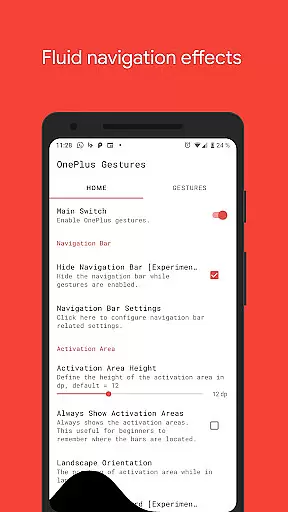
Vivid Navigation Gestures is a powerful tool that revolutionizes the way you interact with your Android device. This app allows users to control their devices through intuitive gestures instead of traditional button presses, bringing a new level of convenience and modernity to navigation.
The application features fluid visual effects during gesture interactions, enhancing the overall user experience. With multiple gesture triggers positioned across the screen and a wide range of available actions, it offers extensive customization options for power users. Whether launching Google Assistant, toggling split-screen mode, or taking screenshots, this app puts advanced functionality at your fingertips.
Designed for tech-savvy individuals who want to maximize their device's potential without upgrading hardware or waiting for system updates, Vivid Navigation Gestures delivers an innovative solution that works across various Android versions and devices.
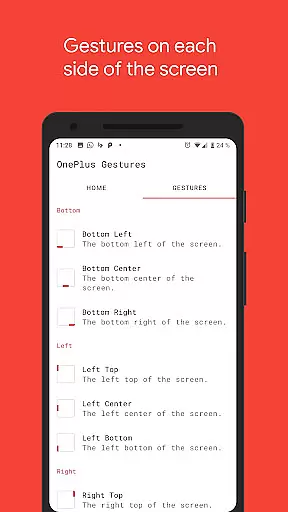
Vivid Navigation Gestures stands out with its comprehensive set of features designed to enhance device interaction. The app supports multiple gesture triggers from different screen areas, including bottom left, center, right, and more, allowing users to execute commands effortlessly.
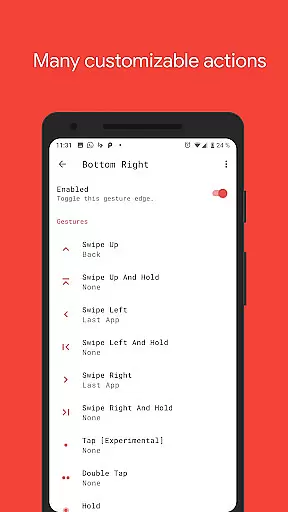
With over ten unique gestures such as swipe up, double tap, and hold, users can perform various actions like navigating back, opening recent apps, controlling media playback, and even taking screenshots. These gestures are complemented by beautiful fluid effects that make navigation smooth and visually appealing.
Advanced functionalities include accessibility services integration for executing system-level actions programmatically, hiding the stock navigation bar for a cleaner interface, and compatibility with ADB commands for additional customization. Whether you're looking to streamline daily tasks or explore advanced device management options, this app provides the tools necessary to elevate your Android experience.
Gestures have become an essential part of modern smartphone interaction, and Vivid Navigation Gestures excels in delivering a highly accurate and effective gesture-based navigation system. The app allows users to control their Android devices through intuitive swipes and taps instead of traditional button presses.
The implementation of multiple gesture triggers located across different screen areas ensures that users can access navigation functions effortlessly. Whether it's swiping up from the bottom center for Home or swiping left from the right center for Back, each gesture is registered with precision, providing a seamless user experience.
What sets this tool apart is its extensive range of available actions, including launching Google Assistant, toggling split-screen mode, and even taking screenshots. These actions are executed reliably, thanks to the app's use of accessibility services, which guarantees that commands like Back, Home, or opening quick settings are performed accurately without delay.
For power users, the option to hide the stock navigation bar further enhances the immersive experience, provided they meet the necessary requirements such as ADB or root access. This feature not only showcases the app's commitment to customization but also highlights its dedication to delivering a clutter-free interface.
Vivid Navigation Gestures places a strong emphasis on simplifying the user interface while maintaining intuitive controls. By replacing traditional button presses with fluid gestures, the app reduces on-screen clutter, offering a cleaner and more modern look.
The app provides visual feedback during gesture execution, ensuring users understand their actions in real-time. These fluid effects contribute to an engaging experience, making navigation feel natural and responsive. Users don't need to second-guess their inputs, as each swipe or tap generates immediate results.
With nine distinct trigger zones spread across the screen edges, the app strikes a balance between simplicity and functionality. Each zone is strategically placed to prevent accidental activations while remaining easily accessible. This thoughtful design minimizes the learning curve, allowing both new and experienced users to adapt quickly.
Additionally, the app includes clear instructions for advanced features like hiding the navigation bar via ADB commands. While these options cater to tech-savvy individuals, they're presented in a straightforward manner that doesn't overwhelm casual users. Overall, Vivid Navigation Gestures achieves a commendable level of simplicity without sacrificing depth.
Intuitive gesture controls
Beautiful fluid effects
Extensive customization options
Wide range of supported actions
Compatibility with various Android versions
Requires ADB setup for full functionality
Root access needed for some features
Potential learning curve for new users
Limited iOS support
Some features may not work on older devices

Just one-tap to easy translate in any language after calls within seconds.
 4.20
4.20
PDF Reader - Document Viewer: Read, Manage & Organize Your Documents
3.10
FV File Manager Pro, Fast and powerful file manager for Android
4.60
An easy-to-use calculator designed to save time calculating and bending conduit
4.30
Create your own custom widget with endless possibilities
3.90
Download any file easily and quickly with Downloader
4.4
NFC Tools can read and write NFC tags.
4.70
Remote Play with FSR upscaling, low latency & full controller support
4.80
Screen recorder with audio to record high-quality videos and take screenshots.
4.40
WiFi Signal Strength Meter help you detect WiFi Signal Strength in real time.
4.80
Small and simple app to Verify Root Access and BusyBox Install!
4.70
Protect your device with antivirus, storage cleanup, and system monitoring
4.70
HD Video player and downloader for all formats, fast & smooth 4K video playback.
4.60
Mirror your screen to Chromecast and Android TV - Super fast and simple
4.60
Button mapper, mouse toggle, sleep timer and a lot of another features
4.50
Pro Emulator is an easy to use game console emulator for a range of consoles.
4.40
VESC Tool can monitor and configure VESC-compatible devices over BLE and Wifi
4.20
Smart and comfortable browsing experience.
3.80
Clean the junk files on your device
3.40


User Reviews