
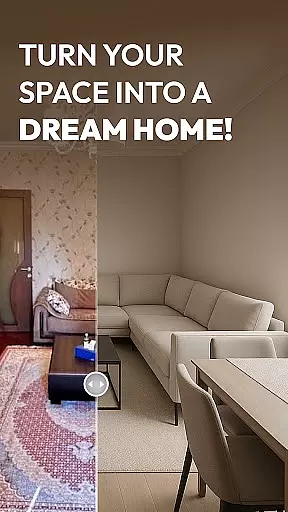
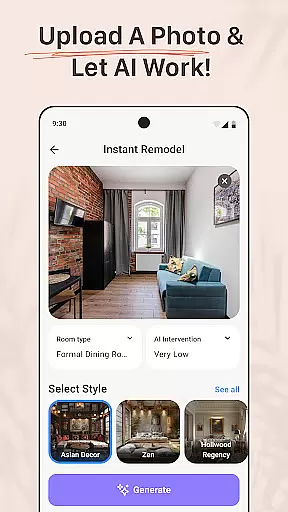
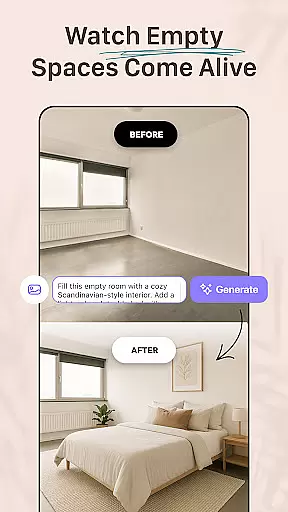
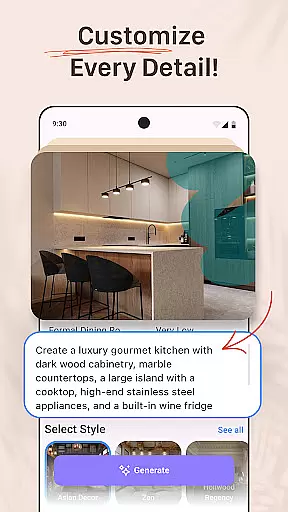


AI Remodel is a revolutionary home design application that empowers users to create their dream spaces with ease. This app combines cutting-edge AI technology with intuitive design tools, enabling both beginners and professionals to plan and visualize complete home renovations. Users can generate accurate floor plans, experiment with various interior styles, and produce stunning 3D renderings of their projects.
The app's powerful features include smart layout suggestions, material recommendations, and seamless integration with Planner 5D for precise measurements and professional-grade exports. Whether remodeling a single room or redesigning an entire house, AI Remodel provides all necessary tools in one comprehensive platform. Its user-friendly interface makes sophisticated design accessible to homeowners, renters, and professional designers alike.
One of the key strengths of AI Remodel is its ability to transform simple ideas into detailed visual plans. By uploading photos or starting from scratch, users can explore different design possibilities, test color palettes, and preview furniture arrangements before making any physical changes. This feature saves time and resources while ensuring confident decision-making throughout the renovation process.
AI Remodel distinguishes itself through its advanced artificial intelligence capabilities specifically tailored for home design. The app's core feature set includes automated layout generation, where users can simply input basic parameters and receive optimized floor plans. It employs sophisticated algorithms to suggest furniture arrangements, lighting solutions, and material combinations based on current design trends and spatial requirements.
A standout characteristic is its interactive 3D planning environment. Users can manipulate objects in real-time, rotate views, and adjust elements with precision. The integration with Planner 5D enhances this experience by providing accurate measurement tools and high-resolution export options. Additionally, the app offers style exploration features that allow users to mix different interior design aesthetics, from minimalism to rustic themes, creating unique personalized spaces.
The application also excels in its collaborative potential and versatility. Professional designers can utilize the platform to present concepts to clients with clarity, while DIY enthusiasts can experiment with confidence. The inclusion of real-world measurement simulation and material testing features ensures that final designs are not only visually appealing but also practically feasible, bridging the gap between digital planning and physical execution.
When it comes to home renovation and design, having accurate and reliable property information is crucial. AI Remodel ensures the authenticity of its virtual property listings by using advanced AI algorithms that generate realistic 3D renderings based on real-world measurements. This means users can trust that the spaces they are designing truly reflect the possibilities within actual property dimensions.
The app's integration with Planner 5D further enhances this accuracy, allowing for precision control in design and layout decisions. Users can draw custom floor plans and adjust elements like walls, lighting, and materials with confidence, knowing their designs maintain fidelity with potential real-world execution.
This level of authenticity provides significant value to users, whether they are homeowners planning renovations, renters visualizing changes, or professional designers presenting concepts to clients. The ability to experiment with layouts and styles in a realistic virtual environment saves time and resources while fostering creativity.
AI Remodel goes beyond basic design functionalities by offering comprehensive home management features that cater to various aspects of renovation projects. With smart layout tools, users can plan and execute full home renovations, from kitchen overhauls to entire layout reimaginings, all within a single platform.
The app's room AI interior design functionality allows users to move beyond static blueprints and explore dynamic changes. They can test different materials, preview color palettes, and experiment with furniture placement, ensuring every decision is well-informed before physical work begins. These capabilities significantly enhance project planning and execution.
For DIY enthusiasts, renters, and professional designers alike, these home management features provide unprecedented flexibility and control. The intuitive interface and seamless synchronization with tools like Planner 5D ensure that even complex projects remain manageable and enjoyable, empowering users to bring their dream spaces to life with confidence.
User-friendly interface
Advanced AI capabilities
3D visualization tools
Planner 5D integration
Versatile design options
Steep learning curve
Premium feature costs
Occasional glitches
Limited offline access
Device compatibility issues

Make Renting Easy
 4.40
4.40
Calculate baluster spacing with ease and precision.
4.4
Wobble Fix Tool
4.40
Turn your phone into a wifi cam with smart features and umlimited reach.
4.20
Schlage Lock Company LLC
4.00
The only mappable smart lights for custom decoration.
4.50
Book your local plumber 24/7, track your service order & get exclusive coupons
4.00
Your guide to apartments & rental homes. Find your next place to rent with AG.
4.60
Find contractors for all home renovation projects. Remodeling, repair, and more.
4.20
Search for Homes, Rentals, Agents & Schools
4.70
Download today to join the community to help bring lost pets home faster.
4.70
MLS-powered real estate app to find homes for sale & apartments for rent
4.70
A Smarter Home in Seconds
4.70
Tailored Care Guides For Houseplants, Indoor Plants, Garden Plants & Flowers.
4.60
Innovative and budget-friendly housing options
4.60
Resident Center, powered by Buildium, is designed with simplicity in mind.
4.50
AI Home Designer & Room Planner: Decorate your interior space with AI
4.40
Universal Tv Remote Control for all Tv. Cast for chromecast & all Tv Controller
4.20
PRO Version of GLB AR Viewer
4.1


User Reviews