
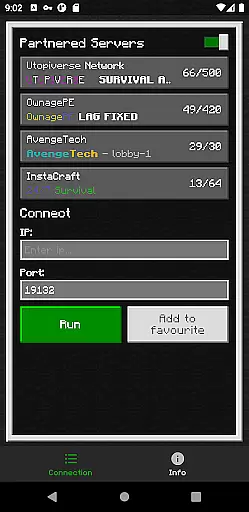
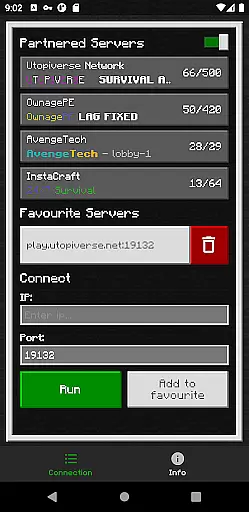
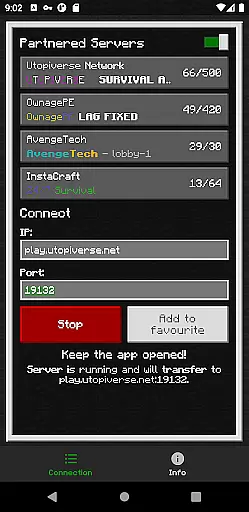
BedrockTogether (Pro) is an innovative networking tool designed to simplify server connections for Minecraft Bedrock Edition players. This ad-free version allows any Bedrock Edition server to appear as a LAN server on Xbox or PlayStation clients, enabling seamless connections without DNS rerouting. The application creates a direct bridge between gaming consoles and Minecraft servers, making multiplayer experiences more accessible.
The app's core functionality lies in its ability to establish local network connections between devices. By entering the server IP and port, users can connect their gaming consoles to Minecraft servers through the LAN tab. While Realms and Nintendo Switch compatibility are not currently supported, the app provides reliable performance for other platforms. This makes it an essential tool for Minecraft enthusiasts who frequently host or join multiplayer sessions.
Ideal for home gaming setups, BedrockTogether (Pro) works best when all devices are connected to the same local network. The simple five-step connection process ensures that even novice users can successfully establish server connections. Once connected, users can safely close the application, allowing for uninterrupted gameplay while maintaining the established connection.
BedrockTogether (Pro) offers several distinctive features that enhance the Minecraft multiplayer experience. The primary advantage is its ability to create LAN server connections without complex network configurations. Unlike traditional methods requiring DNS rerouting, this application establishes direct connections through local networks, significantly reducing setup time and technical complications.
The application implements advanced network bridging technology that maintains stable connections between devices. It automatically detects and connects to available Minecraft servers within the local network, eliminating manual configuration errors. The simple interface requires only server IP and port information, making it accessible for users of all technical skill levels.
Additional features include comprehensive troubleshooting guidelines and active community support through Discord and Telegram channels. These resources help users resolve common connection issues and report bugs effectively. The application also maintains complete independence from official Minecraft services while ensuring compatibility with Bedrock Edition, providing a safe and reliable third-party solution for multiplayer connectivity.
BedrockTogether (Pro) delivers exceptional core functionality by enabling Bedrock Edition servers to appear as LAN servers on various gaming consoles, including Xbox and PlayStation. This seamless integration simplifies the connection process without requiring DNS rerouting, ensuring a smooth user experience.
The app's effectiveness is evident in its straightforward setup process. Users simply input their desired server IP and port, click the 'Run' button, and navigate to the 'Friends' tab within the game. The server then becomes accessible via the LAN tab, allowing for easy connections. This streamlined approach eliminates unnecessary technical hurdles.
By focusing on accuracy, BedrockTogether ensures reliable performance across supported platforms. Although Realms and Nintendo Switch compatibility are not currently available, the app maintains stability and precision in its primary function, providing users with a dependable tool for connecting to Minecraft servers.
This accuracy translates into tangible benefits for users, who can enjoy uninterrupted gaming sessions with friends. The app's ability to maintain stable connections within local networks demonstrates its commitment to delivering precise and effective functionality, making it an essential tool for Minecraft enthusiasts.
BedrockTogether (Pro) excels in providing an intuitive and simple interface that enhances the user experience. The application's design focuses on ease of use, presenting users with a clean layout that requires minimal technical knowledge to operate effectively.
The main interface features a straightforward input field for server IP and port information, accompanied by a prominent 'Run' button. This minimalist approach eliminates clutter and potential confusion, allowing users to quickly grasp the necessary steps for establishing a connection. Such simplicity is particularly beneficial for those who may be less familiar with networking concepts.
Despite its powerful functionality, the app maintains an accessible learning curve. Users can easily follow the four-step connection process without encountering complex settings or configurations. This thoughtful design consideration makes the application approachable even for casual gamers.
The intuitive nature of BedrockTogether extends beyond its basic functions. When issues arise, troubleshooting steps are clearly presented, guiding users through common solutions. This combination of simplicity and guidance creates a user-friendly experience that maximizes accessibility while maintaining professional-grade functionality.
Seamless LAN integration
User-friendly interface
Stable network connections
Comprehensive support channels
Ad-free experience
No Nintendo Switch support
Limited to local networks
Third-party application
Manual server entry required
Realms compatibility absent

Learn the vast amount of system information about device and monitor it's state
 4.70
4.70
Remote for Roku, Fire TV, Samsung TV, LG TV, Android TV, Chromecast and VIZIO TV
4.20
Unlock your Essential Key. Create custom shortcuts to your favorite apps!
4.3
Carry a FTP server in your pocket and avoid USB cables for file transfer
4.20
Small and simple app to Verify Root Access and BusyBox Install!
4.70
Monitor car performance in real time and troubleshoot malfunctions.
4.80
Mirror your screen to Chromecast and Android TV - Super fast and simple
4.60
Planner and Tracker for Stardew Valley
4.60
Enjoy a smooth mobile reading experience!
3.60
Unit and currency converter with easy and simple UI.
4.80
The one-and-only remote control for PC, Mac, and Linux
4.70
Fast Video Downloader, Movie Downloader, Torrent Downloader & Adblock Browser
4.70
Signal Strength, Mobile, Wifi, Speed Test, Bad Signals, Cellular, 5G, LTE, 4G
4.20
View detailed information about your Nissan Leaf the dealer never shows you.
4.10
A simple app to back up and restore SMS & MMS messages and call logs.
4.10
1-Click close all background apps on Android TV
3.90
A recovery soft,it features photo recovery, video recovery, file recovery.
3.40
card-reader app
2.20
Transfer Files, APK from Phone to Watch & Install.
4.2


User Reviews