
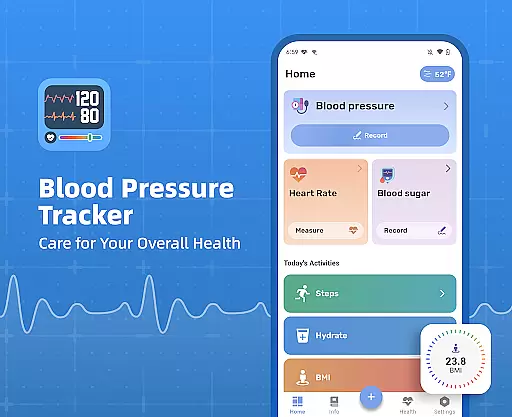
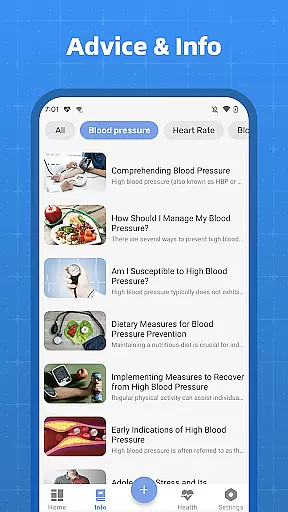
Blood Pressure Tracker is a comprehensive health monitoring application designed to help users manage their blood pressure, heart rate, and blood sugar levels effectively. The app provides a fast, simple, and safe way to track these vital health metrics.
With features tailored for individuals who need regular check-ups but occasionally forget, the app replaces traditional paper-based recording with digital precision. It helps users determine if their readings fall within normal ranges and offers easy tracking and analysis of changes over time.
Designed for those seeking scientific guidance on maintaining a healthy lifestyle, Blood Pressure Tracker also allows users to display their condition and changes to their doctor, making it an essential tool for proactive health management.
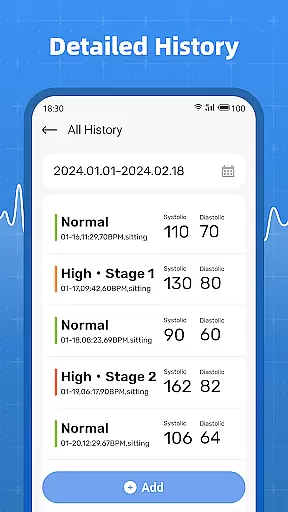
Blood Pressure Tracker stands out with its user-friendly interface and robust functionality. Users can effortlessly record their blood pressure, blood sugar, and pulse, receiving clear analysis and historical data tracking.
The app goes beyond basic measurements by integrating additional health data such as water intake, steps, and BMI, providing a holistic view of the user's health. This comprehensive approach ensures that users have all necessary information at their fingertips.
One of the key innovations is the ability to quickly access the history of all measurements, capturing subtle changes and enabling timely actions for health improvement. Although the app does not measure blood pressure or blood sugar directly, its analytical tools offer valuable insights and guidance.
Personalized planning in health applications refers to the ability to tailor health management strategies based on individual user data. This feature is crucial for users seeking customized health solutions.
Blood Pressure Tracker excels in personalized planning by allowing users to record and analyze their blood pressure, blood sugar, and pulse. The app provides clear insights into these metrics, helping users understand their health trends over time.
Users benefit from personalized health plans that adapt to their recorded data. By tracking all health data including water intake, steps, and BMI, the app ensures a holistic approach to health management.
The true value of personalized planning in Blood Pressure Tracker lies in its ability to empower users with actionable insights. With easy access to historical data, users can make informed decisions and take proactive steps towards better health outcomes.
Progress visualization is a critical feature in health apps, enabling users to see their improvements and maintain motivation. Visual representations of health data help users grasp complex information quickly.
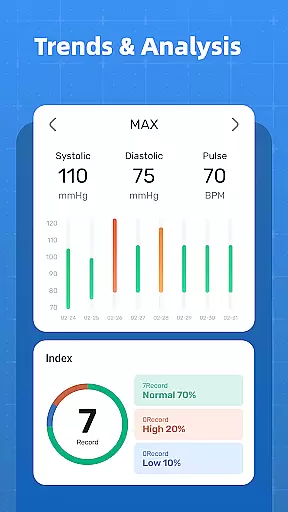
In Blood Pressure Tracker, progress visualization is achieved through detailed graphs and charts. Users can easily track changes in their blood pressure, blood sugar, and pulse over time, capturing subtle shifts that might otherwise go unnoticed.
This feature offers significant benefits to users by providing a clear picture of their health journey. The ability to visualize progress helps users stay committed to their health goals and make necessary adjustments to their routines.
Ultimately, progress visualization in Blood Pressure Tracker enhances user engagement and encourages consistent use. By presenting data in an accessible format, the app supports users in their quest for improved health and well-being.
User-friendly interface
Comprehensive health tracking
Clear data visualization
Easy trend analysis
Actionable health insights
No direct measurement capability
Limited to manual input
Premium features may require subscription
Occasional syncing issues
Dependent on user consistency

The Wear OS BeechBand app is designed to alleviate anxiety and other conditions
 4.5
4.5
Mind on steroids - relaxation, productivity, meditation and sleep!
4.60
Using Recognise™ has been shown to reduce pain and improve performance
4.0
Pupillary distance PD with camera quick and easy, checking glasses frames on you
3.70
Wall Pilates at home & Pilates workout for beginners for core and weight loss.
4.80
Fast Body building & Weight Loss. Home Workouts with Daily Coach, No Equipment.
4.30
Understand your body’s most meaningful messages and transform your health.
3.90
Easy to use step counter, calorie counter helps lose weight, count steps offline
4.80
Focus on BP & Health
3.80
a fun app full of surprises :)
4.70
Get lasting results with Chair Yoga, Wall Pilates, and Walking workouts!
4.60
Memory, mind & logic exercises. Puzzle games, IQ & brain test for kids & adults
4.50
For Absolute Novices to Strength Training. Simple. Effective.
4.40
Interval timer for High Intensity Interval Training, Tabata and Circuit Training
4.20
Monitor, analyze, track, and convert blood sugar & help you control diabetes.
4.10
SportWerks - Workout Tracker for Wear OS Watches
3.90
Enjoy the Gluten Free living with the best app. SCAN the barcodes & SEARCH.
3.60
HRV4Training helps you optimize goals and improve performance. No sensors needed
3.30
Using Recognise™ has been shown to reduce pain and improve performance.
4.5


User Reviews