

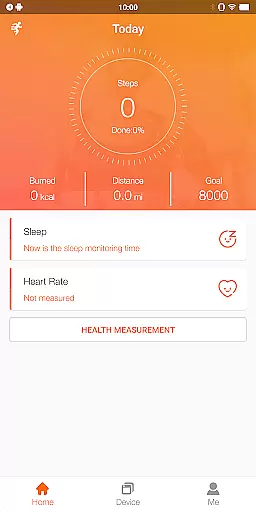
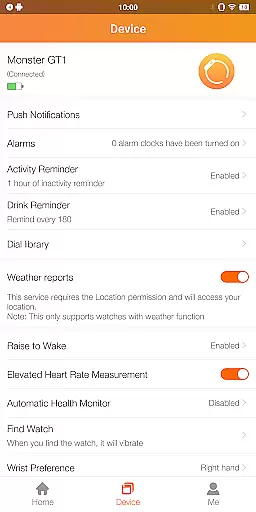
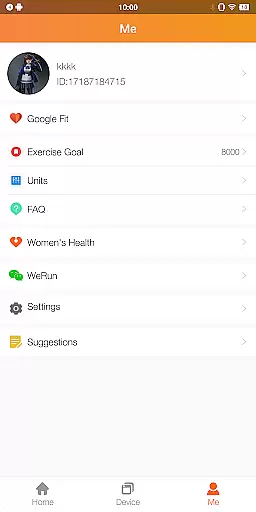
FitCloudPro is a comprehensive health and fitness application designed to seamlessly connect your smartwatch with your mobile device. This app not only manages your Kumi smartwatch but also enhances its functionality, giving users unprecedented control over their wearable technology. With support for models like the KUMI GT6 Pro, GW16T Pro, KU3 Max, and KU3 Meta, FitCloudPro ensures that you can monitor and record essential health metrics such as steps, calories burned, sleep patterns, heart rate, and blood oxygen levels.
Beyond basic health tracking, FitCloudPro offers rich message reminders for calls, SMS, and social media notifications, alongside practical features like sedentary reminders, hydration alerts, and customizable watch faces. These capabilities make it an indispensable tool for anyone looking to maintain an active lifestyle while staying connected. Whether you're monitoring daily activity or personalizing your smartwatch experience, FitCloudPro delivers both utility and customization in one sleek package.
FitCloudPro stands out with its robust feature set tailored for health-conscious individuals. One of its primary functions is the ability to sync and manage data from various Kumi smartwatches, providing real-time health monitoring. Users can track daily steps, calorie expenditure, sleep quality, heart rate, and blood oxygen saturation, all within a single interface. The app's notification system is another highlight, offering timely alerts for incoming calls, messages, and social media updates across platforms like Facebook and Twitter.
Customization is at the heart of FitCloudPro's appeal. It provides a variety of watch face options, allowing users to tailor their smartwatch's appearance to match personal style or mood. Additional features include practical wellness prompts such as sedentary reminders and hydration alerts, alongside settings for brightness adjustment and do-not-disturb modes. By integrating essential permissions like location services, Bluetooth connectivity, and battery optimization, FitCloudPro ensures a seamless and responsive user experience, making it a versatile companion for managing both fitness goals and daily communications.
Personalized planning in FitCloudPro refers to the app's ability to create tailored health and fitness plans based on individual user data. This feature leverages the smartwatch's monitoring capabilities to gather comprehensive health metrics.
The application processes data such as heart rate, blood oxygen levels, sleep patterns, and activity levels to generate customized recommendations. These insights enable users to optimize their daily routines and achieve specific wellness goals more effectively.
Users benefit from personalized planning by receiving actionable insights that are directly relevant to their unique health profiles. The app helps track progress over time, offering adjustments to the fitness plan as needed to ensure continuous improvement.
This level of personalization enhances user engagement and motivation, making health management a more intuitive and rewarding experience. By aligning fitness strategies with personal objectives, FitCloudPro ensures that each user's journey is as effective as it is unique.
Progress visualization in FitCloudPro allows users to see their health and fitness achievements through detailed graphical representations. This feature transforms raw data into easy-to-understand charts and graphs, providing clear insights into personal progress.
The app visualizes various metrics such as steps taken, calories burned, and sleep quality over customizable time frames. Users can view trends and patterns in their health data, empowering them to make informed decisions about their lifestyle choices.
With this visual feedback, users gain a stronger sense of accomplishment as they witness their progress unfold. Milestones and achievements are highlighted, reinforcing positive behaviors and encouraging continued effort towards fitness goals.
FitCloudPro's progress visualization not only informs but also inspires users to maintain an active and health-conscious lifestyle. By presenting data in an engaging format, the app fosters a deeper connection between users and their personal health journeys.
User-friendly interface
Comprehensive health tracking
Wide range of compatible devices
Customizable watch faces
Timely notifications and reminders
Limited to Kumi smartwatches
Requires multiple permissions
No medical-grade accuracy
Potential battery drain
Social media focus may distract

Chair Workout: Women's Edition for safe, flexible, and personalized fitness.
 4.40
4.40
Transform your body and soul with DBFFitness, with a 40-day fitness journey.
4.5
HRV4Training helps you optimize goals and improve performance. No sensors needed
3.30
A simple way to calculate peptide doses and also to convert different units.
4.3
3D Body Measurement System
3.60
Step Counter, track steps when you walk or run
4.70
Track sleep cycle, relax with white noise, sleep sounds & smart alarm clock
3.80
Workouts for everyone
4.70
Control your blood pressure, heart rate and blood sugar in a fast way.
4.00
Home workouts for fitness & fast bodybuilding at home - no equipment needed.
4.90
Easy to use step counter, calorie counter helps lose weight, count steps offline
4.80
Load the bar with this barbell & plate calculator. It's leg day, not brain day!
4.70
Build Healthy Habits!
4.60
For Absolute Novices to Strength Training. Simple. Effective.
4.40
See what's really going on inside your head! Real time EEG graphs from your Muse
4.40
Eat smarter with Eato, your personal calorie counter and nutrition tracker!
4.40
The most accurate heart rate app to monitor and track your heart rate & pulse.
4.40
Pack of 66 calming lullabies for smooth fall asleep and relaxation
4.10
Pupillary distance PD with camera quick and easy, checking glasses frames on you
3.70


User Reviews