

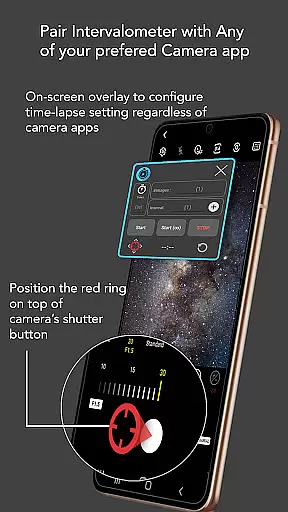
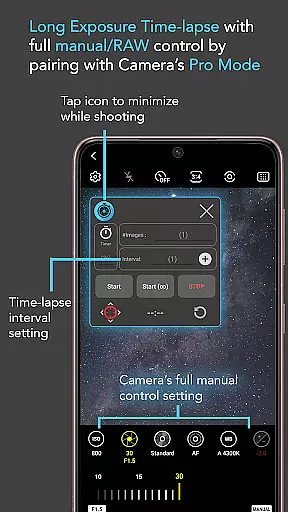
Intervalometer for TimeLapse is a powerful photography tool designed to automate the process of capturing time-lapse sequences. This app allows photographers to configure specific time intervals between shots, enabling precise control over exposure settings and camera modes that are not typically available in standard smartphone time-lapse features.
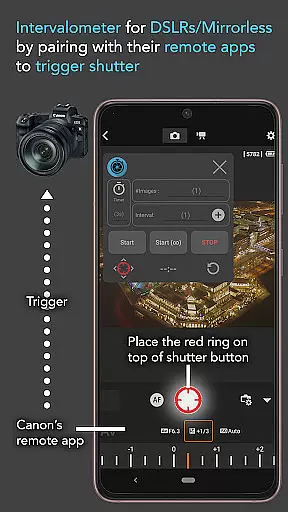
The application works seamlessly with any camera app on Android 7 and above, utilizing AccessibilityService API to trigger the shutter automatically. It supports various advanced shooting techniques such as low light, long exposure, HDR, and even ultra-wide angle time-lapses. Additionally, it can be paired with dedicated camera remote apps from brands like Canon, Sony, and Nikon, making it versatile for both mobile devices and professional cameras.
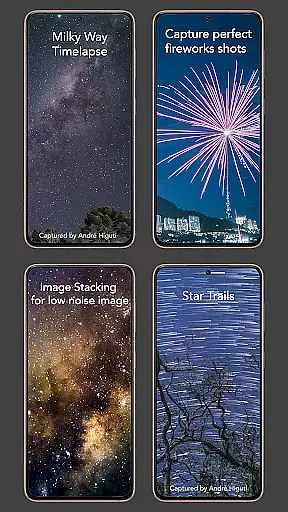
Whether you're capturing star trails, milky way scenes, or creating image stacks for higher quality photos, Intervalometer provides the flexibility needed for creative projects. Its ability to work with different camera modes including manual, night, and telephoto ensures that users can achieve their desired photographic outcomes without limitations.
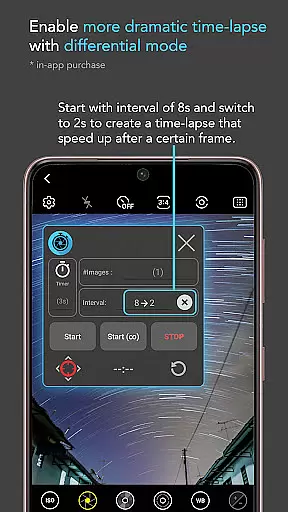
One of the standout features of Intervalometer for TimeLapse is its comprehensive control over time-lapse configurations. Users have the ability to set delay timers, adjust interval times, and specify the number of shots, providing unparalleled customization options. The infinite mode allows for continuous shooting until manually stopped, while bulb mode is perfect for extended exposures required in astrophotography.
This app's compatibility extends beyond just smartphones; it integrates smoothly with external camera systems through their respective remote apps. By automating the photo-taking process, Intervalometer frees photographers from having to manually press the shutter button repeatedly, thus reducing human error and fatigue during lengthy shoots.
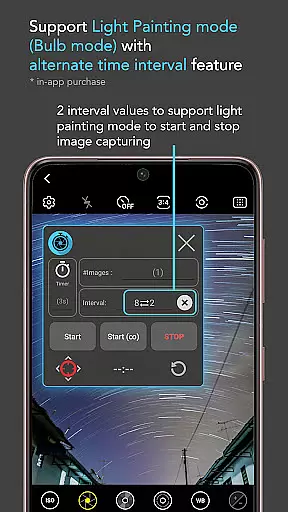
Moreover, the app supports complex time-lapse types such as holy grail transitions (day to night), light painting, and HDR sequences. These capabilities make it an indispensable tool for enthusiasts looking to explore creative avenues in photography. With proper setup, Intervalometer ensures consistent results across various lighting conditions and scenarios, enhancing overall productivity and creativity.
Real-time capture and preview functionality is essential for photographers who need precise control over their time-lapse sequences. Intervalometer for TimeLapse offers this by integrating seamlessly with any camera app, allowing users to configure and trigger the shutter at specific intervals.
This application uses AccessibilityService API to automate the camera shutter triggering process on Android devices, functioning as a virtual intervalometer. This ensures that each frame of the time-lapse is captured exactly when intended, providing consistency and accuracy in the sequence.
Users benefit from the ability to execute complex time-lapse projects such as low light, long exposure, or HDR time-lapses. The app's flexibility enables capturing images in various modes including manual, night, and ultra-wide angle, which significantly enhances creative possibilities.
The real-time aspect of this app means that photographers can rely on it to work with dedicated camera remote apps from brands like Canon, Sony, and Nikon. This makes it an indispensable tool for both smartphone photography enthusiasts and professional photographers using advanced camera equipment.
While Intervalometer for TimeLapse does not focus on AI beauty or enhancement features, it excels in delivering natural and unaltered image captures. This is crucial for photographers who prioritize authenticity and wish to apply their own post-processing techniques.
The app provides full control over time-lapse configurations, including delay timers, interval times, and the number of shots. This level of customization ensures that each photograph reflects the true conditions of the scene without artificial enhancements.
Infinite and bulb modes further expand the creative toolkit available to the user, allowing for extended exposure times and unlimited photo sequences. These features are particularly beneficial for projects like star trails or lightning stacking where natural light patterns are paramount.
By focusing on accurate and flexible time-lapse capabilities rather than automated beautification, Intervalometer maintains the integrity of the original images. This approach caters to professionals who demand high-quality, unprocessed photos for their creative or scientific endeavors.
User-friendly interface
Wide compatibility range
Advanced time-lapse options
Supports multiple camera modes
Flexible configuration settings
Requires AccessibilityService permission
May not work on all devices
No built-in camera functionality
Limited customer support
Occasional touch input issues

Shooting photos and records video easily and efficient with professional Camera
 4.30
4.30
Create & Edit with AI: AI Remove, Enhance, Retouch, Filter
4.10
Android Native system HD camera app. Never been so simple and faster.
4.70
Pet Camera
3.70
Perfect body tune & face app - photo retouch, makeup, slim body & beautify face.
4.80
Automatically backup your photos and videos to computer, NAS and Cloud services
4.60
Turn photos into cartoons & avatars! - Photo Editor, Cartoon Face!
3.90
Pro version: AR sun/moon tracker for any date. Tool for photographers & planners
4.90
Enhance, upscale, and transform your images — on your device, without limits
4.70
See your baby AI baby face generator AI baby maker Face generator babymaker fun!
4.70
Viewfinder, Light meter, Reciprocity failure time, DOF & Bellows Extension
4.60
Transform photos into videos! Create realistic or anime-style images easily!
4.50
HD Camera Pro with HD Video shooting, Panorama, Photo editor , Beauty Camera.
4.50
Photo editor & gallery. Crop pictures & edit photos offline, no wifi!
4.50
Edit like a pro with Hypic. Apply filters, AI effects, & magic touch.
4.40
AI-powered video creator by MiniMax - Where ideas meet cinema
4.20
How would you look like with a differently shaped nose, chin or lips?
3.90
Be your best in every shot! Fix, edit and retouch your face in selfies & photos.
3.70
Superimpose one photo on top of another using the original Superimpose app!
3.20


User Reviews