
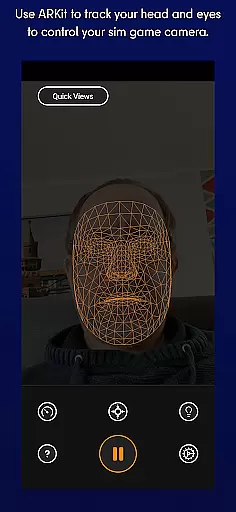
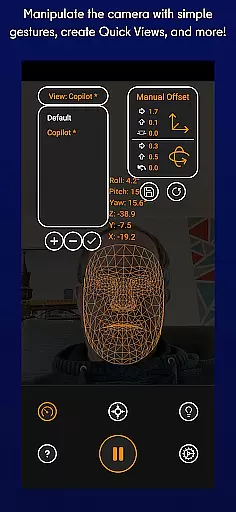
SmoothTrack is an innovative tool that transforms your mobile device into a 3D head tracking controller for simulation games. By leveraging the AR capabilities of your device, it allows you to intuitively control in-game camera perspectives without any additional equipment. Simply position your device to see your face, and with natural head movements, you can seamlessly navigate game environments.
The app supports all games compatible with TrackIR, FreeTrack, or similar protocols, including popular titles like Microsoft Flight Simulator, Elite: Dangerous, and Euro Truck Simulator 2. Whether you want to inspect cockpit details or adjust viewing angles during gameplay, SmoothTrack provides precise and responsive control through slight head motions.
This application is particularly valuable for flight and driving simulators where immersive experiences are crucial. With features such as adjustable sensitivity, dark mode for battery savings, and compatibility across numerous platforms, SmoothTrack enhances both realism and convenience in gaming.
SmoothTrack stands out due to its advanced use of augmented reality technology to enable intuitive head-tracking controls. The app uses your device's front-facing camera to detect facial movements, translating them into corresponding in-game camera shifts. This eliminates the need for specialized hardware while delivering a highly interactive experience.
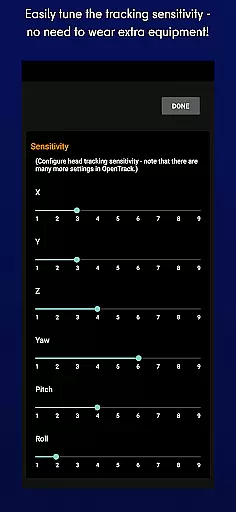
Key functionalities include customizable sensitivity settings, support for multiple tracking protocols (FreeTrack and TrackIR), and adaptive modes for different lighting conditions. Dark mode helps conserve battery life on OLED screens, whereas bright mode ensures visibility in low-light environments. Additionally, users benefit from real-time adjustments, allowing them to fine-tune their virtual perspective effortlessly.
Another notable feature is its broad compatibility with various simulation games, ranging from flight simulators to space exploration titles. The developers also offer robust customer support via Discord and email, ensuring users receive timely assistance and updates based on community feedback.
SmoothTrack's core functionality lies in its ability to provide precise 3D head tracking for controlling simulation game cameras. This is achieved through the device's AR capabilities, ensuring accurate detection of even the slightest head movements.
The app employs advanced algorithms that translate these subtle motions into responsive in-game camera perspectives. Whether you're leaning forward to inspect your Flight Simulator cockpit or glancing left before a turn in Euro Truck Simulator 2, the response is immediate and reliable.
This level of precision benefits users by creating an immersive experience without the need for additional equipment. The slight exaggeration of head movements allows for full situational awareness with minimal physical strain.
By supporting industry-standard protocols like FreeTrack and TrackIR, SmoothTrack ensures compatibility with a wide range of simulation games, making it an effective solution for enhancing gameplay across various titles.
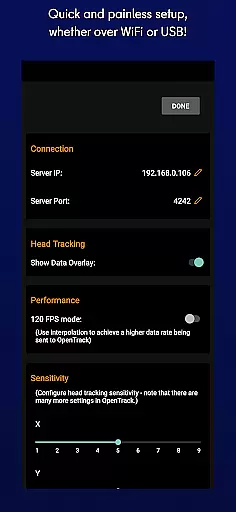
The interface design of SmoothTrack prioritizes user-friendly operation, allowing gamers to set up and use the application without extensive technical knowledge. Its straightforward setup process enables quick configuration of head tracking parameters.
With intuitive controls, users can easily adjust settings to suit their preferences. The app provides clear options for switching between dark and bright modes, catering to different lighting conditions while conserving battery life on OLED screens.
Players benefit from the app's thoughtful design, which requires only simple camera gestures to manipulate in-game perspectives. This streamlined approach eliminates the learning curve typically associated with complex gaming peripherals.
Furthermore, SmoothTrack offers dedicated support channels via Discord and email, ensuring that any interface-related queries or feature requests are promptly addressed by the development team.
Intuitive head tracking
No extra hardware needed
Wide game compatibility
Customizable settings
Efficient power usage
Requires AR services
Limited to supported games
Dependent on device camera
Potential latency issues
Learning curve for new users

Fluid navigation gestures for all of us!
 4.30
4.30
Remote for Roku, Fire TV, Samsung TV, LG TV, Android TV, Chromecast and VIZIO TV
4.20
Unleash gamepad precision for ultimate mobile gaming dominance.
3.90
PC precision for mobile gaming: dominate with keyboard and mouse!
4.30
Undelete and recover your lost or deleted files with DiskDigger!
3.40
The Ultimate Bluetooth Keyboard & Mouse. Securely control your PC, Mac, and more
4.50
Mobile Security with Scam Protection | Malware & Virus Cleaner | Safe Browser
4.70
Clean up your phone, find files, play media, and share files offline
4.50
Enjoy a smooth mobile reading experience!
3.60
ADB support Android 4.X-Android 13(Support wireless pair mode).No root required!
4.70
NFC Tools can read and write NFC tags.
4.70
Screen Mirroring for Roku Sticks, Roku TCL TV and Roku Hisense TV
4.50
Universal TV remote control all TVs, Roku, LG, Samsung, Fire, Vizio, Sony, TCL.
4.40
Mirror your screen to Fire TV - Super fast and simple
4.40
Making emulation easy for everyone!
4.30
pdf merge, word to pdf, jpg to pdf, edit pdf, convert to pdf and much more!
4.20
VESC Tool can monitor and configure VESC-compatible devices over BLE and Wifi
4.20 4.10
4.10
Clean the junk files on your device
3.40


User Reviews