
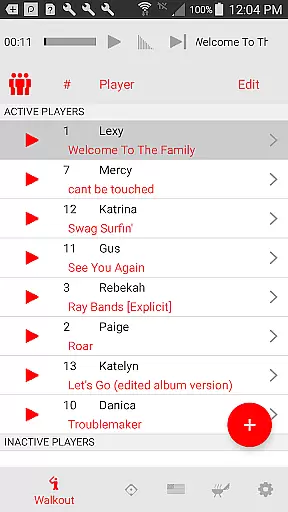
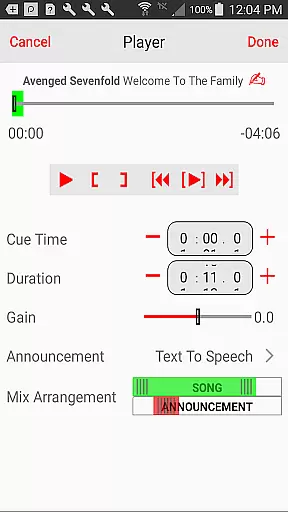
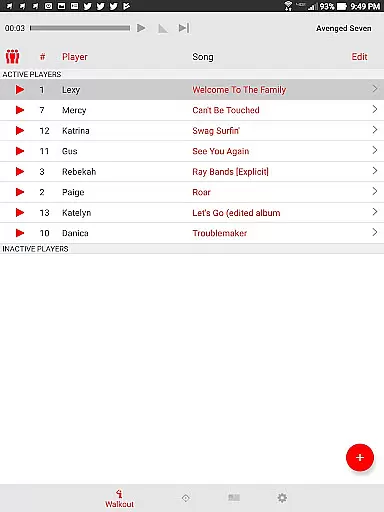
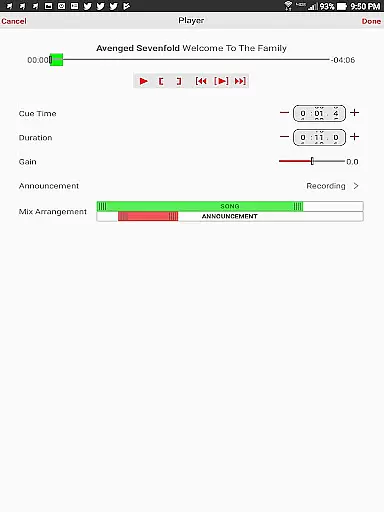
Walkout Song DJ is a specialized music application designed to enhance the ballpark experience by allowing users to easily play personalized walkout songs for each batter. The app simplifies the process of selecting and playing music tracks from your personal library or imported files, making it effortless to create an electrifying atmosphere at ballgames. With precise playback control, users can set specific start times and durations for each song, ensuring seamless integration with the game.
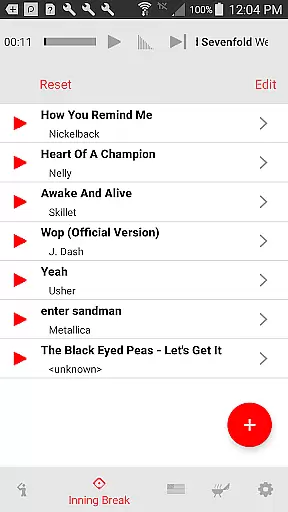
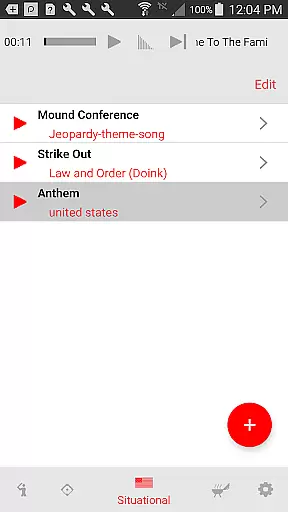
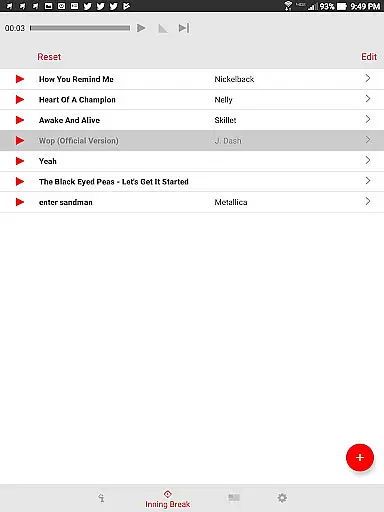
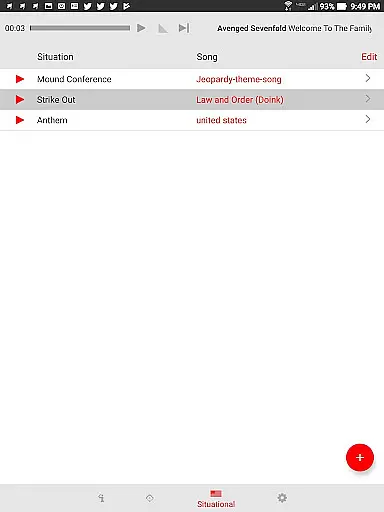
Beyond individual player walkouts, the app offers dedicated views for inning break music and situational music, providing complete audio management for all game scenarios. Whether it's the national anthem, Take Me Out to the Ball Game, or custom sponsor mentions, Walkout Song DJ has you covered. The app also supports multiple team setups, making it perfect for dedicated ballpark DJs managing several teams' music needs.
This application brings professional-level audio management to amateur sports, creating an immersive environment that benefits both players and spectators. By streamlining music selection and playback, it allows operators to focus on other game-day responsibilities while maintaining an engaging auditory experience throughout the event.
Walkout Song DJ distinguishes itself through its comprehensive feature set tailored specifically for sports events. The app's core functionality lies in its ability to manage individual player walkout songs with precision. Users can assign specific tracks to each player, set exact playback positions, and control volume levels to prevent audio bleeding between songs. The intuitive editing interface makes these adjustments straightforward and accurate.
A key innovation is the app's multi-view system, which includes dedicated screens for different game scenarios. The inning break view automatically handles song transitions and fade-outs, while the situational music view provides instant access to essential game-time tracks. The pre-game playlist feature enables uninterrupted background music during warm-ups, helping athletes get in the zone. Additionally, the app supports various announcement options, including AI text-to-speech capabilities.
The ability to save and switch between multiple team configurations sets this app apart from generic music players. This feature, combined with its precise timing controls and volume management, makes Walkout Song DJ an indispensable tool for creating a professional-grade audio experience at amateur sporting events.
Walkout Song DJ offers an extensive framework for managing music libraries tailored to sports environments. While the app itself does not provide a built-in music source, it allows users to import their own music files, ensuring that each song's usage complies with copyright regulations. This flexibility ensures that ballpark DJs can curate playlists that are both personalized and legally compliant.
The app supports integration with your personal music collection, enabling you to select specific tracks for walkout songs, inning breaks, and situational moments. By allowing users to upload their own music, Walkout Song DJ emphasizes the importance of copyright authenticity, giving users full control over the legality and ownership of their audio content.
This feature is particularly valuable in professional sports settings where copyright infringement can lead to serious consequences. With Walkout Song DJ, users can rest assured that their music selections meet legal standards while enhancing the atmosphere at games.
One of the standout features of Walkout Song DJ is its ability to deliver high-quality audio playback optimized for sports venues. The app provides precise volume controls for individual walkout songs, ensuring that each track is played at an appropriate level to engage fans without overwhelming them. This granular control over audio output helps maintain a balanced soundscape throughout the game.
In addition to volume adjustments, the app includes advanced editing tools that allow users to set exact playback positions and durations for each song. This ensures smooth transitions and prevents abrupt endings or interruptions during critical moments like batter walkouts or inning breaks. The result is a professional-grade audio experience that enhances the energy of the ballpark.
Furthermore, the app supports various audio formats, accommodating different file types to suit diverse user preferences. Whether you're playing locally stored MP3s or higher-quality WAV files, Walkout Song DJ delivers consistent performance and clarity, making it an essential tool for any sports venue looking to elevate its auditory impact.
User-friendly interface
Precise playback control
Multiple team support
Volume level customization
Automated song transitions
No streaming service support
Requires manual setup
Limited to personal music
Device storage intensive
Learning curve present

Time Guru will strengthen your internal sense of musical time via random muting.
 4.30
4.30
10-Band Audio Equalizer, Sound / Bass Booster for Spotify Users & Music Players
4.40
Visualize the guitar fretboard, master scales & play through changes like a pro!
4.50
Record, Mix & Master with all n-Track effects, 64-bit audio and Stem Separation.
4.70
AI Music Maker: Generate And Compose AI Tunes & AI Songs & AI Music & AI Melody!
4.60
Unleash your creativity! Turn simple prompts into full fledged songs.
4.70
Enjoy singing any song, no matter how high or low it is
4.30
Simple mp3 and mp4 player with advanced features.
3.40
Be a true music maker: create beats, mix and make music like a real DJ!
4.30
Your song collections with lyrics and chords on Android smartphones and tablets.
4.80
Offline Music Player & MP3 Player.Powerful equalizer, Lyrics, Themes, Tag Editor
4.80
The best music and audio player, with beautiful UI, music search and equalizer.
4.60
Super Sound Editor, Song Maker & Mixer, Vocal Remover, Voice Recorder & Changer!
4.60
Offline Music Player&MP3 Player with themes, equalizer, lyrics, music play mode
4.60
The Music Journey in Your Hands
4.30
The original SP-1200 experience on your iPad
4.20
PowerAudio is a powerful offline music player.
4.20
The only true audiophile music player with Hi-Fi audio rendering and DSP engine
3.90
The Minimalistic Premium Music Player. Handmade with passion for music
2.20


User Reviews