
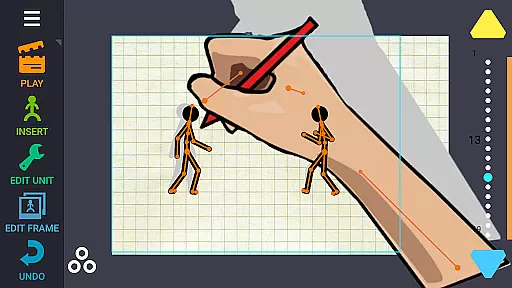
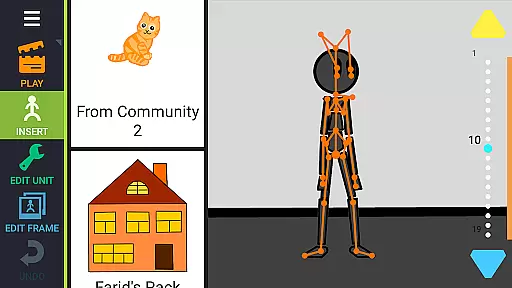
Draw Cartoons 2 PRO is a comprehensive 2D animation application that simplifies the complex process of cartoon creation. The app utilizes motion smoothing techniques, allowing users to set only the start and end positions of characters, with the program generating smooth transitions automatically. This makes animation accessible even to beginners while offering advanced tools for seasoned animators.
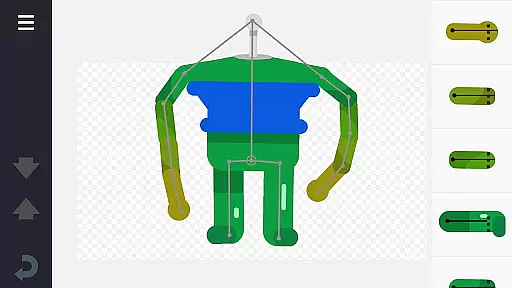
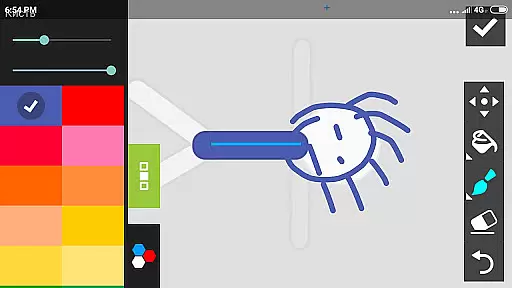
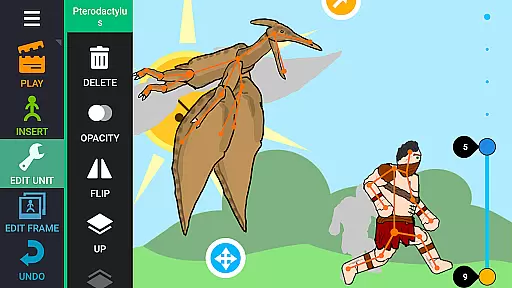
The app provides a rich library of pre-made characters and objects, including dragons, people, cars, and more. Additionally, it features a character editor where users can create custom creatures and objects using 'bones'. You can draw directly within the app or import images from photos. Advanced features include dramatic camera effects for close-ups and speed adjustments for slow-motion sequences, making it a versatile tool for creative expression.
Whether you're an aspiring animator or a professional artist, Draw Cartoons 2 PRO offers a complete suite of tools to bring your ideas to life. With the ability to add music or voiceovers, save animations as MP4 or GIF files, and share creations on platforms like YouTube, this app serves as a one-stop solution for all your animation needs.
Draw Cartoons 2 PRO stands out with its innovative motion smoothing technology, which significantly reduces the complexity of animating movements. Users simply define keyframes, and the software handles the in-between frames, ensuring fluid animations without requiring frame-by-frame drawing. This feature democratizes animation, making it approachable for novices while still providing depth for experts.
Beyond basic animation, the app includes a robust character editor and a vast library of ready-to-use assets. The editor allows for the creation of custom characters by assembling 'bones', which can be drawn within the app or imported from external sources. The library offers a diverse range of characters and objects, enabling users to quickly populate their scenes. Additional advanced tools include a virtual camera for dynamic shots and speed effects for manipulating time, adding cinematic flair to projects.
Furthermore, Draw Cartoons 2 PRO supports multimedia integration, allowing users to incorporate music and voiceovers into their animations. Finished projects can be exported in multiple formats, including MP4 and GIF, facilitating easy sharing across various platforms. The app also fosters a vibrant community where creators can share and utilize each other's assets, enhancing collaborative potential and creative possibilities.
In Draw Cartoons 2 PRO, the suite of creative tools is both comprehensive and versatile, ensuring that animators have everything they need to bring their visions to life.
The application provides a library filled with diverse characters and objects, ranging from mythical dragons to everyday vehicles, all ready for animation. This extensive selection allows users to craft intricate scenes without the need to create every element from scratch.
Additionally, the built-in character editor empowers creators to design unique creatures and objects using a skeletal structure made of 'bones'. These bones can be drawn directly within the app or extracted from photographs, offering limitless customization possibilities.
Advanced features such as dramatic camera close-ups and speed effects further enhance the creative process, enabling users to produce professional-quality animations with ease.
Draw Cartoons 2 PRO excels in providing canvas and format flexibility, catering to a wide range of animation needs and preferences.
Users can manipulate the canvas to create dynamic scenes, including employing dramatic close-ups akin to those found in horror films. This flexibility in framing and composition allows animators to evoke specific emotions and highlight key moments within their cartoons.
Moreover, the ability to save animations in multiple formats, such as MP4 for video and GIF for simpler animations, ensures that creators can distribute their work across various platforms effortlessly.
The option to export individual elements as separate files also enhances collaboration within the animator community, allowing for the sharing and reuse of custom-made characters and objects.
User-friendly interface
Extensive asset library
Advanced animation tools
Community sharing options
Multimedia integration
Steep learning curve
High system requirements
Limited free content
Occasional bugs
Premium cost

Meet the magic aı 3d photo generator and smart AI video generator app.
 3.20
3.20
Digital Drawing: Draw & Paint
4.10
Create neon drawing with magic doodle and fun doodle art effects!
4.50
Draw on screen: FP sDraw is a simple and lightweight drawing app
4.70
Castle is social media for creating and playing games!
4.60
Minecraft & Roblox Clothes
4.70
Photo stitcher for automatically screenshot stitching into a long screenshot
4.70
Create Logos, Tattoos, AI Art & more with our AI Photo Generator & Design Editor
4.20
Just trace a projected picture on paper and color! Draw & Paint with AR drawing
4.40
Mobile pixel art editor. Simple. Fast. Portable.
4.80
Discover Cartoon Dream : Unleash Your Creativity with CuttingEdge AI
4.50
Draw anime & manga drawing, art with templates to create stunning picture!
4.50
Image/ Text to Video Generator
4.40
Photo blender app to create overlay photos & double exposure.
4.40
800+ Drawing, Painting Lessons App to Practice, Sketch & Paint Art.
4.30
Beauty Camera - Selfie Camera is the ultimate beauty camera and selfie app
4.30
AR Anime Drawing: How to draw anime with AR drawing & sketching apps!
4.00
Sketch and paint on your device with the feel and freedom of drawing on paper
4.00
Android 14 style widgets and wallpapers app.
4.2


User Reviews